The best smart plugs for Home Assistant are the ones Home Assistant can talk to on your own network. Matter plugs, Zigbee plugs, and TP-Link Kasa or Tapo plugs all do that. Your automations then keep running even when the internet is down, and you are not stuck waiting on a cloud server to flip a lamp.
A plug that only says “works with Alexa” is a different story. It may only reach Home Assistant through a cloud account or a community add-on, and that link can break. So in this 2026 guide we sort 7 popular 4-packs and 3-packs by how they actually connect to Home Assistant. For each one you get the specs, key features, setup notes, what it can and cannot do, and the pros and cons.
Quick answer: For most Home Assistant users, the TP-Link Tapo P125M 3-pack is the best pick. It is Matter certified, runs on your local network, and is also supported by Home Assistant’s own TP-Link integration. If you already have a Zigbee dongle, the THIRDREALITY Smart Plug Gen3 is the best Zigbee smart plug for Home Assistant, with a power meter and a built-in repeater. For energy data over Wi-Fi, choose the Kasa EP25 4-pack. None of the 7 plugs here is rated for outdoor use.
Top 7 picks at a glance
- Tapo P125M (best overall)
- THIRDREALITY Gen3 (best Zigbee plug with power metering)
- Kasa EP25 (best Wi-Fi plug for energy monitoring)
- meross MSS115 (best for local, no-cloud control)
- Linkind Matter (best value Matter 4-pack)
- GHome WP3 (best for using several apps at once)
- Govee H5083 (best if you already use Govee)


Note: We have not tested these plugs ourselves. The specs come from each Amazon listing and the maker’s product pages, and the Home Assistant notes come from the official Home Assistant and Zigbee2MQTT docs. Listings and pack sizes change, so check the model number before you buy.
Best smart plugs for Home Assistant compared
Here are all 7 side by side. On a phone, swipe the table left to see every column.
| Plug | Pack | How it joins Home Assistant | Runs locally | Energy monitoring | Max load | Extra hardware |
|---|---|---|---|---|---|---|
| Tapo P125M | 3 plugs | Matter, or TP-Link integration | Yes | No | 15 A, 1800 W | None for TP-Link integration |
| THIRDREALITY Gen3 | 4 plugs (check listing) | Zigbee (ZHA or Zigbee2MQTT) | Yes | Yes, ±1% per maker | 15 A | Zigbee coordinator |
| Kasa EP25 | 4 plugs | TP-Link integration | Yes, after setup | Yes | 15 A, 1800 W | None |
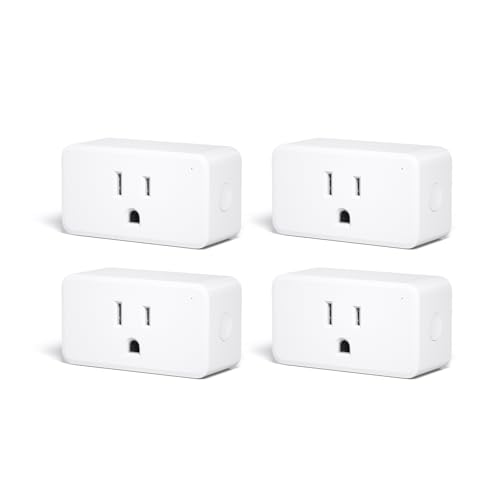
| meross MSS115 | 4 plugs | Matter | Yes | No | 15 A | None |
| Linkind Matter | 4 plugs | Matter | Yes | No | 15 A, 1800 W | None (needs IPv6) |
| GHome WP3 | 4 plugs | Matter | Yes | No | 15 A, 1800 W | None |
| Govee H5083 | 4 plugs | Community add-on or HACS only | No, cloud API | No | 10 A, 1200 W (per listing) | None |
How smart plugs connect to Home Assistant
Before you pick a plug, it helps to know the three paths. Each one changes how setup feels and how reliable the plug is later.
Matter over Wi-Fi
Matter is a shared smart home standard. Home Assistant acts as a Matter controller, so it pairs the plug directly with no brand app or account. Control stays on your home network. You need the Matter Server app (add-on) and the Matter integration, and IPv6 must be turned on in Home Assistant and not blocked by your router. You do not need IPv6 from your internet provider. See the Home Assistant Matter docs for the full list of requirements.
Four plugs here use this path: Tapo P125M, meross MSS115, Linkind, and GHome WP3.
Zigbee
Zigbee plugs do not use Wi-Fi at all. They talk to a small USB Zigbee coordinator plugged into your Home Assistant box, through ZHA or Zigbee2MQTT. Most mains-powered Zigbee plugs also act as repeaters, so each one you add makes the network stronger. The THIRDREALITY Gen3 uses this path.
Brand integrations and cloud links
Some brands have their own Home Assistant integration. The TP-Link Smart Home integration controls Kasa and Tapo plugs over your local network, and it can feed their energy readings into the Energy dashboard. Newer devices ask for your TP-Link account email and password when you add them.
Govee is the weak spot. Home Assistant has no built-in integration for Govee Wi-Fi plugs. People use community options such as the govee2mqtt add-on or HACS integrations, which go through Govee’s cloud API. One user on the Home Assistant forum reported plugs going dead for a day after hitting the API’s 10,000 request daily limit.
1. TP-Link Tapo P125M: Best Overall
The Tapo P125M is a Matter certified mini plug sold as a 3-pack. It is the safest choice if you want a plug that just shows up in Home Assistant and stays there.
You have two ways in. You can pair it straight to Home Assistant over Matter with its setup code. Or you can set it up in the Tapo app first and add it with Home Assistant’s TP-Link integration, which lists the P125M as a supported Tapo plug. Either way, control runs on your local network.
It handles 15 amps and 1800 watts, so a coffee maker or toaster oven is fine. Setup uses Bluetooth onboarding, which makes the first Wi-Fi join quicker. If you also use Alexa, Google, or Apple Home, Matter lets you share the same plug with them. The Tapo app gives you a fresh setup code for each extra controller, valid for 15 minutes.
Specs
| Spec | Details |
|---|---|
| Model | Tapo P125M |
| In the box | 3 plugs, quick start guide |
| Max load | 15 A, 1800 W |
| Voltage | 120 V |
| Connection | 2.4 GHz Wi-Fi, Bluetooth for setup, Matter |
| Home Assistant | Matter integration or TP-Link Smart Home integration |
| Also works with | Apple Home, Alexa, Google Home, SmartThings |
| Size | 1.5 x 1.5 x 2.36 in |
| Safety | UL certified, flame retardant |
| Warranty | 2 years |
Key features
- Matter certified for local control in Home Assistant.
- Also supported by the official TP-Link integration.
- 15 A load rating.
- Bluetooth onboarding for faster setup.
- Schedules and timers in the Tapo app.
Why it stands out
Few plugs give you two official ways into Home Assistant. If Matter acts up on your network, you can switch to the TP-Link integration without buying anything new. TP-Link also has a large user base on the Home Assistant forums, so help is easy to find.
What it can and cannot do
It can switch lamps, fans, and small appliances by automation, dashboard, or voice. It can keep working when your internet drops. It cannot join 5 GHz Wi-Fi. It does not show energy use. It is for indoor use only, and the 3-pack gives you one fewer plug than the others here.
Pros
- Matter and native TP-Link support.
- Runs locally.
- 15 A rating.
- Easy multi-controller sharing.
- 2-year warranty.
Cons
- No energy monitoring.
- 3 plugs, not 4.
- 2.4 GHz only.
- Indoor only.
2. THIRDREALITY Smart Plug Gen3: Best Zigbee Smart Plug for Home Assistant
This is the pick for Home Assistant users who already run Zigbee. It is a Zigbee 3.0 plug with a 15 amp outlet and a calibrated power meter. It does not use Wi-Fi, so it will not crowd your router.
THIRDREALITY lists it for Home Assistant with both ZHA and Zigbee2MQTT, and it has its own page in the Zigbee2MQTT device list under model 3RSP02064Z. The maker says each plug is calibrated at the factory to about ±1% accuracy. It reports both live watts and total energy, which Home Assistant can use in the Energy dashboard.
The Gen3 also adds some useful extras. You can set what state it returns to after a power cut, and that setting is supported in Home Assistant. Firmware updates can run without cutting power to whatever is plugged in. THIRDREALITY’s launch notes also describe a metering-only mode for appliances that should never be turned off.
Check the pack size before you buy. The listing title says 4-pack, but its “included components” line says one plug. Read the current listing to confirm what ships.
Specs
| Spec | Details |
|---|---|
| Model | 3RSP02064Z |
| Pack | Listed as 4-pack (confirm on the listing) |
| Max load | 15 A |
| Voltage | 110 V |
| Connection | Zigbee 3.0, no Wi-Fi |
| Home Assistant | ZHA or Zigbee2MQTT |
| Also works with | Echo with built-in Zigbee hub, SmartThings, Hubitat, Homey, Aeotec |
| Power meter | Live watts and total energy, ±1% per maker |
| Hub needed | Yes, a Zigbee coordinator or Zigbee hub |
| Warranty | 1 year |
Key features
- Calibrated power and energy reporting.
- Acts as a Zigbee repeater to extend your mesh.
- Power-on state you can choose after an outage.
- Firmware updates without cutting power, on supported platforms.
- Small body that leaves the second outlet free.
Why it stands out
Zigbee plugs keep your plug traffic off Wi-Fi, and each one strengthens the Zigbee mesh for your sensors. Add accurate metering and full ZHA and Zigbee2MQTT support, and this is the most “Home Assistant native” plug in the list.
What it can and cannot do
It can switch and meter loads up to 15 amps, all locally. It can extend the range of battery Zigbee sensors. It cannot work on its own over Wi-Fi, so without a Zigbee coordinator or a Zigbee-capable Echo you cannot use it. It has no phone app of its own unless you use a THIRDREALITY hub. It is for indoor use only.
Pros
- Fully local over Zigbee.
- Accurate power metering.
- Zigbee repeater.
- Works with ZHA and Zigbee2MQTT.
- Restore-on-power setting.
Cons
- Needs a Zigbee coordinator.
- Pack size wording on the listing is unclear.
- 1-year warranty.
- Indoor only.
3. Kasa Smart Plug Mini EP25: Best Wi-Fi Plug for Energy Monitoring
The Kasa EP25 is a Wi-Fi mini plug with energy monitoring. If you want power data in Home Assistant but do not want a Zigbee stick, this is the one to get.
Home Assistant’s TP-Link Smart Home integration supports the EP25 and runs it over your local network. You set the plug up in the Kasa app first. Home Assistant may then find it on its own, or you can add it by IP address, which you can look up in the Kasa app under device info. Newer firmware asks for your TP-Link account email and password during that step.
The plug handles 15 amps and 1800 watts. It also has Apple HomeKit support, so some users add it through Home Assistant’s HomeKit Device integration instead. On the Home Assistant forum, one owner said that route did not give them the energy sensors, and the TP-Link integration did.
Specs
| Spec | Details |
|---|---|
| Model | EP25 (pack: EP25P4) |
| In the box | 4 plugs, quick start guide |
| Max load | 15 A, 1800 W |
| Voltage | 120 V |
| Connection | 2.4 GHz Wi-Fi, no hub |
| Home Assistant | TP-Link Smart Home integration |
| Also works with | Alexa, Google Assistant, Apple HomeKit, SmartThings |
| Energy monitoring | Yes, live and history |
| Size | 2.62 x 1.57 x 1.5 in |
| Warranty | 2-year limited |
Key features
- Live and past energy use for each plug.
- Local control through the TP-Link integration.
- 15 A load rating.
- Apple HomeKit, Alexa, and Google support.
- Four plugs per pack.
Why it stands out
It is one of the easiest ways to get per-device energy data into Home Assistant over Wi-Fi. The TP-Link integration is official and well maintained, so you are not relying on a hobby project.
What it can and cannot do
It can switch devices and send watts and kWh to Home Assistant. It can run loads up to 1800 watts. It is not a Matter plug, so you cannot pair it to Home Assistant with a Matter code. It needs the Kasa app and a TP-Link account for first setup. It cannot join 5 GHz Wi-Fi, and it is not made for outdoor use.
Pros
- Energy monitoring in Home Assistant.
- Official local integration.
- 15 A rating.
- Four plugs per pack.
- 2-year warranty.
Cons
- Needs Kasa app and TP-Link account to set up.
- No Matter.
- 2.4 GHz only.
- Indoor only.
4. meross Matter Smart Plug Mini MSS115: Best for Local, No-Cloud Control
The meross MSS115 is a Matter mini plug that meross sells on privacy. The listing promises no cloud, no registration, and no data tracking when you use it over Matter.
That fits Home Assistant well. You pair it to Home Assistant’s Matter integration with the code on the plug or in the box, and it runs on your local network from then on. meross says Matter devices on your LAN keep working when your home internet goes offline.
It is rated at 15 amps and 120 volts. The listing also notes it works with Home Assistant by name, along with HomeKit, Google Assistant, and Alexa. It does not support Thread, so it needs 2.4 GHz Wi-Fi.
Specs
| Spec | Details |
|---|---|
| Model | MSS115 |
| In the box | 4 plugs, user manual |
| Max load | 15 A |
| Voltage | 120 V |
| Connection | 2.4 GHz Wi-Fi, Matter (no Thread) |
| Home Assistant | Matter integration |
| Also works with | Apple Home, Alexa, Google Home, SmartThings (with a Matter hub) |
| Size | 1.9 x 1.2 x 1.9 in |
| Safety | ETL, FCC |
| Warranty | 2 years |
Key features
- Matter control with no account needed.
- Keeps working on the LAN when the internet is out.
- Alexa Frustration-Free Setup if you also use Echo.
- Schedules and timers in the meross app.
- Small body for crowded outlets.
Why it stands out
If you set up Home Assistant to keep your data at home, this plug matches that goal. You never have to make a meross account to use it through Matter.
What it can and cannot do
It can switch plug-in devices by automation, schedule, or voice. It can be shared with other Matter apps. It cannot show energy use. It does not work over Thread or 5 GHz Wi-Fi. Its review count on Amazon is smaller than the others here, so there is less owner feedback to go on.
Pros
- No account or cloud needed via Matter.
- Local LAN control.
- 15 A rating.
- 2-year warranty.
Cons
- No energy monitoring.
- 2.4 GHz only, no Thread.
- Fewer owner reviews.
- Indoor only.
5. Linkind Matter Smart Plug: Best Value Matter 4-Pack
The Linkind plug is a Matter 4-pack with a 15 amp, 1800 watt rating. It is a simple way to get four local plugs into Home Assistant.
Linkind is clear about one need: the plug works on 2.4 GHz Wi-Fi and an IPv6 network. That matches what Home Assistant’s Matter integration needs anyway. If Matter pairing fails, check that IPv6 is on in Home Assistant and on your router first.
Outside Home Assistant, you can run it in the AiDot app with no hub, or in Apple Home, Alexa, Google Home, and SmartThings with a Matter controller. The listing says it has short-circuit and overload protection and fire-resistant materials.
Specs
| Spec | Details |
|---|---|
| Model | LC09003256 (pack: LC09003-PLUG-US-4) |
| In the box | 4 plugs |
| Max load | 15 A, 1800 W |
| Connection | 2.4 GHz Wi-Fi, Matter, IPv6 required |
| Home Assistant | Matter integration |
| Also works with | Apple Home, Alexa, Google Home, SmartThings, AiDot app |
| Safety | FCC, ETL per listing title |
Key features
- Matter control on your LAN.
- Works offline once set up.
- 15 A load rating.
- AiDot app works without any hub.
- Overload and short-circuit protection.
Why it stands out
It is a strong seller with a solid review score, and it gives you four Matter plugs in one box. For lamps and fans around the house, that covers a lot of rooms at once.
What it can and cannot do
It can switch devices locally and keep working when the internet drops. It cannot work on a network with IPv6 turned off. It does not show energy use, and it cannot join 5 GHz Wi-Fi. It is for indoor use only.
Pros
- Four Matter plugs per pack.
- 15 A rating.
- Local control.
- App works without a hub.
Cons
- Needs IPv6 on your network.
- No energy monitoring.
- 2.4 GHz only.
- Indoor only.
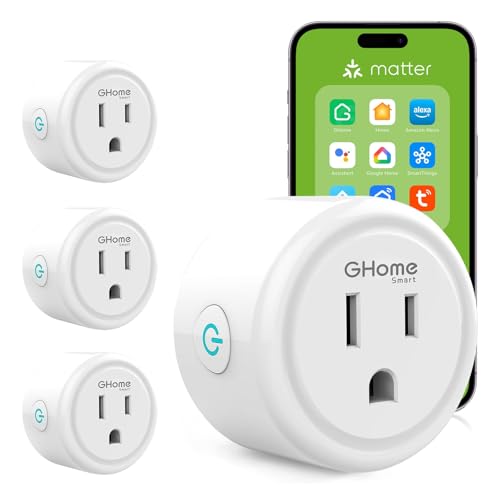
6. GHome Smart Matter Plug WP3: Best for Using Several Apps at Once
The GHome WP3 is a newer Matter plug that joins over Bluetooth and 2.4 GHz Wi-Fi. It suits a home where Home Assistant shares devices with Alexa, Apple Home, or Google Home.
Over Matter, you can add it to Home Assistant and then share the same plug to other apps with a new Matter code. GHome also lists Smart Life and Tuya app support, plus its own GHome app with cycle, random, and countdown timers and scenes based on temperature, humidity, or weather.
It is rated at 120 volts, 15 amps, and 1800 watts, with ETL and FCC listing. The listing names coffee makers as a fit for its higher load rating.
Specs
| Spec | Details |
|---|---|
| Model | WP3 |
| In the box | 4 plugs, user manual |
| Max load | 15 A, 1800 W |
| Voltage | 120 V |
| Connection | 2.4 GHz Wi-Fi, Bluetooth, Matter |
| Home Assistant | Matter integration |
| Also works with | Alexa, Apple Home, Google Home, SmartThings, Smart Life, Tuya |
| Size | 2.1 x 2.1 x 1 in |
| Max temperature | 40 °C |
| Safety | ETL, FCC |
Key features
- Matter plus Bluetooth for stable setup.
- Share one plug across many apps.
- Cycle, random, and countdown timers in the GHome app.
- 15 A rating for heavier appliances.
- ETL and FCC listed.
Why it stands out
It is ranked high in Amazon’s home automation category and has a good review score for a new model. The wide app support helps if family members use different assistants.
What it can and cannot do
It can switch devices locally through Matter and run timers in its own app. It cannot show energy use. Some of its smart scenes live only in the GHome app and will not show up in Home Assistant. It cannot join 5 GHz Wi-Fi, and its IP00 rating means indoor use only.
Pros
- Matter local control.
- 15 A rating.
- Works with many apps.
- Bluetooth plus Wi-Fi.
Cons
- No energy monitoring.
- App-only features do not reach Home Assistant.
- Newer brand with a shorter track record.
- Indoor only.
7. Govee Smart Plug H5083: Best If You Already Use Govee
The Govee H5083 is a very popular Wi-Fi and Bluetooth plug. It is on this list for people who already own Govee gear and want to know how it fits with Home Assistant. For a new Home Assistant setup, the six plugs above are better choices.
Here is the honest picture. Home Assistant has no official integration for this plug. Owners use community options, like the govee2mqtt add-on or HACS integrations built on Govee’s cloud API. These can work well, but they depend on Govee’s servers and an API key, and one forum user hit the daily request limit and lost control for a day.
Also check the load rating. The listing title says 15A, but the product details rate this model at 10 amps and 1200 watts. Treat it as a 10 amp plug for lamps, fans, and chargers.
Specs
| Spec | Details |
|---|---|
| Model | H5083 |
| In the box | 4 plugs, user manual |
| Max load | 10 A, 1200 W (per product details) |
| Voltage | 120 V |
| Connection | 2.4 GHz Wi-Fi and Bluetooth |
| Home Assistant | No official integration, community add-ons only |
| Also works with | Alexa, Google Assistant |
| Safety | ETL certified |
Key features
- Wi-Fi plus Bluetooth connection.
- Schedules and group control in the Govee Home app.
- Family sharing in the app.
- Compact body.
- Huge owner base and review count.
Why it stands out
It has the most reviews of any plug in this list, and the Govee app is easy to use. If you only need simple schedules and voice control, it does the job.
What it can and cannot do
It can run lamps and fans by app, voice, or schedule. Through a community add-on, it can show up in Home Assistant. It cannot run locally in Home Assistant, and it has no Matter support. It cannot handle loads over 10 amps, and it does not show energy use.
Pros
- Very popular, many reviews.
- Wi-Fi and Bluetooth.
- Easy Govee app.
Cons
- No official Home Assistant integration.
- Cloud API with daily limits.
- 10 A, 1200 W rating.
- No energy monitoring.
How to choose a smart plug for Home Assistant
1. Pick the connection first
Choose Matter if you want to pair plugs with no brand account. Choose Zigbee if you already have a coordinator, or plan to add many sensors. Choose Kasa or Tapo if you want an official brand integration with energy data. Avoid cloud-only plugs if local control matters to you.
2. Decide if you need energy data
Only two picks here report power to Home Assistant: the THIRDREALITY Gen3 and the Kasa EP25. Energy data lets you track a washer cycle, catch a fridge that runs too long, or find gear that wastes standby power. For more on standby draw, see our post on whether smart lights use more electricity.
3. Check the amp rating
A 15 amp plug can run up to 1800 watts at 120 volts. Six picks here are rated for 15 amps. The Govee H5083 is rated at 10 amps and 1200 watts. Keep space heaters off smart plugs and plug them straight into the wall, as fire safety groups such as ESFI advise.
4. Check your network
All the Wi-Fi plugs here need 2.4 GHz Wi-Fi. Matter plugs also need IPv6 on your local network. If you split IoT gear onto its own VLAN, Matter needs IPv6 and mDNS to pass between the networks.
5. Think about other apps
Matter plugs can be shared with Alexa, Google, or Apple Home at the same time as Home Assistant. Pair to Home Assistant first, or pair to another app and then share it using a fresh setup code. TP-Link explains the sharing steps in its Matter multi-admin guide.
Best outdoor smart plug for Home Assistant: what to know
None of the 7 plugs in this guide is rated for outdoor use. Several listings show an IP00 rating, which means no protection from dust or water. Do not use them on a porch or patio, even under a roof.
For yard lights or pumps, look for a plug made for outdoor use with a weather rating such as IP44 or higher, and a cover over the outlet. Then check that it uses Matter, Zigbee, or has an official Home Assistant integration, so you get the same local control as the indoor picks here. Our best smart outlet plug guide includes one outdoor plug that works with a Lutron hub.
How to add a smart plug to Home Assistant
Matter plugs (Tapo, meross, Linkind, GHome)
- Turn on IPv6 in Home Assistant under Settings, System, Network.
- Install the Matter integration. On Home Assistant OS it sets up the Matter Server app for you.
- Open the Home Assistant Companion app on your phone with Bluetooth on, and stay on the same 2.4 GHz Wi-Fi.
- Go to Settings, Devices and services, Add device, and scan the plug’s Matter QR code.
- Name the plug and assign it to a room.
Zigbee plug (THIRDREALITY Gen3)
- Plug a Zigbee coordinator into your Home Assistant box and set up ZHA or Zigbee2MQTT.
- Turn on pairing mode in ZHA or Zigbee2MQTT.
- Plug in the Gen3 and follow the pairing steps in its manual. A factory reset may be needed if it was paired before.
- Wait for the switch and power sensors to appear, then rename them.
Kasa EP25 and Tapo with the TP-Link integration
- Set up the plug in the Kasa or Tapo app.
- In Home Assistant, check for a discovered TP-Link device, or add TP-Link Smart Home by hand.
- Enter the plug’s IP address if asked, then your TP-Link account email and password.
- Add the energy sensor to the Energy dashboard if your plug has one.
What smart plugs can and cannot do in Home Assistant
They can turn plug-in devices on and off from automations, dashboards, and voice. With energy monitoring, they can trigger alerts when a washer finishes or a freezer stops drawing power. With Matter or Zigbee, they keep working when your internet is down.
They cannot dim a lamp or press a device’s own power button. They cannot control a hard-wired ceiling light. For that, you need a smart switch, and our guide on how to install a smart light switch walks through it.
Final pick
For most people, the Tapo P125M is the best smart plug for Home Assistant, thanks to Matter plus TP-Link’s official integration. The THIRDREALITY Gen3 is the best Zigbee smart plug for Home Assistant if you run a coordinator. Get the Kasa EP25 for energy data over Wi-Fi, and the meross MSS115 if you want no account at all. The Linkind Matter 4-pack and GHome WP3 are good Matter options for many rooms. Keep the Govee H5083 for homes that already run Govee.
Want one screen to run it all? Our list of the best smart home control panels shows wall-mounted options for your smart home.
Frequently asked questions
What is the best smart plug for Home Assistant?
For most users, the TP-Link Tapo P125M is the best pick. It is Matter certified and also supported by Home Assistant’s official TP-Link integration, so it runs locally either way.
What is the best Zigbee smart plug for Home Assistant?
In this guide, the THIRDREALITY Smart Plug Gen3 is the best Zigbee pick. It works with ZHA and Zigbee2MQTT, has a 15 A outlet, reports power and energy, and acts as a Zigbee repeater.
Do Matter smart plugs work with Home Assistant?
Yes. Home Assistant is a Matter controller. You need the Matter integration and Matter Server, IPv6 turned on in Home Assistant, and the Companion app on your phone to scan the plug’s code.
Which smart plugs show energy use in Home Assistant?
In this list, the THIRDREALITY Gen3 and the Kasa EP25 report power and energy. You can add them to the Home Assistant Energy dashboard.
Does the Govee H5083 work with Home Assistant?
Not with an official integration. Owners use community add-ons such as govee2mqtt or HACS integrations that run through Govee’s cloud API, which has daily request limits.
Can I use these smart plugs outdoors?
No. None of the 7 plugs here is rated for outdoor use. For outdoor use, pick a plug with a weather rating such as IP44 or higher and a covered outlet.
Can one Matter plug work with Home Assistant and Alexa together?
Yes. Matter supports several controllers at once. Pair it to one app, then create a new setup code in that app and use it to add the plug to the other.
Do I need a hub for these plugs?
The Wi-Fi and Matter plugs connect straight to your network with no hub. The THIRDREALITY Gen3 needs a Zigbee coordinator or a Zigbee hub, such as an Echo with built-in Zigbee.