The best smart plug to use with Alexa lets you say “Alexa, turn on the lamp” and the lamp turns on. It sits between your wall outlet and a device. Once it is set up, you can also run that device on a schedule or from your phone when you are away.
This 2026 guide covers 7 picks from Linkind, Govee, GHome, EIGHTREE, meross and Kasa. Five are multi-packs of single plugs. Two packs have dual outlet plugs, and one pick is a smart power strip. For each one you get specs, key features, what it can and cannot do, and pros and cons. After that you will find how to pick one, how to set it up with Alexa, and what you should never plug in.
Quick answer: For most Alexa homes, the Linkind Matter Smart Plug 6-Pack is the best pick. It is rated 15 A, gives you six plugs, and keeps working on your home network if the internet drops. You need a Matter-ready Echo for Alexa control. For simple lamp control with no Matter step, get the Govee H5083 4-Pack. If your router runs on 5 GHz, pick the EIGHTREE 5GHz plug. To see how much power each device uses, choose the Kasa HS300 power strip.
Top 7 picks at a glance
- Linkind Matter Smart Plug 6-Pack (best overall)
- Govee Smart Plug H5083 4-Pack (best for lamps and small devices)
- Govee Dual Smart Plug H5082 4-Pack (best dual outlet plug)
- GHome Smart Dual Smart Plug WP2 4-Pack (best for Smart Life and Tuya users)
- EIGHTREE 5GHz Smart Plug ET05 4-Pack (best for 5 GHz Wi-Fi)
- meross Smart Plug 15A MSS110HK 4-Pack (best for Alexa plus Apple Home)
- Kasa Smart Power Strip HS300 (best for energy monitoring)
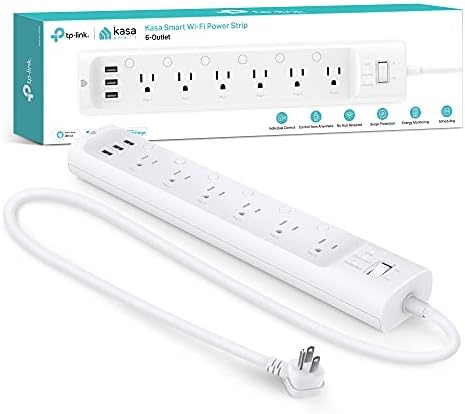
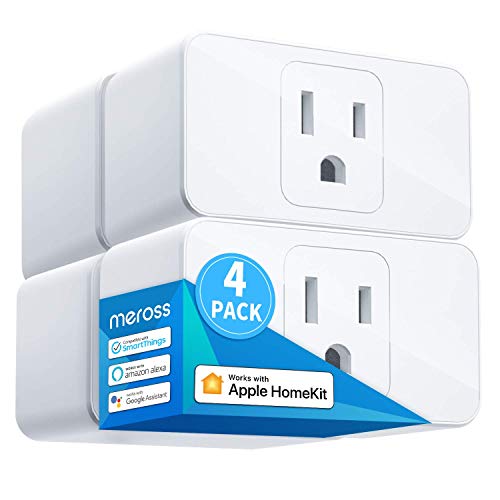


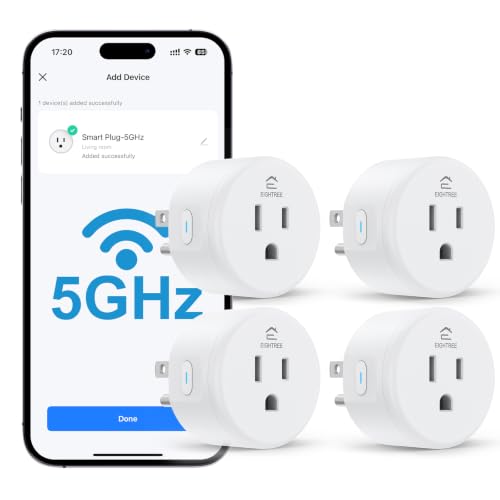
Note: We have not tested these plugs ourselves. The specs here come from each product’s Amazon listing. Pack sizes and listings can change, so check the model number and what is in the box before you buy.
Best smart plug to use with Alexa: comparison table
Here are all 7 picks side by side. On a phone, swipe the table left to see every column.
| Pick | In the box | Max load | Wi-Fi | Alexa setup | Best for |
|---|---|---|---|---|---|
| Linkind Matter | 6 plugs | 15 A, 1800 W | 2.4 GHz | Matter, needs Echo controller | Most homes |
| Govee H5083 | 4 plugs | 10 A, 1200 W (feature text) | 2.4 GHz plus Bluetooth | Govee skill | Lamps and small devices |
| Govee H5082 Dual | 4 plugs, 8 outlets | 15 A, 1800 W | 2.4 GHz plus Bluetooth | Govee skill | Two devices in one spot |
| GHome WP2 Dual | 4 plugs, 8 outlets | 15 A, 1800 W | 2.4 GHz plus Bluetooth | GHome, Smart Life or Tuya skill | Smart Life and Tuya homes |
| EIGHTREE ET05 | 4 plugs | 15 A, 1800 W (feature text) | 5 GHz and 2.4 GHz | Smart Life skill | 5 GHz routers |
| meross MSS110HK | 4 plugs | 15 A | 2.4 GHz | meross skill | Alexa plus Apple Home |
| Kasa HS300 | 1 strip, 6 outlets, 3 USB | 15 A, 1875 W total | 2.4 GHz | Kasa skill | Energy monitoring |
What is the best smart plug to use with Alexa?
There is no single answer for every home. The best one depends on your Wi-Fi, the devices you want to control, and the other apps you already use.
A smart plug only switches power on and off. So it works best with devices that have a plain on switch, like lamps, fans, string lights and drip coffee makers. Leave the device switch on, and it starts when the plug sends power. New to this? Our guide on what a smart plug is and how it works explains the basics.
How to choose the best smart plugs to use with Alexa
1. Check your Wi-Fi band
Six picks here join 2.4 GHz Wi-Fi only. The EIGHTREE ET05 can join 5 GHz or 2.4 GHz. If setup keeps failing, check that your phone is on the 2.4 GHz band, or choose the EIGHTREE plug.
2. Look at the amp rating
A 15 A plug can carry up to 1800 W at 120 V. The Govee H5083 is rated 10 A and 1200 W in its feature text. That is fine for lamps and chargers, but not for heaters. A power strip like the Kasa HS300 shares one limit across all its outlets.
3. Pick single, dual or a strip
A single plug controls one device. A dual plug like the Govee H5082 or GHome WP2 controls two devices from one socket. A strip like the Kasa HS300 handles six devices and adds USB ports.
4. Know how it links to Alexa
Most plugs here link to Alexa through the maker’s app and an Alexa skill. You set up the plug in that app first. The Linkind plug uses Matter instead, so Alexa needs a Matter-ready Echo to control it.
5. Think about extras
Want Apple Home too? Look at the meross or Linkind plugs. Want to see power use? Only the Kasa HS300 in this list tracks energy. Want backup when Wi-Fi is weak? The Govee plugs also use Bluetooth.
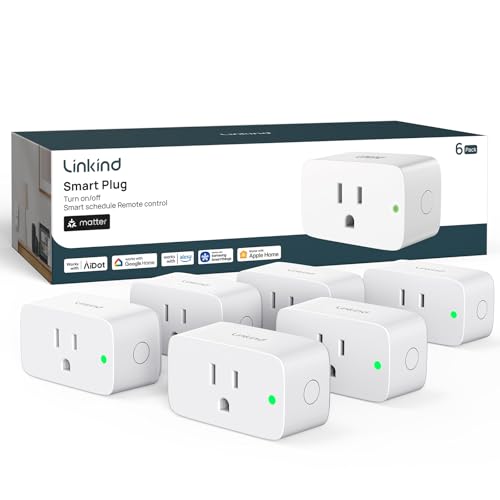
1. Linkind Matter Smart Plug 6-Pack: Best Overall
This is a Matter smart plug sold in a pack of six. It is a strong pick if you want to put a plug in every room and talk to all of them through Alexa.
Each plug is rated 15 A and 1800 W. That covers lamps, fans, TVs and small kitchen gear. Linkind lists ETL and FCC certification, fire-resistant materials, and protection against short circuits and overloads.
Matter is a shared smart home standard. You add the plug once, and it can work in Alexa, Apple Home, Google Home or SmartThings. To use it with Alexa, you need an Echo device that can act as a Matter controller. No Echo? You can still run the plug from the free AiDot app without a hub.
Matter devices also talk to each other on your home network. Linkind says that once they are set up, they keep working inside your LAN even if the internet goes down.
Specs
| Spec | Details |
|---|---|
| Model | LC09003256 |
| In the box | 6 smart plugs |
| Max load | 15 A, 1800 W |
| Voltage | 120 V |
| Plug | 3-prong, Type B (North American) |
| Wi-Fi | 2.4 GHz only, IPv6 network needed |
| Works with | Alexa, Apple Home, Siri, Google Home, SmartThings (Matter) |
| App | AiDot (no hub needed) |
| Hub | Matter controller needed for Alexa, such as an Echo |
| Safety | ETL and FCC certified |
Key features
- Matter certified, so one plug works across Alexa, Apple, Google and SmartThings.
- 15 A, 1800 W load rating.
- Schedules and a timer for auto shut-off.
- Local control on your home network during an internet outage.
- Six plugs in one box.
What makes it a good pick
Six plugs is more than most packs give you. Add Matter and a 15 A rating, and you have a set you can keep using even if you later switch from Alexa to another system.
What it can and cannot do
It can switch plug-in devices by Alexa voice command, app, schedule or timer. It can keep working on your local network when the internet is down. It cannot join 5 GHz Wi-Fi. Your network must support IPv6. It does not track energy use, and it is for indoor use only.
Pros
- Six plugs per pack.
- 15 A, 1800 W rating.
- Matter works with Alexa and other systems.
- Local control during internet outages.
- AiDot app works without a hub.
Cons
- Alexa control needs a Matter-ready Echo.
- 2.4 GHz Wi-Fi only.
- Network must support IPv6.
- No energy monitoring.
2. Govee Smart Plug H5083 4-Pack: Best for Lamps and Small Devices
The Govee H5083 is a small round plug that connects by Wi-Fi or Bluetooth. It is a simple Alexa pick for lamps, fans, string lights and chargers.
Bluetooth helps during setup and when you are close to the plug. Govee says this makes the link more stable than plugs that only use Wi-Fi.
You add the plug in the Govee Home app by searching for H5083. From there you can set schedules, group several plugs into one button, and share control with your family. Then you link the Govee skill in the Alexa app.
Read the load rating with care. The title says 15A, but Govee’s own feature text rates this plug at 10 A and 1200 W, and the spec table lists 11 A. Treat it as a 10 A plug. Keep heaters, kettles and toasters off it.
Specs
| Spec | Details |
|---|---|
| Model | H5083 (pack B5081) |
| In the box | 4 smart plugs, 1 user manual |
| Max load | 10 A, 1200 W (per feature text) |
| Voltage | 120 V |
| Connection | 2.4 GHz Wi-Fi and Bluetooth |
| Works with | Alexa, Google Assistant |
| App | Govee Home |
| Hub | Not needed |
| Safety | ETL and FCC certified |
Key features
- Wi-Fi plus Bluetooth connection.
- Schedules and group control from one button.
- Family sharing in the Govee Home app.
- Small body that fits tight corners.
- No hub needed.
What makes it a good pick
The Bluetooth link gives it a second way to connect, which most Wi-Fi plugs lack. Setup with Alexa takes one skill link after the Govee app step.
What it can and cannot do
It can turn lamps, fans and chargers on and off by voice, app or schedule. It can be grouped with other Govee plugs. It cannot safely run loads above 1200 W. It does not support 5 GHz Wi-Fi, Apple Home or energy monitoring.
Pros
- Wi-Fi and Bluetooth connection.
- Easy group control.
- Works with Alexa and Google.
- Small, compact shape.
- Family sharing in the app.
Cons
- Rated 10 A and 1200 W, not 15 A.
- 2.4 GHz Wi-Fi only.
- No Apple Home support.
- No energy monitoring.
3. Govee Dual Smart Plug H5082 4-Pack: Best Dual Outlet Plug
Each Govee H5082 has two outlets side by side, and each outlet works on its own. One plug covers only one socket of a normal wall outlet. So a two-socket wall outlet can turn into four smart outlets.
The plug is rated 15 A and 1800 W. It connects by Wi-Fi or Bluetooth and needs no hub. You set it up in the Govee Home app by adding the H5082. You need a Govee account to use it.
Once it is in the Govee app, you link Govee to Alexa. Then you can name each outlet, like “desk lamp” and “desk fan,” and control them one at a time.
The app lets you set timers and on and off schedules for each outlet. The pack gives you four plugs, which means eight smart outlets in total.
Specs
| Spec | Details |
|---|---|
| Model | H5082 |
| In the box | 4 smart plugs, user manual |
| Outlets | 2 per plug, each controlled on its own |
| Max load | 15 A, 1800 W |
| Voltage | 120 V |
| Connection | 2.4 GHz Wi-Fi and Bluetooth |
| Works with | Alexa, Google Assistant |
| App | Govee Home (account needed) |
| Size | 4 x 1.3 x 1.5 in |
| Safety | ETL, FCC and CA65 listed |
| Upper temperature rating | 40 °C (104 °F) |
Key features
- Two outlets per plug with separate control.
- Covers only one wall socket.
- 15 A, 1800 W rating.
- Wi-Fi plus Bluetooth.
- Timers and schedules for each outlet.
What makes it a good pick
Eight smart outlets from one box is a lot of control for the wall space. It suits a desk, a TV stand or a bedside table where two devices sit close together.
What it can and cannot do
It can control two devices from one plug, by Alexa, app or schedule. It cannot join 5 GHz Wi-Fi. It needs a Govee account. It is for indoor use only. Keep in mind that both outlets share the plug’s 15 A limit.
Pros
- Two separate outlets per plug.
- Leaves the second wall socket free.
- 15 A, 1800 W rating.
- Wi-Fi and Bluetooth.
- Eight smart outlets per pack.
Cons
- Govee account required.
- 2.4 GHz Wi-Fi only.
- No Apple Home support.
- Both outlets share one load limit.
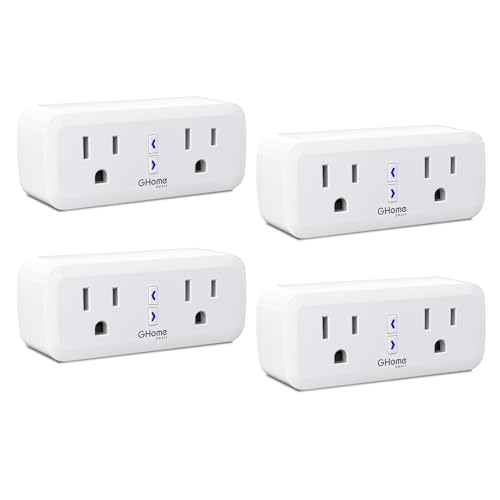
4. GHome Smart Dual Smart Plug WP2 4-Pack: Best for Smart Life and Tuya Users
The GHome WP2 is another two-outlet plug. Each outlet has its own control, so you can run two devices from one plug.
It is rated 15 A and 1800 W. Setup uses Bluetooth and Wi-Fi, and the plug joins 2.4 GHz Wi-Fi only. GHome says the 5 GHz band is not supported.
You can control it from the GHome app, the Smart Life app or the Tuya app. That is handy if you already have other Smart Life or Tuya gear. GHome says it cannot link to Alexa directly. Add the plug to the app first, then link that app to Alexa.
The app has timers, schedules, a random on and off mode, remote access, grouping and sharing. GHome lists a V0 fire-resistant shell, over-temperature protection and a 2-year warranty.
Specs
| Spec | Details |
|---|---|
| Model | WP2 |
| In the box | 4 dual smart plugs |
| Outlets | 2 per plug, each controlled on its own |
| Max load | 15 A, 1800 W |
| Voltage | 120 V |
| Connection | 2.4 GHz Wi-Fi and Bluetooth |
| Works with | Alexa, Google Home |
| Apps | GHome, Smart Life, Tuya |
| Contacts | Copper |
| Safety | FCC listed, V0 fire-resistant casing, over-temperature protection |
| Upper temperature rating | 104 °F |
| Warranty | 2 years |
Key features
- Two outlets per plug with separate control.
- Works in the GHome, Smart Life and Tuya apps.
- 15 A, 1800 W rating.
- Random mode to make the home look lived in.
- Over-temperature protection.
What makes it a good pick
Support for three apps is the big plus. If your home already runs on Smart Life or Tuya, this plug joins the same app and the same Alexa link.
What it can and cannot do
It can switch two devices on and off by Alexa, app, timer or schedule. It can run a random on and off cycle while you are away. It cannot join 5 GHz Wi-Fi. It cannot link to Alexa until you add it to the app. It is for dry indoor spots only.
Pros
- Two separate outlets per plug.
- 15 A, 1800 W rating.
- Works with GHome, Smart Life and Tuya apps.
- Over-temperature protection.
- 2-year warranty.
Cons
- 2.4 GHz Wi-Fi only.
- Must set up in the app before Alexa.
- No Apple Home support.
- Both outlets share one load limit.
5. EIGHTREE 5GHz Smart Plug ET05 4-Pack: Best for 5 GHz Wi-Fi
Most smart plugs only join 2.4 GHz Wi-Fi. The EIGHTREE ET05 is dual band, so it can use 5 GHz or 2.4 GHz. That helps if your router or mesh system makes it hard to pick 2.4 GHz.
EIGHTREE says the 5 GHz band gives faster replies when you are near your router. Setup starts over Bluetooth. You add the plug in the Smart Life app first, then link Smart Life to Alexa.
The feature text rates it at 120 V, 15 A and 1800 W, and EIGHTREE names coffee makers and space heaters as uses. The spec table lists 9.09 A, though. Check the label on the plug before you run a heavy load.
You get schedules, timers, sunset and bedtime routines, remote control and group control. The shape is small and rounded.
Specs
| Spec | Details |
|---|---|
| Model | ET05 |
| In the box | Smart plug, user manual (4 plugs per pack) |
| Max load | 15 A, 1800 W (feature text); 9.09 A (spec table) |
| Voltage | 120 V |
| Wi-Fi | Dual band, 5 GHz and 2.4 GHz |
| Setup | Bluetooth |
| Works with | Alexa, Google Home |
| App | Smart Life |
| Hub | Not needed |
| Safety | ETL listed |
Key features
- Dual band Wi-Fi with 5 GHz support.
- Bluetooth setup.
- Schedules, timers and group control.
- Smart Life app with Alexa link.
- Compact rounded shape.
What makes it a good pick
5 GHz support is rare in smart plugs. If setup keeps failing because your router mixes both bands, this plug removes that problem.
What it can and cannot do
It can join 5 GHz or 2.4 GHz Wi-Fi and run on Alexa voice commands, schedules and groups. It cannot be linked to Alexa until you add it to Smart Life. It does not list energy monitoring or Apple Home support. It is not rated for outdoor use.
Pros
- Works on 5 GHz and 2.4 GHz Wi-Fi.
- Bluetooth makes setup easier.
- Group control for whole rooms.
- No hub needed.
Cons
- Load rating differs between listing sections.
- Must set up in Smart Life first.
- No Apple Home support.
- No energy monitoring listed.
6. meross Smart Plug 15A MSS110HK 4-Pack: Best for Alexa Plus Apple Home
The meross MSS110HK works with Alexa and also with Apple HomeKit, Siri, Apple Watch and CarPlay. The title adds Google and SmartThings. It suits a home where one person uses an Echo and another uses an iPhone.
It is rated 15 A. The body is small enough that two plugs can stack in the same wall outlet.
Schedules can follow sunrise and sunset, which is great for porch lamps and window lights. The title also lists offline control.
For HomeKit control away from home, you need a HomePod, an Apple TV or an iPad set up as a home hub. That hub must stay online. Alexa control works through the meross app link.
Specs
| Spec | Details |
|---|---|
| Model | MSS110HK |
| In the box | 4 smart plugs |
| Max load | 15 A, 1800 W |
| Voltage | 120 V |
| Wi-Fi | 2.4 GHz |
| Works with | Alexa, Apple HomeKit, Siri, Google Assistant, SmartThings |
| Material | Flame-retardant polycarbonate (PC) |
| Weight | 275 g for the pack |
| Safety | ETL and FCC certified |
| Warranty | 2 years |
Key features
- Works with Alexa and Apple HomeKit.
- Two plugs fit in one wall outlet.
- Sunrise and sunset schedules.
- 15 A rating.
- 2-year warranty.
What makes it a good pick
It works with Alexa and Apple HomeKit without a Matter step. If your house mixes Amazon and Apple devices, everyone can use the same plugs.
What it can and cannot do
It can be controlled by Alexa, Siri, the app and schedules tied to sunrise and sunset. It cannot join 5 GHz Wi-Fi. Remote HomeKit control needs an Apple home hub. It is for indoor use and does not list energy monitoring.
Pros
- Works with Alexa and Apple HomeKit.
- Two plugs stack in one outlet.
- Sunrise and sunset schedules.
- 15 A rating.
- 2-year warranty.
Cons
- 2.4 GHz Wi-Fi only.
- Remote HomeKit needs a home hub.
- No energy monitoring.
- Indoor use only.
7. Kasa Smart Power Strip HS300: Best for Energy Monitoring
The Kasa HS300 is a smart power strip, not a single plug. It has six smart outlets that you control one by one, plus three USB ports.
Each outlet can be named and run on its own in Alexa. So you could say “Alexa, turn off the printer” and leave the computer on.
The strip shows how much energy each connected device uses. You check it in the Kasa app, and you can turn off a device that uses too much.
It has ETL certified surge protection rated as a Type 3 SPD. The whole strip shares one 15 A, 1875 W limit. Each USB port gives 5 V at 2.4 A, and 2.4 A is also the total for all three ports. TP-Link makes it and backs it with a 2-year warranty.
Specs
| Spec | Details |
|---|---|
| Model | HS300 |
| In the box | 1 power strip, quick start guide |
| Smart outlets | 6, each controlled on its own |
| USB ports | 3, 5 V/2.4 A each and in total |
| Max load | 15 A, 1875 W total |
| Input | 100 to 125 V, 60 Hz |
| Surge protection | ETL certified, Type 3 SPD |
| Works with | Alexa, Google Assistant |
| App | Kasa Smart |
| Size | 14.17 x 2.49 in |
| Warranty | 2 years |
Key features
- Six smart outlets with separate control.
- Energy monitoring for each outlet.
- Surge protection for electronics.
- Three USB charging ports.
- No hub needed.
What makes it a good pick
It packs six plugs and power tracking into one strip. For a desk or TV area, it shows you which device uses the most power, and Alexa can switch each one.
What it can and cannot do
It can control six devices one at a time by Alexa, app or schedule. It can show energy use for each outlet. It cannot give each device its own 15 A; all outlets share one total limit. The listing does not say the USB ports can be switched by Alexa.
Pros
- Six smart outlets in one strip.
- Energy monitoring for each outlet.
- Surge protection.
- Three USB ports.
- 2-year warranty.
Cons
- All outlets share one 15 A limit.
- Large; takes up floor or desk space.
- USB total is 2.4 A for all ports.
- No Apple Home support listed.
How to set up a smart plug with Alexa
The steps are nearly the same for every pick. The Linkind Matter plug is the one that works a little differently.
- Plug the smart plug into an outlet near your router for the first setup.
- Install the maker’s app: Govee Home, GHome or Smart Life, meross, Kasa, or AiDot for Linkind.
- Add the plug in that app and join it to your Wi-Fi. Use 2.4 GHz unless you have the EIGHTREE plug.
- Give it a clear name, like “bedroom lamp.” Alexa will use this name.
- In the Alexa app, open Skills and link the maker’s account. For the Linkind plug, add it as a Matter device in the Alexa app instead, using your Echo as the controller.
- Ask Alexa to discover devices. Then say, “Alexa, turn on bedroom lamp.”
You can also add the plug to an Alexa routine, so a lamp turns on at sunset or when you say “Alexa, good night.” Have a Kasa plug? Our step-by-step guide on how to set up a Kasa smart plug covers that app.
Best cheap smart plugs to use with Alexa: how to get more for less
Prices change often, so we do not list them here. You can still lower the cost of each smart outlet with a few simple choices.
- Buy a multi-pack. The Linkind 6-pack and the 4-packs cost less per plug than buying single plugs one by one.
- Pick dual plugs. The Govee H5082 and GHome WP2 packs give eight smart outlets from four plugs.
- Use one strip for a crowded desk. The Kasa HS300 covers six devices with one product.
- Match the rating to the job. A 10 A plug like the Govee H5083 is enough for a lamp.
What you should not plug into a smart plug
A smart plug is safe when you stay inside its limits. Avoid these uses.
- Space heaters on a 10 A plug. Many safety groups advise plugging heaters straight into the wall. The Electrical Safety Foundation (ESFI) shares home electrical safety tips.
- Anything above the plug’s rating. That is 1200 W for the Govee H5083 and 1800 W for most 15 A picks here.
- Medical equipment that must never lose power.
- Devices with soft power buttons. Many TVs and air purifiers stay off when power comes back.
- Outdoor or wet spots. None of these 7 picks are rated for outdoor use.
Can a smart plug save energy with Alexa?
It can help a little. Many devices draw power even when they look off. The U.S. Department of Energy says standby power can make up 5 to 10 percent of home energy use. Its page of tips to reduce standby power loads explains more.
With Alexa, you can cut power to a TV area at bedtime with one routine. The Kasa HS300 also shows which device uses the most power. Each plug uses a small amount of power to stay online, so your savings depend on what you control.
What a smart plug can and cannot do with Alexa
It can turn plug-in devices on and off by voice, by app or on a schedule. It can be part of Alexa routines. It can make your home look lived in while you travel.
It cannot dim a lamp or press a device’s own power button. It also cannot control a hard-wired ceiling light. For that you need a smart switch. Our guide to smart plug vs smart switch explains which one fits your room.
Final pick
For most homes, the Linkind Matter Smart Plug 6-Pack is the best smart plug to use with Alexa. It gives you six 15 A plugs and local control through Matter. The Govee H5083 is the easy choice for lamps. For two devices in one spot, look at the Govee H5082 Dual or the GHome WP2 Dual, which also works in Smart Life and Tuya. Choose the EIGHTREE ET05 for 5 GHz Wi-Fi and the meross MSS110HK if your home mixes Alexa and Apple. For energy tracking at a desk or TV stand, the Kasa HS300 is the one to get.
Want more options? See our list of the best smart outlet plugs, or pair your plugs with the best smart light bulbs to use with Alexa.
Frequently asked questions
What are the best smart plugs to use with Alexa in 2026?
Our top picks are the Linkind Matter 6-pack, the Govee H5083 and H5082, the GHome WP2, the EIGHTREE ET05, the meross MSS110HK and the Kasa HS300 power strip. All seven work with Alexa.
What is the best smart plug to use with Alexa for most people?
The Linkind Matter Smart Plug 6-pack is the best fit for most homes. It is rated 15 A, gives you six plugs, and works with Alexa through a Matter-ready Echo.
Do smart plugs need a hub to work with Alexa?
Most picks here connect straight to Wi-Fi and link to Alexa with a skill. The Linkind Matter plug needs a Matter controller, such as a Matter-ready Echo, to work in Alexa. It also works in the AiDot app with no hub.
Is there a smart plug that works with 5 GHz Wi-Fi?
Yes. The EIGHTREE ET05 joins both 5 GHz and 2.4 GHz Wi-Fi. The other picks in this guide use 2.4 GHz only.
Can one smart plug control two devices?
Yes. The Govee H5082 and the GHome WP2 each have two outlets. Each outlet has its own control in the app and in Alexa.
Which smart plug shows energy use with Alexa?
In this list, only the Kasa HS300 power strip shows energy use. You can check each outlet in the Kasa app.
Why does my smart plug not show up in Alexa?
First add the plug in the maker’s app and connect it to 2.4 GHz Wi-Fi, unless it supports 5 GHz. Then link the maker’s skill in the Alexa app and ask Alexa to discover devices.
Can I plug a space heater into a smart plug?
Safety groups advise plugging space heaters straight into a wall outlet. Check your heater’s manual. Never use a 10 A plug like the Govee H5083 for heating appliances.