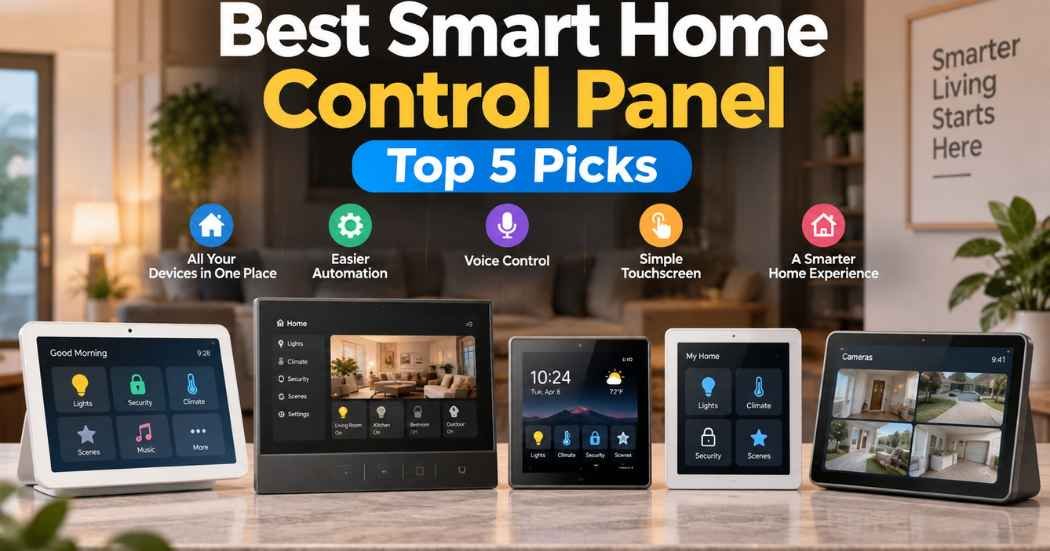
Smart homes get messy fast. One app for your lights. Another for your locks. A third for your thermostat. Pretty soon you’re swiping through five apps just to turn off a lamp.
The best smart home control panel fixes that. It’s a touchscreen device, usually mounted on a wall, that puts your devices in one place. Tap a button and your scene runs. Ask a question and your voice assistant answers. No more app-hopping.
The tricky part is picking one. Not every panel works with every ecosystem. Some are built for Alexa. Others lean on Home Assistant or Google Home. Some come with a Zigbee radio built in, so you don’t need a separate hub. Others need a neutral wire behind your wall, and some don’t.
This guide compares five real options: the MOES Smart Home Control Panel, the Shelly Wall Display XL, the SONOFF NSPanel Pro 120, the Amazon Echo Hub, and the eufy Smart Display E10. We’ll look at what each one actually does, based on the maker’s own listed specs, not marketing talk.
By the end, you’ll know which panel fits your ecosystem, your screen-size preference, and your installation setup.
What Is a Smart Home Control Panel?
A smart home control panel is a touchscreen device that lets you control smart devices from one screen. You tap an icon, and a light turns on. You tap another, and your whole house switches to “movie night.”
This is different from a basic smart switch. A switch controls one thing. A panel controls many things at once, often from a dashboard.
It’s also different from a plain smart home hub. A hub is usually a small box that talks to your devices in the background. A panel adds a screen you can actually see and touch. Some panels even have the hub built right in.
Touchscreens matter because they give you a visual layout of your home. Ecosystem compatibility matters even more. If a panel doesn’t talk to Alexa, Google Home, or Home Assistant, it won’t fit into a home that already uses one of those systems. People setting up a new smart home, or trying to unify an existing one, tend to get the most out of a panel.
Why These Products Made Our List
We picked these five panels by comparing their listed features, not by how they’re marketed. We looked at display size, ecosystem support, connectivity, automation options, and how each one gets installed.
We also thought about who each panel actually suits. A renter with a few smart plugs has different needs than someone running Home Assistant across forty devices. Design and everyday usability mattered too, since a panel you have to fight with every day isn’t worth wall space.
None of this is based on star ratings or how many people bought each one. It’s based on what the specs say these panels can do.
Quick List — Top 5
- Amazon Echo Hub — Best Overall and Best for Alexa
- Shelly Wall Display XL — Best Large-Screen Panel and Best for Home Assistant
- SONOFF NSPanel Pro 120 — Best for Smart Home Automation
- MOES Smart Home Control Panel — Best Value / Best Compact Zigbee Hub
- eufy Smart Display E10 — Best for Home Security Monitoring



Comparison Table
Product | Type | Display | Compatibility | Standout Feature | Best For |
Amazon Echo Hub | Wall-mounted hub/panel | 8-inch touchscreen | Alexa, plus Wi-Fi, Bluetooth, Zigbee, Matter, Sidewalk, Thread devices | Built-in multi-protocol hub | Alexa households wanting one hub for everything |
Shelly Wall Display XL | In-wall panel with relay | 10.1-inch touchscreen | Alexa, Google, Apple HomeKit, Home Assistant | Built-in 5A relay plus 4 physical buttons | Home Assistant users and large-screen fans |
SONOFF NSPanel Pro 120 | In-wall panel with Zigbee gateway | 4.7-inch touchscreen | Alexa, Google, Apple Home, Home Assistant | Zigbee gateway with camera viewer and thermostat control | Multi-ecosystem automation |
MOES Smart Home Control Panel | In-wall panel with Zigbee hub | 5-inch touchscreen | Alexa (built-in), Smart Life app | All-in-one Zigbee gateway in a compact panel | Budget-conscious Zigbee and Alexa users |
eufy Smart Display E10 | Countertop/wall security display | 8-inch touchscreen | eufy Security compatible devices | Four-camera live view with local storage | Households focused on entry monitoring |
At a Glance
Best Overall: Amazon Echo Hub
Best for Alexa: Amazon Echo Hub
Best for Home Assistant: Shelly Wall Display XL
Best Large-Screen Panel: Shelly Wall Display XL
Best for Smart Home Automation: SONOFF NSPanel Pro 120
Best Value: MOES Smart Home Control Panel
Key Features to Compare
Display Size and Touchscreen
A bigger screen shows more at once. A camera feed, a thermostat dial, and a row of scene buttons can all fit without crowding. A smaller screen saves wall space and often costs less, but you’ll do more scrolling and tapping to get to the same controls.
Smart Home Ecosystem
Check this before anything else. A panel built for Alexa won’t necessarily play well with Home Assistant. If you’ve already picked an ecosystem, buy a panel that lists it as compatible.
Zigbee and Other Protocols
Zigbee lets a panel talk directly to sensors, bulbs, and plugs without needing your Wi-Fi router. Some panels add Matter or Thread support too, which widens the pool of devices you can connect. Bluetooth is often used for local pairing or speaker control.
Voice Control
A built-in voice assistant means you can control your home without touching the screen. That’s handy when your hands are full or you’re across the room.
Automation and Scenes
Scenes bundle several actions into one tap or command, like dimming lights and locking the door at bedtime. This is where a panel earns its keep. A device with a screen but no scene support is really just a fancy remote.
Wall-Mounted Design
A wall-mounted panel stays put and looks intentional, almost like a light switch upgrade. The trade-off is installation. Some models need an in-wall box and a neutral wire. Others are simpler, using standard power adapters.
Physical Controls
Touchscreens can be slow to wake up. Physical buttons respond instantly, which matters for something you’ll use dozens of times a day, like a hallway light.
Installation Requirements
Some panels replace an existing wall switch and need proper wiring, including a neutral wire in certain cases. Others just need power through a cable, making them easier for renters or DIY installs.
Amazon Echo Hub Review
Overview
The Amazon Echo Hub is an 8-inch touchscreen panel built around Alexa. It’s designed to control thousands of connected devices from one dashboard, and it includes a built-in hub for Wi-Fi, Bluetooth, Zigbee, Matter, Sidewalk, and Thread devices. This unit is listed as Amazon Certified Refurbished, tested and certified to work like new.
Key Features
- Display: 8-inch touchscreen with customizable widgets
- Compatibility: Alexa-enabled, plus thousands of connected locks, thermostats, speakers, and more
- Connectivity: Built-in support for Wi-Fi, Bluetooth, Zigbee, Matter, Sidewalk, and Thread devices
- Control: Voice control through Alexa or tap controls on the screen
- Automation: Custom dashboards and routines through the Alexa app
- Installation: Wall mountable near an outlet, with optional in-wall cable pass-through or a Power-over-Ethernet adapter (sold separately)
- Security: Can arm and disarm compatible security systems and check in on cameras, locks, and sensors
- Privacy: Includes a microphone off button
What Makes It Different?
Most panels support one or two extra protocols beyond Wi-Fi. The Echo Hub lists five: Bluetooth, Zigbee, Matter, Sidewalk, and Thread, all built in. That’s a wider net than the Shelly, SONOFF, or MOES panels offer on their own.
It also leans hard into Alexa, which makes sense since Amazon builds both. If your smart home already runs on Alexa routines, this panel slots in without much extra setup.
Where it differs from the Shelly and SONOFF panels is installation. It’s not designed to replace an in-wall switch. It’s a standalone unit you mount near an outlet, which is simpler but means it isn’t tied into your home’s wiring the way an in-wall panel is.
Performance Analysis
Based on the listed specs, the Echo Hub is built to be a central point for Alexa-based homes with a mix of device types. The built-in Zigbee, Matter, and Thread support means you may not need separate hubs for those protocols. The trade-off is that this is a Certified Refurbished unit, so buyers should expect tested, like-new condition rather than a brand-new sealed box.
Pros
- Wide built-in protocol support, including Zigbee, Matter, and Thread
- Strong Alexa integration for voice and app control
- Flexible mounting, including wall or tabletop with an optional stand
- Security system arm/disarm from the panel
- Refurbished units are tested and carry the same limited warranty as new
Cons
- Best suited to households already using Alexa
- Not designed as an in-wall replacement switch like the Shelly or SONOFF
- Table-top stand and Ethernet adapter are sold separately
Best For
Households that already use Alexa and want one screen to manage a mix of Wi-Fi, Zigbee, Matter, and Thread devices without juggling separate hubs.
Who Should Skip It?
Buyers set up around Home Assistant or Apple Home may prefer the Shelly Wall Display XL or SONOFF NSPanel Pro 120 instead, since those list broader third-party ecosystem support.
Why It Ranks #1
The Echo Hub combines a sizable screen, one of the widest protocol lists on this page, and direct Alexa integration. That combination covers more use cases than a single-ecosystem panel. It loses a few points for buyers outside the Alexa ecosystem, but for the search intent behind “best smart home control panel,” it’s the most well-rounded option here.
Bottom Line
If you’re already in the Alexa ecosystem and want a panel that also speaks Zigbee, Matter, and Thread, the Echo Hub covers the most ground. Just know you’re buying a certified refurbished unit, not a new one.
Shelly Wall Display XL Review
Overview
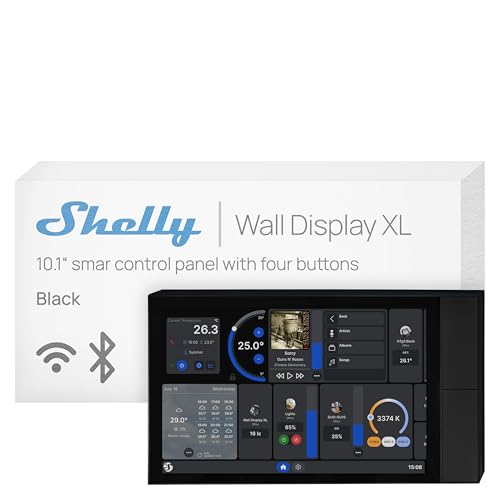
The Shelly Wall Display XL is a 10.1-inch in-wall touchscreen with a built-in 5A relay and four physical buttons. It’s built for direct appliance control and works with Alexa, Google, Apple HomeKit, and Home Assistant, plus the Shelly Smart Control app.
Key Features
- Display: 10.1-inch touchscreen, the largest on this list
- Compatibility: Alexa, Google, Apple HomeKit, and Home Assistant
- Connectivity: Wi-Fi based, with a built-in relay for direct appliance switching
- Control: Touchscreen, four customizable physical buttons, or the built-in relay
- Automation: Scenes and routines through the Shelly app or Home Assistant
- Installation: Installs in a standard electrical wall box; a neutral wire is required
- Extras: Lux (light) sensor and Bluetooth or Sonos speaker control for music playback
What Makes It Different?
At 10.1 inches, this is the biggest screen in this lineup by a wide margin. That size difference alone changes how it feels to use day to day. You can see more information, more buttons, and more camera or dashboard tiles without scrolling.
It’s also the only panel here with a built-in 5A relay, meaning it can directly switch an appliance like a fan or a coffee maker without needing a separate smart plug or switch. That’s a genuine hardware advantage over the MOES and SONOFF panels, which rely on your existing devices rather than switching power themselves.
Where the Shelly asks more of you is installation. It needs a neutral wire and fits into a standard electrical box, which usually means an electrician or a confident DIYer, not a plug-and-play setup.
Performance Analysis
Based on the listed specs, this panel suits someone who wants a genuine control center rather than just a display. The combination of a large touchscreen, four physical buttons, and a built-in relay covers both quick taps and direct appliance control. Buyers should plan for a proper in-wall installation, since it isn’t a drop-in replacement for a standard switch without a neutral wire.
Pros
- Largest touchscreen on this list at 10.1 inches
- Works with four major ecosystems, including Home Assistant
- Built-in relay for direct appliance switching
- Four physical buttons for instant, no-touchscreen control
- Bluetooth and Sonos speaker control built in
Cons
- Requires a neutral wire, which not every home has
- Installation is more involved than a plug-in panel
- Larger footprint may not suit tight wall spaces
Best For
Home Assistant users and anyone who wants the biggest screen here, along with real appliance switching built into the wall.
Who Should Skip It?
Renters or anyone without access to a neutral wire may find the MOES or Amazon Echo Hub easier to install without an electrician.
Why It Ranks #2
The screen size and ecosystem range are hard to beat, and the built-in relay is a real functional edge over the other in-wall options. It ranks just behind the Echo Hub because of the stricter wiring requirement, which narrows who can install it without help.
Bottom Line
If your home already has a neutral wire and you want the largest, most capable screen on this list, the Shelly Wall Display XL is a strong pick, especially for Home Assistant setups.
SONOFF NSPanel Pro 120 Review
Overview
The SONOFF NSPanel Pro 120 is a 4.7-inch in-wall touchscreen with a built-in Zigbee gateway. It’s built for security scenes, thermostat control, and camera viewing, and it works with Alexa, Google, Apple Home, and Home Assistant.
Key Features
- Display: 4.7-inch touchscreen
- Compatibility: Alexa, Google, Apple Home, and Home Assistant
- Connectivity: Built-in Zigbee gateway
- Control: Touchscreen tap control, plus energy monitoring
- Automation: Security scenes with up to three arming modes and sensor-triggered alarms
- Extras: Camera viewer supporting four camera types, thermostat control, and a browser for saved webpages
- Installation: In-wall panel design
What Makes It Different?
The camera viewer and security-scene features set this panel apart. You can view live feeds from up to four connected cameras directly on the panel, and set three separate arming modes that trigger alarms and phone notifications when a sensor trips. Neither the MOES nor the Shelly lists this exact combination.
It also works across four major ecosystems, matching the Shelly for breadth, but in a smaller 4.7-inch screen. That’s a reasonable trade if wall space is limited but you still want Home Assistant or Apple Home support.
Compared to the MOES panel, which also includes a Zigbee gateway, the NSPanel Pro 120 adds thermostat control, energy tracking, and the camera viewer, giving it a more security-and-automation focused feature set.
Performance Analysis
Based on the listed specs, this panel fits homes that want centralized security monitoring alongside general smart home control. The energy tracking and thermostat features add practical daily use beyond basic on/off switching. The smaller screen means less room for multiple camera tiles at once compared to the Shelly’s 10.1-inch display.
Pros
- Works with four ecosystems, including Home Assistant and Apple Home
- Built-in Zigbee gateway, no separate hub needed
- Live camera viewing for up to four cameras
- Three-mode security arming with alarm notifications
- Energy consumption tracking
Cons
- Smaller 4.7-inch screen compared to the Shelly’s 10.1-inch panel
- In-wall installation needed
- No built-in relay for direct appliance switching like the Shelly
Best For
Buyers who want a Zigbee gateway, security scenes, and camera viewing in one compact in-wall panel that still supports major ecosystems.
Who Should Skip It?
Anyone wanting the largest possible screen or a built-in relay for appliance control should look at the Shelly Wall Display XL instead.
Why It Ranks #3
The four-ecosystem support and built-in Zigbee gateway are strong, and the camera viewer adds real value for security-minded buyers. It ranks behind the Echo Hub and Shelly mainly due to its smaller screen and narrower protocol list, since it doesn’t mention Matter or Thread support.
Bottom Line
The NSPanel Pro 120 is a solid middle-ground pick: broad ecosystem support, a built-in Zigbee gateway, and security features, all in a compact in-wall unit.
MOES Smart Home Control Panel Review
Overview
The MOES Smart Home Control Panel is a 5-inch touchscreen with Alexa built in and an integrated Zigbee gateway. It’s designed to control Smart Life app devices like switches, bulbs, sockets, cameras, and door locks from one screen.
Key Features
- Display: 5-inch full touchscreen
- Compatibility: Built-in Alexa, plus Smart Life app devices
- Connectivity: Integrated Zigbee gateway, removing the need for a separate hub
- Control: Touchscreen taps or Alexa voice commands
- Automation: Scene control through the panel or the Smart Life app
- Installation: In-wall panel, supporting both wired and wireless network connections
- Power: Works with Type-C power or a standard circuit connection
What Makes It Different?
This is the most affordable and compact panel on the list, and it packs a Zigbee gateway and Alexa voice control into a small in-wall footprint. That combination, gateway plus voice plus touchscreen, usually costs more when bought as separate devices.
Compared to the Shelly and SONOFF, it doesn’t list Home Assistant or Google Home support, sticking instead to the Smart Life ecosystem and Alexa. That’s a narrower path, but a simple one if you’re already using Smart Life devices.
It also skips the extras found on pricier panels, like a built-in relay, security arming modes, or a camera viewer. What you get instead is a focused, no-frills gateway and control screen.
Performance Analysis
Based on the listed specs, this panel suits buyers who mainly use Smart Life app devices and want Alexa access without buying a separate Zigbee hub. The flexible power options, Type-C or circuit connection, make installation a bit more forgiving than a strict neutral-wire requirement.
Pros
- Compact and budget-friendly compared to the other panels here
- Built-in Zigbee gateway replaces a separate hub
- Built-in Alexa for hands-free voice control
- Supports both wired and wireless network setup
- Flexible power options, including Type-C
Cons
- No listed Home Assistant or Google Home support
- Smallest screen on this list at 5 inches
- No built-in relay, camera viewer, or security arming modes
Best For
Buyers already using Smart Life app devices who want an affordable, compact panel with a built-in Zigbee gateway and Alexa access.
Who Should Skip It?
Home Assistant users, or anyone wanting a larger screen or extra features like a relay or camera viewer, should look at the Shelly or SONOFF panels instead.
Why It Ranks #4
The built-in Zigbee gateway and Alexa support at this size and price point are genuinely useful, but the narrower ecosystem support and smaller feature set place it behind the more versatile panels above it.
Bottom Line
For Smart Life users on a budget who mainly want Zigbee and Alexa in one compact panel, the MOES panel gets the job done without extra frills.
eufy Smart Display E10 Review
Overview
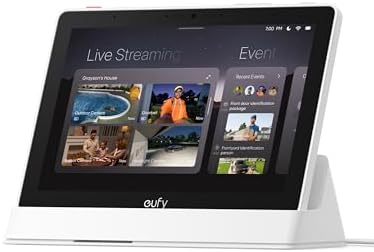
The eufy Smart Display E10 is an 8-inch touchscreen built around home security monitoring. It shows four camera views at once, sends instant door alerts, and stores event recordings locally for playback without buffering.
Key Features
- Display: 8-inch touchscreen
- Compatibility: eufy Security compatible devices
- Storage: 64GB eMMC local storage for instant playback
- Alerts: Automatic live feed and voice alert when a doorbell rings, a door unlocks, or a camera detects motion
- Monitoring: Four simultaneous live camera views on one screen
- Smart Reports: Daily summaries using facial and package recognition, powered by HomeBase 3
- Included Items: Charging station, power adapter, wall mount, and Type-C charging cable
What Makes It Different?
This panel is built almost entirely around security monitoring rather than general smart home control. The four-camera live view and local storage for instant playback are features none of the other four panels list. It’s less about controlling lights and scenes, and more about watching your doors and property.
Unlike the MOES, Shelly, SONOFF, and Echo Hub, the listed specs don’t mention Alexa, Google Home, Apple Home, or Home Assistant compatibility. It’s built to work within the eufy Security ecosystem specifically.
The daily report feature, using facial and package recognition through HomeBase 3, is a genuinely unique touch for people who want a quick daily summary of who came by and what happened.
Performance Analysis
Based on the listed specs, this display suits a household that already uses, or plans to use, eufy Security cameras and devices. The local storage means playback doesn’t depend on an internet connection, which is a real plus for reliability. It’s a weaker fit if your goal is a general-purpose panel for lights, thermostats, and scenes across multiple brands.
Pros
- Four-camera live view on one screen
- Local 64GB storage for instant, buffer-free playback
- Daily security reports with facial and package recognition
- Simple to use, described as suited for both kids and seniors
- Includes charging station and wall mount in the box
Cons
- No listed support for Alexa, Google Home, Apple Home, or Home Assistant
- Focused on eufy Security devices rather than broad smart home control
- Less suited to general scene control or automation across other brands
Best For
Households already using or planning to use eufy Security cameras and want a dedicated screen for live views, alerts, and daily activity reports.
Who Should Skip It?
Anyone wanting a single panel to control lights, plugs, and scenes across multiple brands and ecosystems should choose one of the other four panels instead.
Why It Ranks #5
The security-monitoring features are strong on their own, but this display doesn’t list the broad ecosystem compatibility the search intent for “best smart home control panel” usually calls for. It ranks here because it’s more of a specialized security display than a general smart home control panel.
Bottom Line
If home security monitoring is your main goal, this display’s local storage and daily reports are worth a look. If you want to control lights, plugs, and scenes across ecosystems, the other four panels fit that need better.
How These Products Compare
Amazon Echo Hub vs Shelly Wall Display XL
The Echo Hub covers more built-in protocols out of the box, including Zigbee, Matter, Thread, and Sidewalk, and leans on Alexa as its main voice layer. The Shelly Wall Display XL has the bigger screen and a built-in relay for direct appliance switching, plus support for Home Assistant. Choose the Echo Hub if you’re already deep in Alexa. Choose the Shelly if you run Home Assistant or want the largest display and hands-on hardware control.
SONOFF vs MOES
Both include a built-in Zigbee gateway, so neither needs a separate hub. The SONOFF NSPanel Pro 120 adds Home Assistant, Google, and Apple Home support, along with a camera viewer and security scenes. The MOES panel sticks to Alexa and the Smart Life app, in a smaller, more affordable package. Pick the SONOFF for broader ecosystem reach and security extras. Pick the MOES if budget and simplicity matter more.
Best for Alexa
The Amazon Echo Hub is the clearest choice, since it’s built by Amazon specifically for Alexa.
Best for Home Assistant
The Shelly Wall Display XL lists direct Home Assistant support alongside a large screen and built-in relay.
Best for Zigbee
The MOES panel and the SONOFF NSPanel Pro 120 both include a built-in Zigbee gateway. The SONOFF edges ahead with broader ecosystem support alongside it.
Best Large Screen
The Shelly Wall Display XL, at 10.1 inches, is the largest screen among these five panels.
Best Wall-Mounted Option
The Shelly Wall Display XL and SONOFF NSPanel Pro 120 are both built for in-wall installation, giving them the most permanent, built-in feel.
How We Evaluated These Products
We compared these five panels using their listed specifications: display size, ecosystem compatibility, connectivity, automation features, installation requirements, and overall design. We looked at how each panel handles voice control, scene automation, and device support, along with practical factors like wiring needs and screen size.
We did not use Amazon customer reviews, star ratings, review counts, or sales rank data to build this list. We also did not personally test these panels. Every claim here comes from the manufacturer’s own published product information. Where a spec wasn’t clearly verified, we left it out rather than guess.
The goal was to match each panel’s real capabilities to real buyer needs, not to rank by price or popularity.
How to Choose the Best Smart Home Control Panel
Picking the best smart home control panel for your home comes down to a handful of practical checks.
1. Check Your Smart Home Ecosystem
Start here. If you already use Alexa, Google Home, Apple Home, or Home Assistant, buy a panel that lists that exact ecosystem. Skipping this step is the most common way to end up with a panel that won’t talk to your existing devices.
2. Check Device Compatibility
A panel might support Alexa in general but still miss specific devices you own. Check the listed compatible device types, like locks, cameras, or plugs, against what you actually have.
3. Choose the Right Screen Size
A larger screen, like the Shelly’s 10.1 inches, shows more at once. A smaller screen, like the MOES at 5 inches, takes up less wall space and often costs less. Pick based on how much you want to see at a glance.
4. Decide Between Wall-Mounted and Other Designs
Wall-mounted, in-wall panels look built-in but usually need proper wiring. Standalone panels, like the Echo Hub, mount near an outlet and skip the in-wall wiring step, which is easier for renters.
5. Check Connectivity
Look for Wi-Fi as a baseline, then check for Zigbee, Matter, Thread, or Bluetooth if you want direct device connections without extra hubs.
6. Look at Automation Features
Scenes and routines are what make a panel more than a fancy remote. Check whether the panel supports multi-device scenes, not just single on/off toggles.
7. Check Wiring Requirements
Some in-wall panels need a neutral wire, like the Shelly Wall Display XL. Others, like the MOES, support flexible power options. Check your existing wiring before buying an in-wall model.
8. Consider Voice Control
If hands-free control matters to you, check whether the panel has a built-in voice assistant, like the MOES and Echo Hub, both listing Alexa.
9. Check Physical Controls
Physical buttons respond instantly and don’t need a screen wake-up. The Shelly Wall Display XL is the only panel here with dedicated physical buttons.
10. Compare Long-Term Value
Think past the price tag. A cheaper panel that doesn’t support your ecosystem isn’t a good value. Focus on compatibility and features that match how you’ll actually use the panel every day.
Benefits of a Smart Home Control Panel
- Centralized device control: One screen for lights, locks, plugs, and more, instead of five separate apps.
- Easier access to smart-home scenes: Trigger multi-device routines with one tap instead of adjusting each device by hand.
- Faster control of compatible devices: A wall panel is often quicker to reach than pulling out your phone.
- Visual smart-home dashboard: See device status at a glance instead of guessing.
- Less need to open multiple apps: Fewer logins and fewer app icons to manage.
- Convenient wall-mounted control: A fixed panel means everyone in the house knows where to find it.
- Voice control on supported models: Hands-free control when your hands are full.
- Easier access to automation: Setting up and adjusting routines from a dedicated screen tends to be simpler than digging through a phone app.
Common Buying Mistakes
- Buying without checking ecosystem compatibility first
- Ignoring installation requirements, like a neutral wire
- Assuming every smart device you own will automatically connect
- Choosing a screen size that’s too small or too large for your wall space
- Overlooking which wireless protocols a panel actually supports
- Forgetting to check whether a separate hub is still required
- Choosing a panel based only on how it looks
- Choosing a panel based only on the lowest price
Who Should Buy One?
- Smart-home beginners who want one simple starting point
- Alexa users who want a dedicated screen for voice and touch control
- Home Assistant users who want a wall panel that plugs into their existing setup
- Smart-home automation enthusiasts running multiple scenes and routines
- People with many compatible devices across different rooms
- Buyers who want centralized control instead of juggling several apps
- Households wanting camera and security monitoring on a dedicated screen
- Anyone replacing a plain light switch with something that does more
FAQ
What is a smart home control panel?
It’s a touchscreen device, usually wall-mounted, that lets you control multiple smart devices from one screen instead of separate apps.
What is the difference between a smart home hub and a control panel?
A hub is typically a small box that connects devices in the background. A control panel adds a visible touchscreen, and some panels include a hub built right in.
What should I look for in a smart home control panel?
Check ecosystem compatibility first, then screen size, connectivity options like Zigbee or Matter, automation support, and installation requirements.
Which smart home control panel works best with Alexa?
The Amazon Echo Hub is built specifically for Alexa, though the MOES panel also includes built-in Alexa support.
Can a smart home control panel control Zigbee devices?
Some can. The MOES and SONOFF NSPanel Pro 120 both include a built-in Zigbee gateway. The Amazon Echo Hub also lists Zigbee support.
Can I use a smart home control panel with Home Assistant?
Yes, if the panel lists it. The Shelly Wall Display XL and SONOFF NSPanel Pro 120 both list Home Assistant compatibility.
Are wall-mounted smart home control panels worth it?
They can be, especially if you want a permanent, always-visible control point. The trade-off is usually a more involved installation than a plug-in device.
Do smart home control panels require a neutral wire?
It depends on the model. The Shelly Wall Display XL requires a neutral wire. The MOES panel supports flexible power options instead. Always check the specific product’s requirements before buying.
Final Verdict
After comparing display size, ecosystem support, connectivity, and installation needs, a few clear picks stand out.
Best Overall: Amazon Echo Hub, thanks to its wide protocol support and strong Alexa integration.
Best for Alexa: Amazon Echo Hub.
Best for Home Assistant: Shelly Wall Display XL, with its large screen and direct Home Assistant support.
Best Large-Screen Option: Shelly Wall Display XL, at 10.1 inches.
Best Value: MOES Smart Home Control Panel, for its compact size, built-in Zigbee gateway, and lower price point.
If security monitoring matters more to you than broad device control, the eufy Smart Display E10’s four-camera view and local storage are worth a look on their own terms.
There’s no single best smart home control panel for everyone. It depends on your ecosystem, your wiring, and how much screen you want on your wall. Choose the panel that fits your devices, smart-home ecosystem, installation needs, and budget.
Check the Amazon links above for the latest product details and availability.