
The best pet camera with two way audio lets you see your pet, hear what is going on, and talk back from your phone. Your voice can calm a nervous dog or stop a cat from jumping on the counter. This guide covers 7 proven picks for 2026. Each pick has key features, pros, cons, and plain notes on what it can and cannot do. We also explain which cameras let you watch on a computer or a TV, not just a phone.
Quick answer: For two rooms with one easy app, pick the Tapo C211 2-pack. For sharp 4K video and 5 GHz Wi-Fi, pick the Anona Pano 4K. If you want your pet to see your face while you talk, pick the CIAJIE video call camera. It has a 4.3-inch screen.
Top 7 Picks at a Glance: Best Pet Camera With Two Way Audio
Here are the 7 picks in the order we cover them. Each one has a clear “best for” label, so you can jump to the one that fits your home.
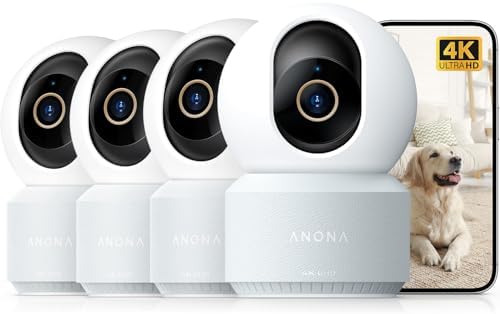
- Anona Pano 4K 4-Pack (best for whole-home coverage)
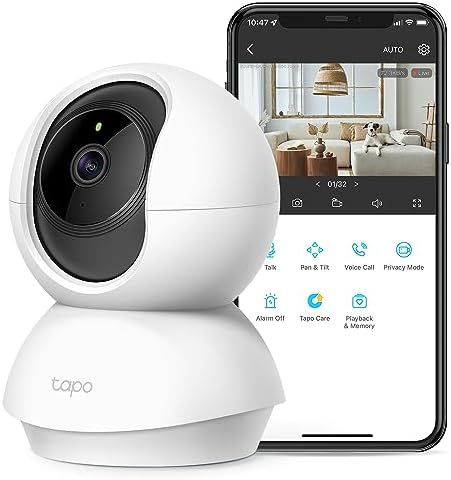
- Tapo C211 2-Pack (best for two rooms on one app)
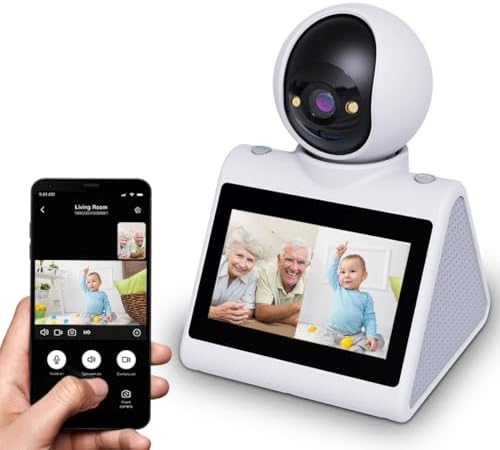
- CIAJIE Two-Way Video Camera (best for face-to-face video calls)
- Tapo C210P2 2-Pack (best for sound and crying alerts)
- Anona Pano 4K 2-Pack (best 4K pair with Wi-Fi 6)
- Anona Pano 4K Single (best single 4K camera)
- Tapo C210 Single (best for viewing on a computer)




Note: We have not tested these cameras ourselves. This guide uses the details in each product listing and on the makers’ own pages. Listings can change, so check the details before you buy.
Best Pet Camera With Two Way Audio: Quick Comparison Table
Use this table to compare all 7 picks side by side. On a phone, swipe the table left to see every column.
| Camera | Pack | Video | Movement | Wi-Fi | Talk-back | Best for |
|---|---|---|---|---|---|---|
| Anona Pano 4K 4-Pack | 4 | 4K (8MP) | 355° pan, 110° tilt, auto tracking | 2.4 GHz and 5 GHz (Wi-Fi 6) | Two-way audio | Whole home |
| Tapo C211 2-Pack | 2 | 2K (3MP) | 360° pan, 114° tilt | 2.4 GHz only | Two-way audio and siren | Two rooms |
| CIAJIE Video Call Camera | 1 | 1080p | Listing notes a 360° view | 2.4 GHz and 5 GHz | Two-way video and audio on a 4.3-inch screen | Video calls |
| Tapo C210P2 | 2 | 2K (3MP) | 360° pan, 114° tilt | 2.4 GHz only | Two-way audio and siren | Sound alerts |
| Anona Pano 4K 2-Pack | 2 | 4K (8MP) | 355° pan, 110° tilt, auto tracking | 2.4 GHz and 5 GHz (Wi-Fi 6) | Two-way audio | 4K pair |
| Anona Pano 4K Single | 1 | 4K (8MP) | 355° pan, 110° tilt, auto tracking | 2.4 GHz and 5 GHz (Wi-Fi 6) | Two-way audio | One 4K room |
| Tapo C210 Single | 1 | 2K (3MP) | 360° pan, 114° tilt | 2.4 GHz only | Two-way audio and siren | Computer viewing |
1. Anona Pano 4K 4-Pack: Best for Whole-Home Coverage
Product type: Plug-in 4K indoor pan and tilt AI camera, sold as a 4-pack.
Best for: Pet owners who want a camera in the living room, kitchen, bedroom, and hallway.
This pack gives you four Anona Pano cameras. Each one records 4K video and pans 355° with 110° of tilt. Auto tracking follows your pet as it moves. AI can tell a pet, a person, and a crying baby apart, then sends an alert to your phone. You can talk to your pet from any room through the Anona Security app. See the Anona Pano support page for maker details.
Key features
- Four cameras in one box.
- 4K (8MP) video with 8x digital zoom and H.265 encoding.
- 355° pan, 110° tilt, and auto tracking.
- AI pet, person, and baby crying detection.
- Two-way audio and one-tap privacy mode.
- Dual-band Wi-Fi 6 (2.4 GHz and 5 GHz).
- Night vision up to 30 feet with 4 IR LEDs.
- microSD up to 512GB (not included) or AES-128 encrypted cloud storage.
What makes it good
Most pets roam. A cat may nap upstairs, then eat in the kitchen. With four cameras, you can find your pet fast and talk to it wherever it is. All four run in one app, so you do not juggle logins. 4K keeps detail when you zoom in, so you can check if the water bowl is empty. The cameras sit on a table or mount on a ceiling with the included plate and screws.
What it can and cannot do
It can track, zoom, talk, and alert you to pets. Each camera needs its own outlet. They are for indoor use only. Video runs at 15 frames per second, so fast running can look a bit choppy. The zoom is digital. You need one microSD card per camera for local recording, and cards are not included. The listings do not mention a web browser viewer.
Pros
- Four cameras cover the whole home.
- Sharp 4K with 8x zoom.
- Pet and person detection.
- Dual-band Wi-Fi 6.
Cons
- Needs four outlets.
- 15 fps video.
- Four memory cards needed for local recording.
- More cameras than a small apartment needs.
2. Tapo C211 2-Pack: Best for Two Rooms on One App
Product type: Plug-in 2K indoor pan and tilt camera from TP-Link, sold as a 2-pack.
Best for: Owners whose pet moves between two rooms.
The Tapo C211 records 2K video. It pans 360° and tilts 114°, so it sees across a full room. You get push alerts for motion, people, and baby crying. Two-way audio lets you speak to your pet, and the built-in siren can scare off an intruder. Two cameras in one box let you watch two rooms from the Tapo app. Learn more on the official Tapo website.
Key features
- Two cameras in one box, in black.
- 2K (3MP) video.
- 360° pan and 114° tilt.
- Motion, person, and baby crying alerts.
- Two-way audio and a built-in siren.
- Night vision.
- microSD up to 512GB (not included) or Tapo Care cloud with 30-day history.
- Works with Alexa and Google Assistant, including live view on Echo Show or Chromecast.
What makes it good
Two cameras cut blind spots. You can put one by the food bowl and one by the bed. The wide tilt range sees the floor where pets spend most of their time. The listing says there is no extra fee to use the alerts. Continuous recording to a card also needs no plan. You can also view the stream on an Echo Show or a Chromecast TV.
What it can and cannot do
It can pan, tilt, talk, record, and alert you. It connects on 2.4 GHz Wi-Fi only. The listing names motion tracking as a Tapo Care benefit, so auto follow may need the paid plan. TP-Link asks you to check its FAQ before you buy a memory card. It is an indoor camera and needs an outlet. There is no browser login, but plug-in Tapo cameras can stream to a computer through RTSP (see the website access section below).
Pros
- Two cameras in one pack.
- Wide pan and tilt range.
- Free motion and person alerts.
- Card support up to 512GB.
Cons
- 2.4 GHz Wi-Fi only.
- Motion tracking listed under the paid plan.
- Cards sold separately.
- No pet-specific alert listed.
3. CIAJIE Two-Way Video Camera: Best for Face-to-Face Video Calls
Product type: Plug-in 1080p indoor camera with a 4.3-inch screen and a call button (model C40P).
Best for: Homes where pets, kids, or older family members should see your face while you talk.
Most pet cameras only play your voice. This one also shows your face on its 4.3-inch screen. That makes it a two-way video camera, not just a two-way audio camera. Someone at home can press one button to video call your phone. Two of these cameras can also call each other. The listing says you can share access with up to 10 family members.
Key features
- 4.3-inch screen for two-way video calls.
- One-button calling from the camera to your phone.
- Device-to-device calls between two cameras.
- 1080p video with motion detection.
- Night vision, and the listing notes a 360° wide-angle view.
- Dual-band Wi-Fi (2.4 GHz and 5 GHz).
- Alarm reminders, such as a medicine or study reminder.
- Sharing with up to 10 family members.
What makes it good
Some dogs get confused when they hear your voice but cannot see you. A screen can help, because your pet sees and hears you at the same time. The call button is also handy for a pet sitter or a child who needs to reach you fast. It works on both 2.4 GHz and 5 GHz Wi-Fi. The listing includes simple Wi-Fi fixes, like resetting the camera and moving it closer to the router.
What it can and cannot do
It can make video calls, detect motion, and work in the dark. Video is 1080p, which is lower than the 2K and 4K picks here. The listing does not state storage options, a memory card size, or smart speaker support. It does not list AI pet detection. Your pet cannot answer a call on its own, so the screen helps most when you call in. It sits on a tabletop and needs an outlet.
Pros
- Your pet can see your face.
- One-button video calls.
- Dual-band Wi-Fi.
- Share with up to 10 people.
Cons
- 1080p video only.
- Storage details not listed.
- No AI pet detection listed.
- Smaller brand with fewer reviews.
4. Tapo C210P2 2-Pack: Best for Sound and Crying Alerts
Product type: Plug-in 2K indoor pan and tilt camera from TP-Link, sold as a 2-pack in white.
Best for: Owners who want to know when there is noise at home, like barking or meowing.
The C210P2 gives you two Tapo C210 cameras. Its listing names four alert types: motion, person, baby crying, and sound. Sound alerts can catch a barking dog or a loud crash. Two-way audio lets you answer right away. Night vision reaches up to 30 feet. Two phones can view the same camera, so you and a partner can both check in.
Key features
- Two cameras in one box.
- 2K video at 25 frames per second, per the listing.
- 360° pan and 114° tilt.
- Motion, person, baby crying, and sound alerts.
- Two-way audio and a built-in siren.
- Infrared night vision up to 30 feet.
- Device sharing with two phones.
- 2-year maker warranty listed.
What makes it good
Sound alerts matter for pets. You may not see a problem, but you can hear it. When the app pings you about noise, you can open live view and speak to your pet within seconds. 25 fps gives smoother motion than the 15 fps Anona cameras. The 2-year warranty is longer than the 1-year coverage listed in the Anona manual. It works with Alexa and Google Assistant too.
What it can and cannot do
It can pan, tilt, talk, record, and alert you to sound. It needs 2.4 GHz Wi-Fi. The listing shows 256GB in its storage specs, so check card size before you buy. Google streaming works only on Chromecast and Nest displays. It is indoor only and needs an outlet. Sound alerts cannot tell barking from other noise.
Pros
- Sound alerts plus motion and person alerts.
- Smooth 25 fps video.
- Two cameras in the box.
- 2-year maker warranty.
Cons
- 2.4 GHz Wi-Fi only.
- Card size unclear on the listing.
- Cards sold separately.
- Sound alerts are not bark-specific.
5. Anona Pano 4K 2-Pack: Best 4K Pair With Wi-Fi 6
Product type: Plug-in 4K indoor pan and tilt AI camera, sold as a 2-pack in cream.
Best for: Two-room homes that want 4K detail and a 5 GHz option.
This is the same Anona Pano camera as pick 1, in a pack of two. It suits a home where your pet splits time between two main rooms. You get 4K video, auto tracking, and AI pet detection in each room. Two-way audio works from the same app for both cameras.
Key features
- Two cameras in one box.
- 4K (8MP) video with 8x digital zoom.
- 355° pan, 110° tilt, and auto tracking.
- AI pet, person, and baby crying detection.
- Two-way audio and privacy mode.
- Dual-band Wi-Fi 6.
- microSD up to 512GB (not included) or encrypted cloud storage.
What makes it good
Compared with the Tapo 2-packs, you get 4K instead of 2K and a 5 GHz Wi-Fi option. 5 GHz helps if your 2.4 GHz band is crowded. Pet detection means fewer alerts from shadows or moving curtains. Privacy mode stops live view and recording with one tap when you are home.
What it can and cannot do
It can track, zoom, talk, and alert. Video runs at 15 fps. Each camera needs its own card and outlet. It is not waterproof, so keep it away from water bowls that splash. It does not toss treats. The listing does not mention a web browser viewer.
Pros
- 4K in two rooms.
- Auto tracking and pet detection.
- Dual-band Wi-Fi 6.
- One-tap privacy mode.
Cons
- 15 fps video.
- Cards not included.
- Digital zoom only.
- Not waterproof.
6. Anona Pano 4K Single: Best Single 4K Camera
Product type: Plug-in 4K indoor pan and tilt AI camera, single pack.
Best for: Apartments or one main pet room.
One Anona Pano can cover a whole room with 355° pan and 110° tilt. It follows your pet, tells you when it spots one, and lets you talk back. It weighs under one pound in this single-pack listing, so it is easy to place on a shelf. It can also mount upside down on a ceiling, and the app flips the picture.
Key features
- 4K (8MP) video with 8x digital zoom.
- 355° pan, 110° tilt, and auto tracking.
- AI pet, person, and baby crying detection.
- Two-way audio and privacy mode.
- Dual-band Wi-Fi 6.
- Night vision up to 30 feet.
- Works with Alexa and Google Assistant for Echo Show and Nest Hub viewing.
What makes it good
It packs the same 4K and AI features as the larger Anona packs into one camera. For a single room, 4K plus 8x zoom gives the most detail of any pick here. You can stream the live view to an Echo Show or Nest Hub with a voice command, which is handy in the kitchen. Card support up to 512GB keeps many days of video.
What it can and cannot do
It can watch one room in sharp detail and talk to your pet. It cannot see into other rooms. Video runs at 15 fps. The microSD card is not included. It is indoor only, needs power, and does not list a web browser viewer.
Pros
- Sharp 4K in one room.
- Pet detection and auto tracking.
- 5 GHz Wi-Fi option.
- Echo Show and Nest Hub viewing.
Cons
- Covers one room only.
- 15 fps video.
- Card not included.
- 4K files use more space.
7. Tapo C210 Single: Best for Viewing on a Computer
Product type: Plug-in 2K indoor pan and tilt camera from TP-Link, single pack.
Best for: One room, plus owners who want to watch on a PC through RTSP.
The Tapo C210 is the single version of the C210P2. It records 2K video, pans 360°, and tilts 114°. You get free alerts for motion, people, and baby crying. Two-way audio and a siren are built in. TP-Link explains how to stream plug-in Tapo cameras to a PC, NAS, or NVR in its RTSP and ONVIF guide.
Key features
- 2K video.
- 360° pan and 114° tilt.
- Free motion, person, and baby crying alerts.
- Two-way audio and a built-in siren.
- Night vision up to 30 feet.
- microSD up to 512GB with no subscription, or Tapo Care cloud.
- Device sharing with two phones.
- 2-year maker warranty listed.
What makes it good
It is a simple way to start with one room. Card recording needs no monthly fee. RTSP support means you can view the stream in a free player like VLC on your computer while you work. You can also cast the live view to an Echo Show or a Chromecast TV. The listing reminds you to keep firmware updated in the Tapo app for best results.
What it can and cannot do
It can pan, tilt, talk, record, and alert. It needs 2.4 GHz Wi-Fi. There is no Tapo website login for live view. TP-Link says the RTSP stream works when your computer is on the same home network as the camera. Two-way talk still happens in the phone app. It covers one room only.
Pros
- RTSP for viewing on a computer.
- Free alerts with no plan.
- Card support up to 512GB.
- 2-year maker warranty.
Cons
- 2.4 GHz Wi-Fi only.
- No browser login.
- One camera only.
- Card sold separately.
Best Pet Camera With Two Way Audio and Website Access: What Works
Many people search for a pet camera they can open in a web browser. Here is the honest answer. None of these seven listings offers a website where you log in and watch. Talk-back on all seven happens in the phone app. You still have good ways to watch on a bigger screen.
| Camera | Phone app | Echo Show, Nest, or TV | Computer viewing |
|---|---|---|---|
| Anona Pano (all packs) | Anona Security app | Echo Show and Google Nest Hub | Not listed |
| Tapo C211, C210P2, C210 | Tapo app | Echo Show, Chromecast, and Nest displays | RTSP or ONVIF on the same home network |
| CIAJIE C40P | Phone app | Not listed | Not listed |
Good to know: RTSP gives you live video in an app like VLC or a home recorder. It does not give you two-way audio. To talk to your pet, use the phone app.
If true browser access is a must for you, check a brand’s own site before you buy. For how the app, cloud, and Wi-Fi fit together, read how pet cameras work.
How Two-Way Audio Works on a Pet Camera
The camera has a small microphone and a speaker. The mic picks up sound in the room and sends it to your phone. When you tap the mic icon in the app and speak, your voice plays from the camera speaker. There is often a short delay, because the sound travels over the internet. A strong Wi-Fi signal keeps the delay small.
| Talk feature | What it does | Picks that list it |
|---|---|---|
| Two-way audio | You hear the room and speak back | All 7 |
| Two-way video | Your pet also sees your face on a screen | CIAJIE C40P |
| Siren | Plays a loud alarm from the app | Tapo C211, C210P2, C210 |
| Sound alerts | Pings you when the room gets loud | Tapo C210P2 |
| Crying alerts | Made for babies, may catch some pet noises | Anona Pano, Tapo models |
How to Choose a Pet Camera With Two-Way Audio
Picking the best wifi camera with two way audio pet owners can rely on starts with your home, your router, and your pet’s habits. Use these points.
Wi-Fi band
The Tapo cameras use 2.4 GHz only. That band reaches farther through walls. The Anona and CIAJIE picks also support 5 GHz. If your router only broadcasts 5 GHz, pick one of those or turn on 2.4 GHz. Weak Wi-Fi causes laggy talk-back, so place the camera within good range of the router.
Number of rooms
Count the rooms your pet uses most. One room needs a single camera. Two rooms fit a 2-pack. A larger home or a pet that roams fits the Anona 4-pack.
Video quality and smoothness
1080p works for a quick look. 2K shows more fur and toy detail. 4K helps most when you zoom in. Frame rate matters too. The Tapo C210P2 lists 25 fps, while the Anona cameras run at 15 fps.
Pan, tilt, and tracking
Pan and tilt let you look around the room from your phone. Auto tracking follows your pet for you. The Anona cameras list free auto tracking. The Tapo C211 listing places motion tracking under its paid Tapo Care plan.
Storage and monthly fees
The Anona and Tapo cameras record to a microSD card with no required plan. Cloud plans add history and extra features. Our guide to indoor cameras without a subscription explains the trade-offs.
Privacy and safety
Use a strong password and two-step login if the app has it. Turn on privacy mode when you are home. Share access only with people you trust. The FCC home wireless network tips cover the basics of a safe home network.
Which Camera Fits Your Pet? Quick Match Table
| Your situation | Good match | Why |
|---|---|---|
| Pet roams the whole house | Anona Pano 4-Pack | Four cameras with auto tracking |
| Pet uses two rooms | Tapo C211 or Anona 2-Pack | Two cameras in one box |
| Pet gets confused by your voice alone | CIAJIE C40P | Shows your face on a screen |
| You want noise alerts | Tapo C210P2 | Lists sound alerts |
| You want the sharpest single camera | Anona Pano Single | 4K with 8x zoom |
| You want to watch on a PC | Tapo C210 | RTSP stream to VLC or a recorder |
| Your router is 5 GHz only | Anona Pano or CIAJIE | Dual-band Wi-Fi |
What a Two-Way Audio Pet Camera Can and Cannot Do
| It can | It cannot |
|---|---|
| Let you hear and talk to your pet | Work without power or Wi-Fi |
| Show live video on your phone | Toss treats (none of these 7 do) |
| Send motion, pet, or sound alerts (where listed) | Stop chewing or scratching by itself |
| Record clips to a card or cloud | Be used outdoors (all 7 are indoor models) |
| Stream to an Echo Show or TV (Anona and Tapo) | Replace walks, play time, or a pet sitter |
Want to toss treats or feed from your phone? See our best smart pet feeder with camera picks. For dog-focused options, read our best camera to monitor dog at home guide.
Tips for Talking to Your Pet Through a Camera
- Start while you are home. Talk from another room so your pet learns the sound.
- Use a calm, low voice. Loud or sudden sounds can scare pets.
- Keep it short. A few words often work better than a long chat.
- Watch how your pet reacts. If your voice makes it search the house or whine, talk less.
- Do not use the siren near your pet unless you need it. It is very loud.
- Place the camera a little above pet height, so the speaker faces into the room.
A camera can show stress, but it cannot fix it. If your dog seems very upset when alone, read the AKC guide to dog separation anxiety and talk to your vet or a trainer.
How to Set Up a Pet Camera in 6 Easy Steps
- Pick a spot with a clear view of your pet’s bed, bowl, or favorite area.
- Plug the camera in and keep the cord out of chewing reach.
- Install the maker’s app (Anona Security, Tapo, or the CIAJIE app).
- Connect to a Wi-Fi band the camera supports.
- Add a memory card if you want local recording.
- Turn on alerts and test two-way audio while you are home.
For a full walk-through, read how to set up a pet camera. If the app step gives you trouble, see how to connect a security camera to your phone. For more choices, browse our best indoor camera for dogs, best dog camera with phone app, and best AI pet camera guides.
Frequently Asked Questions
What is the best pet camera with two way audio?
The Tapo C211 2-pack is a strong pick for two rooms on one app. The Anona Pano is best for 4K video and 5 GHz Wi-Fi. The CIAJIE C40P is the pick if you want your pet to see your face. The right choice depends on your rooms, Wi-Fi, and storage needs.
Can I watch these pet cameras on a website or computer?
None of these seven listings offers a website login for live view. Plug-in Tapo cameras can stream to a computer through RTSP or ONVIF on the same home network. The Anona and Tapo cameras can also show live view on an Echo Show or other smart display.
Can my pet see me on a two-way audio camera?
Not on most of them. They only play your voice. The CIAJIE C40P has a 4.3-inch screen, so it supports two-way video as well as two-way audio.
Do I need a subscription to talk to my pet?
No. Two-way audio and live view work in the free apps. Cloud plans like Tapo Care and Anona Cloud add video history and some extra features. The Anona and Tapo cameras can record to a microSD card with no plan.
Which pet cameras work on 5 GHz Wi-Fi?
The Anona Pano cameras and the CIAJIE C40P support both 2.4 GHz and 5 GHz. The Tapo C211, C210P2, and C210 use 2.4 GHz only.
Which camera alerts me when my pet makes noise?
The Tapo C210P2 lists sound alerts. The Anona and Tapo cameras also list baby crying alerts, but those are tuned for babies, not barking or meowing.
Is there a delay when I talk through a pet camera?
Often a short one. Your voice travels over the internet before it plays from the camera. A strong Wi-Fi signal near the camera helps keep the delay small.
Can I use these pet cameras outside?
No. All seven are indoor cameras. Keep them away from rain, heat, and splashing water bowls.
What happens if my internet goes down?
You lose live view, alerts, and two-way audio. A camera with a memory card may keep recording. Check your model’s listing to confirm how it works offline.
Final Thoughts on the Best Pet Camera With Two Way Audio
Pick the Tapo C211 2-pack for two rooms on one simple app. Pick an Anona Pano pack for 4K video, auto tracking, and 5 GHz Wi-Fi. Pick the CIAJIE C40P if you want your pet to see you while you talk. Pick the Tapo C210 if watching on a computer matters to you. Check your Wi-Fi band and storage plan first, and you will find the right camera for your pet.