Choosing a smart feeder involves balancing remote monitoring with reliable dispensing. These devices are separated by camera quality, two-way audio capabilities, and whether they offer app-controlled feeding schedules.
Best overall: PETLIBRO Automatic Camera Feeder offers a strong mix of 1080P video, stable dual-band connectivity, and a reliable anti-clogging system that keeps daily feeding schedules running smooth for smaller pets. Best for multiple pets: oneisall Camera Feeder provides two separate cameras and a dual-bowl design, which is ideal if you need to monitor two pets eating at the same time in different spots. Best advanced tracking: PETLIBRO AI Smart Feeder uses AI to recognize individual pets and track their intake by the gram, making it the top choice for owners who need detailed health data.
The rest of this guide is for pet owners looking to bridge the gap between their busy schedules and their pets’ dietary needs.
How We Picked
We compared 48 different Amazon listings to find the best smart feeders with cameras for your home. To earn a spot, each device had to clearly state its camera resolution, connectivity options, and power backup methods. We prioritized models that offered clear app integration and documented safety features for food storage. Products that lacked clear specifications regarding their app functionality or material safety were excluded from our final selection.
1. PETLIBRO Automatic Cat Feeder with Camera

Best for: Owners of cats and small dogs.
This feeder focuses on reliable daily performance with a 1080P HD camera that includes night vision for low-light monitoring. You can use the app to schedule up to 10 meals, which helps maintain a consistent routine for your pet. The two-way audio feature lets you talk to your pet, and the personalized meal call can help comfort them when you aren’t home.
If you struggle with connection drops, this model supports both 2.4GHz and 5GHz WiFi to maintain a stable link. Use the app to track your pet’s feeding history and receive instant notifications if the food level drops low.
The anti-blockage design uses infrared sensors to detect potential jams before they happen. If you notice your pet isn’t eating, check the app logs first to confirm if the system successfully dispensed the scheduled portion.
The 5L tank includes a desiccant compartment to keep kibble dry. Because the outlet is designed for standard kibble, avoid using oversized or irregular treats that could trigger the sensor. This model isn’t designed for very large dogs due to the bowl and tank size.
Pros
- Clear 1080P night vision.
- Stable dual-band WiFi connectivity.
- Prevents food clogging effectively.
Cons
- Not suited for large dogs.
- Limited to smaller kibble sizes.
2. PETLIBRO Automatic Cat Feeder with Camera

Best for: Detailed health and intake monitoring.
This model stands out by using AI to recognize your cat and track exactly how much they eat by the gram using a precision scale. It provides deep insights into eating habits through the app, helping you spot appetite changes early. The 169.5-degree wide-angle camera ensures you can see the entire feeding area clearly.
If you have multiple cats, the AI distinguishes between them using face and full-body recognition. This allows you to monitor individual intake even when your pets share a feeding station. Use the 1080P camera and two-way audio to check in during the day, but remember that saving these video clips requires a Video Cloud AI subscription.
The system is highly automated, with a smart refill mode and detailed trend reports. You can schedule up to 10 meals daily or rely on the sensor to refill the bowl when food runs low.
This feeder is ideal for owners who prioritize granular data and remote oversight. It isn’t the right fit if you prefer a simple, subscription-free setup for basic feeding. Avoid this model if your home network operates exclusively on a 5GHz connection, as the device requires 2.4GHz or 5GHz compatibility to maintain its app-based features.
Pros
- AI-powered pet recognition.
- Precision gram-scale tracking.
- Wide-angle 169.5-degree camera.
Cons
- Some features require subscription.
- More complex initial setup.
3. PETKIT Automatic Cat Dog Feeder with Camera

Best for: Multi-pet homes needing AI recording.
This feeder uses a 1080P camera with a 140-degree field of view to capture your pet’s daily activities. The AI life recording feature automatically clips funny moments, which you can share easily through the app. It also offers 24/7 privacy control, allowing you to turn the camera and microphone off when you’re home.
The dual-hopper design allows for customized feeding plans for different pets. If your pets have different dietary needs, you can set separate schedules for each hopper. This is a great choice for households with more than one animal. It may not be ideal for those who only have one pet and don’t need the complexity of a dual-hopper system.
When setting up, ensure your phone’s Bluetooth is active and you’re connected to a 2.4GHz network. If the device fails to connect, verify your WiFi password and permissions within the PETKIT app. Many users overlook the 2.4GHz requirement; attempting to connect to a 5GHz network will cause the setup to fail.
Pros
- Excellent AI life recording.
- Dedicated privacy control settings.
- Two-way audio for remote interaction.
- Two-year warranty coverage.
Cons
- Requires a standard home wireless network connection.
- Dual-hopper setup takes space.
- Some cloud storage services require in-app purchases.
4. oneisall Automatic Cat Feeder with Camera
Best for: Households with two cats.
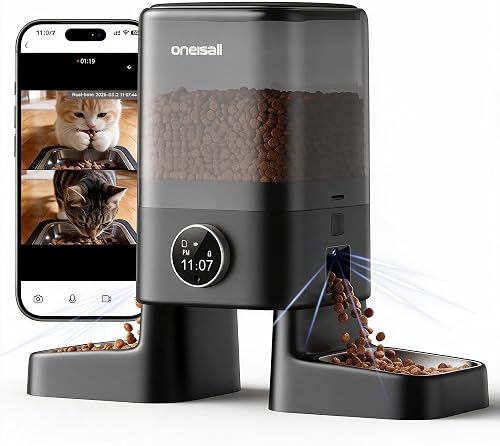
With dual cameras, this unit lets you monitor multiple feeding spots simultaneously. This is helpful if your pets tend to compete for food or if you want to ensure both are eating their full portions. The 5L capacity is generous, lasting up to 10 days for two cats. The bowls sit 16 inches apart, a distance designed to reduce stress and physical conflict between pets during meals.
The feeder includes a battery backup, though you should note that Wi-Fi and app logs are disabled when using batteries alone. If the power fails, the device continues to dispense food based on your preset schedule, but you’ll lose the ability to receive notifications or view live streams. Always check your battery levels manually before leaving for a long trip, as the feeder can’t charge batteries while plugged into an outlet.
It’s a solid choice for those who want to prevent food stealing between pets. Use the app to schedule up to 10 meals per day, allowing for precise portion control. This model isn’t for people who require constant remote app control during power outages.
Pros
- Dual cameras for monitoring.
- 5L large tank capacity.
- Prevents mealtime competition.
Cons
- No app logs on battery.
- Batteries not included.
5. WOPET Automatic Dog Feeder with Camera

Best for: High-definition video and flexible viewing.
The rotating 1080P camera on this feeder allows for 70-degree vertical movement and a 160-degree wide-angle view. It also supports micro SD cards up to 256 GB for local video storage.
The dual-band WiFi support—covering both common frequency ranges—keeps the connection reliable. If you struggle with signal drops, this dual-band capability is your best defense against connection failures. Use the WOPET Life app to schedule up to 10 meals per day, with precise control of 1 to 20 portions per feeding.
This unit isn’t for those seeking a compact device, as the 6L hopper adds significant bulk to your floor space. If you experience frequent power outages, insert 3 D-cell batteries to ensure your pet stays fed. Relying only on the AC adapter leaves you vulnerable during grid failures.
Pros
- Adjustable camera view rotation.
- Supports large SD cards.
- Strong dual-band WiFi.
- Dual power backup options.
Cons
- Larger physical footprint.
- Batteries not included.
6. Frienhund Automatic Cat Feeder with 2K Camera

Best for: Large capacity storage needs.
This model features a 3-megapixel 2K camera for crisp video quality. The 7L storage container holds 29 cups of food. It is ideal for owners who want to refill the tank less often or manage multiple pets at once. It supports both common WiFi frequency bands, ensuring your connection remains stable without needing to modify your router settings.
The carabiner wall-mount design is a vital feature if your pets are known to knock over their bowls. If you have a large dog or an especially active cat, use this mount to secure the unit to the wall. This prevents accidental spills and keeps the feeder upright.
Avoid this model if you have limited floor space, as the 7L footprint is significantly larger than standard dispensers. While the app allows for 15 meals per day, this capacity is best leveraged by those who need to store weeks of food at once. If your pet is sensitive to sound, remember to adjust the “Device Volume” in the app to keep them calm during two-way audio calls.
Pros
- High-resolution 2K camera.
- Very large 7L capacity.
- Wall-mount for stability.
Cons
- Larger footprint for small spaces.
- More complex for single pets.
7. Dual-Camera Smart Feeder

Best for: Multiple pets needing separate zones.
This feeder uses dual 2MP cameras to watch both bowls at the same time. The physical separation of the bowls helps reduce stress and food stealing in multi-pet households. It supports up to 20 meals per day, which is excellent for pets that need frequent, small feedings.
The Slow Feed Mode is a helpful feature for pets that eat too fast. If your pet frequently vomits after eating, use this mode to dispense portions one minute apart for better digestion. It’s a great, well-rounded choice for households with two cats. It isn’t for someone who wants the most compact unit, as the dual-bowl design requires more floor space.
If you experience frequent power outages, insert three D-cell batteries. While this keeps your preset schedule running, remember that remote video monitoring and app controls will go offline until power returns. Most users make the mistake of relying solely on the app; always check the transparent window to ensure the 6L tank is adequately filled.
Pros
- Dedicated zones for each pet.
- Slow feed mode included.
- High meal frequency settings.
- Dual-band WiFi for stable connectivity.
Cons
- Batteries not included.
- App features disabled during power outages.
How to Choose in Sixty Seconds
Which camera features actually matter?
Resolution is the most important factor, but field of view and rotation are what make the camera useful in practice. A 1080P resolution is the standard for clear images, but look for night vision if you want to check on your pet after dark. If the feeder has a fixed camera, make sure it’s angled correctly toward the bowl. Some models, like the WOPET Smart Camera Feeder, offer vertical rotation, which helps if you need to adjust the view after installation.
Always confirm if the model uses local SD storage or requires a cloud subscription. For example, the PETLIBRO AI Smart Feeder requires a subscription for video cloud storage, while the oneisall model allows clips to save to a TF card. If you want to avoid monthly fees, prioritize models that explicitly support TF or SD cards for local recording.
Does the WiFi band make a difference?
Yes, dual-band WiFi is significantly more reliable than models restricted to a single frequency. Many modern routers use both, and a 5GHz connection can provide a more stable, higher-quality video stream. If your home has a lot of interference from other devices, a 5GHz connection will likely result in fewer dropped connections.
Before buying, check your router settings to ensure you have a signal in the area where you plan to place the feeder. If you have a large home, test the signal strength at the exact spot on the floor where the unit will sit.
What should I confirm before ordering?
Check the power options and the physical dimensions. Most of these feeders use an AC adapter but offer a battery backup; always verify if the backup mode supports all app features. Many models, including the oneisall and CATBOAT feeders, disable WiFi and app controls when running on batteries. This means you won’t receive notifications or see live video during a power outage.
Measure your floor space before choosing a model. Units with dual bowls, such as the oneisall or CATBOAT, require more width to accommodate the 16-inch bowl separation. If you have active pets, look for features like the Frienhund carabiner wall-mount or a non-slip base to prevent the feeder from being knocked over.
Distinguish between basic scheduling and advanced tracking. If you want to monitor exactly how much your pet eats, look for models with precision scales. If you simply need to ensure a consistent mealtime, a standard 10-meal-per-day model will suffice.
Frequently Asked Questions
What does a smart feeder need to work?
Smart feeders require a stable WiFi connection and a power outlet to function. You must use the manufacturer’s app to manage schedules, view the camera, and receive alerts. While most models include a battery backup, this only maintains the feeding schedule during power outages, disabling camera access and notifications.
What does owning one ask of the buyer?
Owning a smart feeder requires regular cleaning and maintenance to keep your pet healthy. You should wash the stainless steel bowls and the food tank regularly, as oils from the kibble can build up and attract bacteria. You also need to monitor the “low food” alerts in the app and ensure the desiccant packs are replaced as suggested by the manufacturer.
What goes wrong first?
The listing doesn’t mention common connectivity issues. This often happens if the feeder is placed too far from the router or if there are too many walls in between. Using the correct kibble size as recommended by the seller and keeping the food tank clean will significantly reduce the chances of a jam occurring during your absence.
Is the simplest one on the list enough?
A simpler model is sufficient if your goal is consistent feeding while you are away. A standard 1080P model like the PETLIBRO Automatic Camera Feeder provides essential remote feeding and basic video monitoring. These models offer reliable performance without the complexity of advanced AI tracking or multi-pet recognition features.
Conclusion Best smart pet feeder with camera
Finding the right feeder will give you real peace of mind while you’re away. Once you’ve picked your favorite model, take a moment to test the camera angle and portion sizes before your next trip. You’ll feel much better knowing your pet’s happy, well-fed, and just a quick video call away.