
How do pet cameras work? A pet camera sees your pet with a lens, turns the picture into digital video, and sends it over Wi-Fi to an app on your phone. You open the app and watch live. Many models also let you talk, hear sounds, and get alerts. This guide explains every part in plain words, so you know what to expect before you buy.
Quick answer: A pet camera has a lens and sensor, a small computer chip, a Wi-Fi radio, a microphone, and a speaker. The chip turns the picture into video and sends it through your router to a cloud server or straight to your phone. The app then plays it live. Night vision, motion alerts, and two-way talk are extra tools built on the same flow.
How Do Pet Cameras Work, Step by Step?
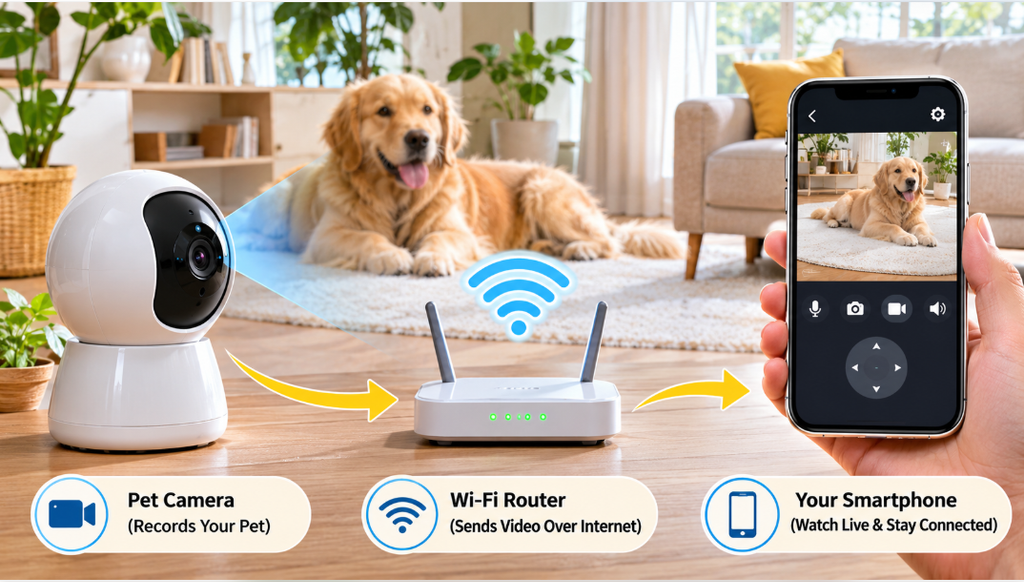
The flow is short. Most pet cameras follow these steps. Exact details vary by maker and model.
- Light enters the lens. The lens focuses light onto an image sensor.
- The sensor makes a picture. It turns light into many small dots of color. Many pictures per second make video.
- The chip shrinks the video. A small processor packs the video so it can travel over Wi-Fi.
- Wi-Fi carries it to your router. The camera joins your home network like a phone does.
- The video reaches your phone. It goes through the maker’s cloud service or a direct link, depending on the model.
- The app plays it. You see your pet live and can use extra tools such as talk, zoom, or snapshot.
Main Parts Inside a Pet Camera
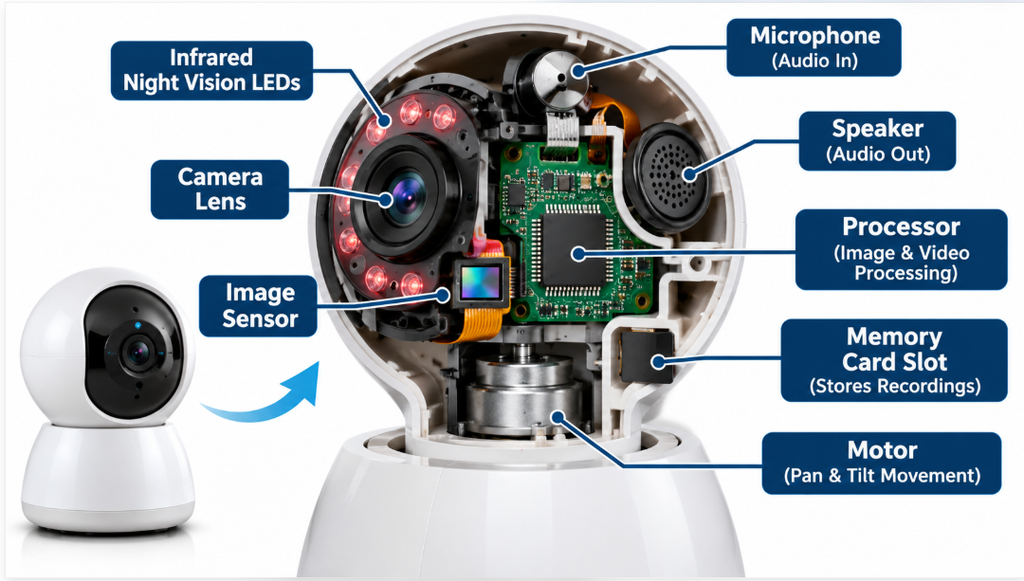
Each part has one job. This table shows what they do.
| Part | What it does | Why it matters to you |
|---|---|---|
| Lens and sensor | Captures the picture | Sets how sharp the video looks |
| Processor chip | Packs the video and runs the camera | Affects speed and smart alerts |
| Wi-Fi radio | Sends data to your router | Decides if it uses 2.4 GHz, 5 GHz, or both |
| Infrared LEDs | Light the room for night vision | Set how far you can see in the dark |
| Microphone and speaker | Pick up sound and play your voice | Make two-way talk possible |
| Motor (some models) | Turns the lens left, right, up, and down | Lets the camera cover a whole room |
| Memory card slot (some models) | Saves video inside the camera | Gives you local recording |
| Power cable or battery | Runs the camera | Decides where you can place it |
Video Quality: What Resolution Really Means
Resolution is the number of dots in each picture. More dots give more detail. Common levels are 1080p, 2K, and 4K. A 1080p picture is fine for a quick check. 2K and 4K help when you zoom in on a bowl, a toy, or a chewed cable.
Frame rate matters too. It is how many pictures show each second. A low frame rate can look choppy when your pet runs. High resolution also makes bigger files, so a memory card fills faster and the stream needs a stronger Wi-Fi signal.
Pet Camera Night Vision: How It Sees in the Dark
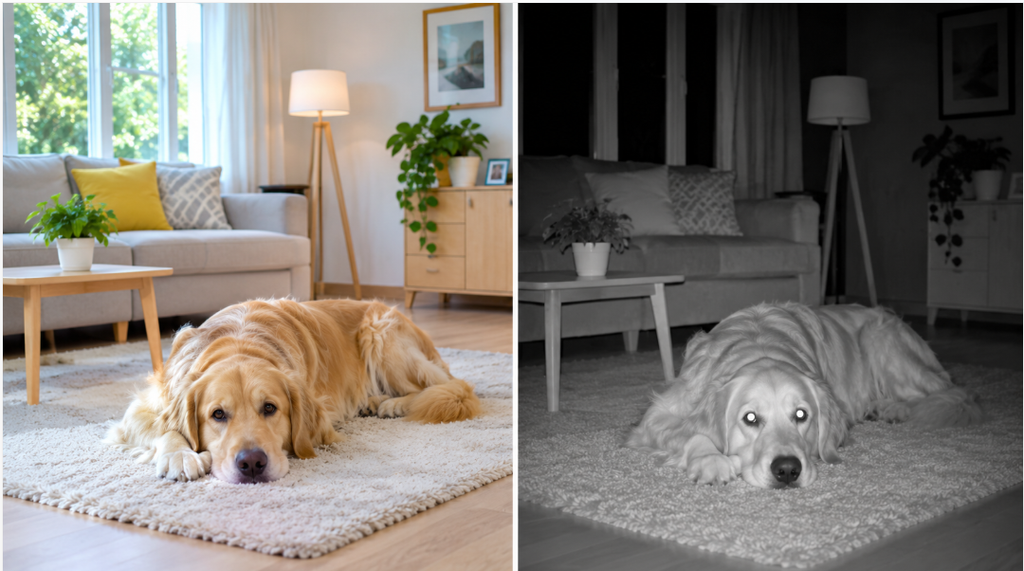
Most pet cameras use infrared (IR) night vision. Small LEDs give off light that people cannot see, and the sensor can pick it up. The picture is usually black and white. Some models add a small white light or spotlight to show color at night. Range differs by model, so check the number in the listing.
- Infrared mode: black-and-white picture, invisible light.
- Color night mode: needs a visible light, so it can be seen by your pet.
- Tip: Do not place the camera behind glass. IR light can bounce back and wash out the picture.
Pet Camera With Two-Way Audio: Talk and Listen
A microphone picks up barks, whines, and room sound. The app plays that sound on your phone. When you tap the talk button, your phone mic records your voice and the camera speaker plays it. This is two-way audio. Some models need you to hold the button. Others let you talk and listen at once.
Some pets calm down when they hear you. Others get more excited. Try it a few short times and watch how your pet reacts.
Motion, Sound, and Pet Alerts
The camera compares each picture with the one before it. If enough dots change, it sees motion and sends an alert. Sound alerts work the same way with the microphone. Newer models add AI that tries to tell a person from a pet. Some can also flag crying or barking sounds. AI features differ a lot, and some need a paid plan. Read the listing to see what is included.
To cut false alerts, aim the camera away from windows and moving curtains. Many apps let you draw a zone, so only that area counts.
Pan, Tilt, Zoom, and Auto Tracking
Fixed cameras watch one view. Pan and tilt cameras have small motors that turn the lens. You steer with your finger in the app. Auto tracking turns the lens on its own to follow movement. Zoom is often digital. That means the app enlarges the picture, so fine detail can get soft. See our best indoor camera for dogs guide for models that list these features.
Storage: Memory Card or Cloud
Live view and saved video are different things. Live view just streams. To keep clips, the camera must save them somewhere.
| Storage type | How it works | Good to know |
|---|---|---|
| Memory card | Video is saved inside the camera | Often sold separately. Old clips may be overwritten when full. |
| Cloud | Video is saved on the maker’s servers | Often needs a plan after a free trial. Check the terms. |
| Both | You pick one or use both | Gives a backup if one fails. |
Want to skip monthly fees? Read our guide to indoor cameras without a subscription.
Do Pet Cameras Need Wi-Fi?
For watching from your phone while away, yes. The camera needs a Wi-Fi link to your router, and your router needs internet. Without internet you usually lose live view and alerts away from home. A camera with a memory card may still record. Some models can also be used on your home network only. Check the listing for your model.
Many cameras use 2.4 GHz Wi-Fi only. This band reaches farther and passes through walls better. 5 GHz is faster but has a shorter range. Dual-band models support both. You can read more about Wi-Fi bands on the Wi-Fi Alliance website.
What a Pet Camera Can and Cannot Do
Good to know: A pet camera helps you watch and talk. It cannot feed, walk, or care for your pet. It also cannot call for help on its own.
| It can | It cannot |
|---|---|
| Show a live view on your phone | Work without power |
| Let you talk to your pet | Stop your pet from chewing or escaping |
| Send motion and sound alerts | Feed or give treats (only special models do) |
| Record clips to a card or cloud | Replace a visit when your pet is sick |
| Show you how your pet acts when alone | Work well outdoors (most are indoor models) |
If you want treats too, see the best smart pet feeder with camera.
Pros and Cons of Using a Pet Camera
Pros
- Check on your pet from anywhere with internet.
- See how your pet acts when you are away.
- Talk to your pet and hear sounds.
- Get alerts when something moves.
- Save clips to review later.
Cons
- Needs power and a steady Wi-Fi link.
- Some smart features need a paid plan.
- False alerts can happen.
- Privacy needs care, since it streams video of your home.
- It cannot help your pet physically.
How to Set Up a Pet Camera in 6 Steps
- Pick a spot near power, out of your pet’s reach.
- Install the maker’s app on your phone.
- Connect your phone to the Wi-Fi band the camera supports.
- Follow the app steps to add the camera.
- Add a memory card if you want local recording.
- Set alerts and test the two-way audio.
Need more help? Read how to connect a security camera to your phone. The basics are also in how security cameras work.
Common Problems and Easy Fixes
| Problem | Likely cause | Try this |
|---|---|---|
| Video lags or freezes | Weak Wi-Fi signal | Move the camera or router closer. Try another band. |
| Camera shows offline | Router or power issue | Restart the camera and router. Check the cable. |
| Night picture looks washed out | IR light bouncing off glass or a wall | Move it away from windows and close walls. |
| Too many alerts | Motion from curtains or sunlight | Use motion zones and lower the sensitivity. |
| Cannot add the camera | Wrong Wi-Fi band | Join the 2.4 GHz band on your phone and try again. |
Privacy and Safety Tips
- Use a strong, unique password for the camera app.
- Turn on two-step sign-in if the app offers it.
- Keep the app and camera firmware up to date.
- Share access only with people you trust.
- Keep cords out of chewing reach.
- Avoid bedrooms and bathrooms, or use privacy mode if your camera has one.
If your pet gets very upset when you leave, a camera shows it but does not fix it. The ASPCA website and your vet can help with separation stress.
Ready to Pick One?
Now you know how the parts work together. See our picks in the best dog camera with phone app and best camera for pet monitoring guides. For smart alerts, read the best AI pet camera post.
Frequently Asked Questions
How do pet cameras work?
A lens and sensor capture the picture. A chip turns it into video. The camera sends the video over Wi-Fi to an app on your phone, so you can watch live and often talk to your pet.
Do pet cameras need Wi-Fi?
For remote viewing, yes. The camera needs a Wi-Fi link and your router needs internet. Some models can record to a memory card if the internet drops.
How does pet camera night vision work?
Infrared LEDs light the room with light people cannot see. The sensor picks it up and shows a black-and-white picture. Some models add a spotlight for color.
Can I talk to my pet through the camera?
Yes, if the camera has two-way audio. Tap the talk button in the app. Your voice plays from the camera speaker.
Do I need a subscription?
Not always. Many cameras record to a memory card with no plan. Cloud storage and some smart alerts often need a paid plan after a free trial. Read the listing first.
Are pet cameras safe and private?
They can be, with good habits. Use a strong password, turn on two-step sign-in, update the app, and share access with few people.
Can a pet camera work outdoors?
Most pet cameras are made for indoor use. Check the listing before you put one outside. Keep indoor models away from rain and heat.
Why does my pet camera lag?
Weak Wi-Fi is the most common cause. Move the camera or router closer, restart both, or try another Wi-Fi band if the camera supports it.
Final Thoughts on How Pet Cameras Work
A pet camera is a small, simple system: lens, chip, Wi-Fi, mic, speaker, and app. Night vision, alerts, and tracking add extra help. Choose the video quality, Wi-Fi band, and storage that fit your home. Then set it up safely, and you can check on your pet with ease.