The best mini projector with WiFi and Bluetooth lets you stream shows without a TV stick and send sound to a speaker without wires. It fits on a nightstand. It can throw a big picture on a wall or even the ceiling. But small projectors are not all the same. Some have Roku or licensed Netflix. Some only play sound out to headphones. Some are bright enough for a dim living room, and some need a fully dark bedroom.
This 2026 guide covers 5 proven picks. Each one has key features, pros, cons, and plain notes on what it can and cannot do. If you are hunting for the best mini projector with WiFi connection and Bluetooth for a bedroom, dorm, or backyard, you will find the specs that matter in one place, plus a buying guide, setup steps, and FAQs.
Quick answer: For the easiest streaming, pick the Aurzen E1R. It has Roku built in and works with iPhone AirPlay. For a native 1080p picture with licensed Netflix, pick the VoltSync H2. For the brightest image in this list (300 ANSI lumens) and a 3-year warranty, pick the YGSKK projector.
Top 5 picks at a glance: best mini projector with WiFi and Bluetooth
Here are the 5 picks in the order we cover them. Each has a clear “best for” label, so you can jump to the one that fits your room.
- Aurzen EAZZE E1R (best for easy Roku streaming and iPhone casting)
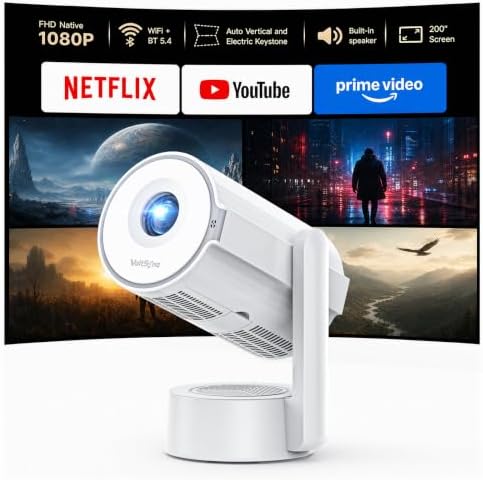
- VoltSync H2 (best for native 1080p with Netflix built in)
- Philoent Wi-Fi 6 Mini Projector (best for quiet bedroom and ceiling viewing)
- Alwtniet HY300Pro (best for small rooms that want a big screen)
- YGSKK Electric Focus Projector (best for brightness and warranty)



Note: We have not tested these projectors in person. Every spec below comes from the maker’s product listing. Where a listing leaves something out, such as brightness or Netflix support, we say so.
Best mini projector with WiFi and Bluetooth: comparison table
| Projector | Native resolution | Brightness | Wi-Fi | Bluetooth | Built-in apps | Image size | Weight | Warranty |
|---|---|---|---|---|---|---|---|---|
| Aurzen E1R | 720p | 160 lumens | 2.4 and 5 GHz | 5.2, two-way | Roku TV, AirPlay | 40 to 120 in | 0.44 kg (under 1 lb) | 1 year |
| VoltSync H2 | 1080p | Not listed | 2.4 and 5 GHz | 5.4 | Netflix, Prime Video, YouTube | 50 to 200 in | About 1.3 to 1.54 lb | 2 years |
| Philoent | 720p (1080p/4K input) | 200 ANSI lumens | Wi-Fi 6 | 5.4 | Prime Video, YouTube, app store | Up to 86 in | 0.85 lb (387 g) | 2 years |
| Alwtniet HY300Pro | 720p (4K input) | 200 ANSI lumens | Wi-Fi 6, dual band | 5.4 | Android 14, Hulu, YouTube | 35 to 135 in | 0.77 lb | 1 year |
| YGSKK | 1080p (4K input) | 300 ANSI lumens | Wi-Fi 6, 2.4 and 5 GHz | 5.3, audio devices only | Prime Video, YouTube, Hulu, app store | 50 to 200 in | 1.7 lb | 3 years |
1. Aurzen EAZZE E1R: Best for Easy Roku Streaming
Product type: Plug-in 720p smart mini projector with Roku TV built in.
Best for: First-time projector buyers and iPhone users who want simple streaming in a bedroom or dorm.
The Aurzen E1R runs the Roku TV home screen, so Netflix, Prime Video, Hulu, YouTube, Apple TV, and The Roku Channel are all in one menu. You do not need a streaming stick. A Roku account (free) and an internet connection are required to activate it. It also supports Apple AirPlay, so you can cast videos and photos from an iPhone or iPad. Roku explains the AirPlay steps on its AirPlay support page. For a deeper look, read our full Aurzen Roku projector review.
Key features
- Roku TV OS built in, with live sports and free movies, shows, and live TV.
- Apple AirPlay casting and screen mirroring from iOS devices.
- Dual-band Wi-Fi (2.4 GHz and 5 GHz).
- Two-way Bluetooth 5.2: send sound to a speaker or headphones, or play phone music through the projector.
- Sound base with Dolby Audio and a 3x larger sound chamber, rated for up to 2x the volume.
- 1.12:1 throw ratio for a 40 to 120 inch picture, from 1.6 to 9.6 feet away.
- 180° rotating stand for wall or ceiling viewing.
- Auto vertical keystone, a top focus wheel, and six picture modes, including Roku Smart Picture.
- HDMI and USB ports, plus a dust cleaning kit in the box.
What makes it good
Roku is the main reason to buy this one. The menu is the same one used on Roku TVs, so setup is simple, and the big apps are all there. That solves the most common problem with cheap projectors, which is missing or unofficial apps. Two-way Bluetooth is also rare. Most mini projectors only send sound out. The E1R can also act as a Bluetooth speaker for your phone. If you later want an external speaker, a small smart speaker like the ones in our Sonos Era 100 vs Era 100 SL guide can fill a room better than any built-in speaker.
What it can and cannot do
It can stream, cast from Apple devices, rotate to the ceiling, and pair with Bluetooth audio both ways. It cannot run on a battery. It needs a wall outlet and the included DC power cable, and USB-C power is not supported. Brightness is listed at 160 lumens, the lowest in this guide, so it works best in a dark room. Native resolution is 720p. For ceiling use, Aurzen warns not to twist the power plug and to tuck the cable into the left-side opening at the base. The remote needs 2 AAA batteries.
Pros
- Roku TV built in with all the major apps.
- AirPlay casting from iPhone and iPad.
- Two-way Bluetooth 5.2.
- Light at under 1 lb, with a carry strap.
Cons
- Lowest brightness here (160 lumens).
- Native 720p only.
- No battery and no USB-C power.
- 1-year warranty.
2. VoltSync H2: Best for Native 1080p With Netflix
Product type: Portable native 1080p smart projector with licensed streaming apps.
Best for: Movie fans who want a sharper picture and official Netflix without an extra device.
The VoltSync H2 has native 1080p resolution, which means the panel itself shows full HD detail. It comes with officially licensed Netflix, YouTube, and Prime Video, so you can power it on and start watching. Dual-band Wi-Fi and Bluetooth 5.4 handle streaming and wireless audio. The stand turns through 240°, so you can aim it at a wall or the ceiling.
Key features
- Native 1920 x 1080 resolution.
- Licensed Netflix, YouTube, and Prime Video built in.
- Dual-band 2.4 GHz and 5 GHz Wi-Fi with screen casting.
- Bluetooth 5.4 for speakers, headphones, phones, and tablets.
- 240° adjustable angle with desktop front or rear, ceiling, and tripod setups.
- Six picture modes and five audio modes (Standard, Cinema, Music, Game, Custom).
- Auto vertical keystone, manual focus, and electronic vertical adjustment.
- HDMI, USB, and audio out ports.
- Picture size from 50 to 200 inches, with a 2-year warranty.
What makes it good
Native 1080p and licensed Netflix together are the strong points. Many low-cost projectors list 1080p or 4K support, but the panel is really 720p. This one lists 1080p as native. Licensed apps matter too. Unofficial apps can stop working or play in low quality. The audio out port and audio modes give you more ways to tune sound for movies, games, or music.
What it can and cannot do
It can stream licensed apps, play from HDMI or USB, and project up to 200 inches. The listing does not give a brightness rating, so it is hard to compare with the others. Plan for a dark room until you know more. The weight is given as 1.54 lb in one place and 1.3 lb in another. The listing does not mention a built-in battery. Throw distance runs to about 10 feet.
Pros
- Native 1080p panel.
- Licensed Netflix, YouTube, and Prime Video.
- 240° rotation for ceiling use.
- Audio out port and five sound modes.
- 2-year warranty.
Cons
- No brightness rating listed.
- Weight figures differ in the listing.
- No battery mentioned.
- Smallest image size is 50 inches.
3. Philoent Wi-Fi 6 Mini Projector: Best for Quiet Bedroom Viewing
Product type: Compact LED smart projector with autofocus and Wi-Fi 6.
Best for: Watching on the wall or ceiling from bed with little fan noise.
The Philoent projector runs at about 25 dB, which is quiet for a projector. It rotates up to 180°, so you can lie back and watch on the ceiling. Autofocus sharpens the picture by itself, and a focus slider lets you fine-tune it. It weighs just 0.85 lb (387 g). Prime Video and YouTube are built in, and you can add more apps from its app store.
Key features
- 200 ANSI lumens brightness.
- Native 720p, with support for 1080p and 4K video files.
- 0.8:1 short throw ratio, from 0.6 to 3.5 meters, up to 86 inches.
- Autofocus plus a manual focus slider.
- Automatic vertical keystone correction.
- About 25 dB fan noise and a built-in speaker.
- Wi-Fi 6 for streaming and screen mirroring, and Bluetooth 5.4 for headphones or speakers.
- HDMI and USB ports for laptops, TV sticks, and USB drives.
- 2-year warranty, with support replies within 24 hours.
What makes it good
Autofocus is the big win here. Many mini projectors need you to get up and turn a dial each time you move them. This one sharpens on its own. The short 0.8:1 throw makes a larger picture from less distance, which helps in small bedrooms and dorms. Low noise matters at night too. If you want a bigger app list, you can plug in a stick from our best streaming device for projector guide.
What it can and cannot do
It can autofocus, rotate to the ceiling, and connect Bluetooth headphones. It cannot show true 1080p or 4K detail. The panel is 720p, and the 1080p/4K label means it can play those files. Netflix is not named in its app list. The largest picture is 86 inches, smaller than the others. It mounts on a tabletop only, per the listing.
Pros
- Autofocus with manual fine-tune.
- Quiet at about 25 dB.
- Wi-Fi 6 and Bluetooth 5.4.
- Very light at 0.85 lb.
- 2-year warranty.
Cons
- Native 720p.
- Netflix not listed.
- Max picture is 86 inches.
- Tabletop mount only.
4. Alwtniet HY300Pro: Best for Small Rooms and Big Screens
Product type: Ultra-short-throw Android 14 mini projector.
Best for: Bedrooms and small living rooms where the projector has to sit close to the wall.
The HY300Pro uses a 0.9:1 throw ratio and sits 0.75 to 2.65 meters from the wall. It makes a picture from 35 to 135 inches. You can shrink the image from 100% to 80% without moving it. For an 80 inch or larger picture, Alwtniet suggests placing it about 1.6 meters away. It runs Android 14 on an Allwinner H726 chip, with Hulu and YouTube.
Key features
- Android 14 on an Allwinner H726 chip.
- 0.9:1 throw ratio, 35 to 135 inch picture.
- Digital resize from 80% to 100%.
- 200 ANSI lumens and an 8000:1 contrast ratio.
- Native 720p, with 4K video support.
- Dual-band Wi-Fi 6 and Bluetooth 5.4.
- Integrated 5W sound base speaker.
- 180° swivel lens, plus ceiling, table, and tripod mounting.
- Auto vertical keystone and manual focus, at only 0.77 lb.
What makes it good
It fits tight spaces. A big picture from less than 3 meters away suits dorm rooms and small apartments. The digital resize helps when your wall has a shelf or door in the way. The 5W speaker is enough for kids’ shows and casual viewing. If you are deciding between a projector and a small TV for a dorm, our best smart TVs for dorm rooms guide shows the other side.
What it can and cannot do
It can stream Hulu and YouTube, decode H.264 and H.265 video, and project up to 135 inches. Its panel is 720p, so 4K files play at 720p detail. Netflix is not named in the listing. Shrinking the image digitally lowers the pixel count you see. The 1-year warranty is shorter than three of the others.
Pros
- Short throw for small rooms.
- Up to 135 inch picture.
- Wi-Fi 6 and Bluetooth 5.4.
- Very light at 0.77 lb.
- Ceiling and tripod mounting.
Cons
- Native 720p.
- Netflix not listed.
- Manual focus only.
- 1-year warranty.
5. YGSKK Electric Focus Projector: Best for Brightness and Warranty
Product type: Native 1080p LED smart projector with remote-controlled electric focus.
Best for: Rooms that are not fully dark, and buyers who want the longest warranty.
The YGSKK projector is the brightest in this guide at 300 ANSI lumens. It has a native 1080p panel and accepts 4K video over HDMI. Electric focus means you press F+ or F- on the remote, and the picture sharpens in about 3 seconds. The base rotates 210°, including toward the ceiling. Prime Video, YouTube, and Hulu are built in, with an app store for more.
Key features
- 300 ANSI lumens and a 10000:1 contrast ratio.
- Native 1920 x 1080, 4K compatible through HDMI.
- Wi-Fi 6 with 5 GHz and 2.4 GHz support.
- Bluetooth 5.3 for speakers and headphones.
- Electric focus from the remote.
- 210° rotating base.
- J-Share wireless phone mirroring. iPhones use built-in screen mirroring, and Android phones need an app.
- HDMI, USB, and 3.5mm audio ports, with an HDMI cable in the box.
- 50 to 200 inch picture and a 3-year warranty with 24/7 support.
What makes it good
Brightness and focus are the strong points. 300 ANSI lumens is still a modest number, but it gives you more room for a dim lamp than the 160 to 200 lumen models. Electric focus saves you from walking to the projector. The 3-year warranty is the longest here. Ports for HDMI, USB, and audio make it easy to hook up a game console, laptop, or one of the sticks in our best Roku streaming device guide.
What it can and cannot do
It can stream, mirror an iPhone, play 4K files over HDMI, and focus from the couch. Its Bluetooth only pairs with audio devices. It cannot connect to a phone over Bluetooth. Netflix is not named in its app list. It is the heaviest pick at 1.7 lb and needs at least 4.92 feet of throw distance. It mounts on a tabletop only, per the listing.
Pros
- Brightest here at 300 ANSI lumens.
- Native 1080p panel.
- Electric focus from the remote.
- Longest warranty at 3 years.
- HDMI cable included.
Cons
- Bluetooth works with audio devices only.
- Netflix not listed.
- Heaviest at 1.7 lb.
- Needs nearly 5 feet of throw space.
How to choose the best mini projector with WiFi connection and Bluetooth
Choosing the best mini projector with WiFi and Bluetooth starts with a few specs. These are the ones that change what you see and hear.
Native resolution vs supported resolution
Native resolution is what the panel really shows. Supported resolution is what file it can play. A projector with a native 720p panel and 4K support plays 4K files, but you see 720p detail. In this guide, the VoltSync H2 and YGSKK are native 1080p. The other three are native 720p.
Brightness
Look for ANSI lumens. It is a standard test, so it is easier to compare. Mini projectors in this list range from 160 to 300 lumens. That is fine for a dark bedroom or night outdoors, but daylight will wash out the picture. Aurzen’s own projector lumens guide suggests 100 to 200 ANSI lumens for dark bedrooms. A smaller picture also looks brighter than a bigger one.
Built-in apps and Netflix
Check the app list before you buy. Only the Aurzen (through Roku) and VoltSync list Netflix. The others list Prime Video, YouTube, or Hulu. If an app you need is missing, plug a streaming stick into the HDMI port. Our streaming device for projector picks cover that setup.
Wi-Fi bands
All five picks support 5 GHz Wi-Fi, which helps with buffering when the router is close. Wi-Fi 6 models (Philoent, Alwtniet, YGSKK) can be more stable on busy home networks.
Bluetooth direction
Most projectors send sound out to a speaker or headphones. The Aurzen also works the other way, so your phone can play music through it. The YGSKK pairs with audio devices only, not phones.
Throw ratio and room size
A lower throw ratio makes a bigger picture from less distance. The Philoent (0.8:1) and HY300Pro (0.9:1) fit tight rooms. The YGSKK needs at least 4.92 feet.
Focus, keystone, and power
Autofocus (Philoent) and electric focus (YGSKK) are easier than a manual wheel. All five list auto or digital keystone. None of the five listings mention a built-in battery, so plan to sit near an outlet or use a power station outdoors.
Which mini projector fits you? Quick match table
| Your situation | Good match | Why |
|---|---|---|
| You want the easiest setup | Aurzen E1R | Roku menu with all major apps |
| You use an iPhone | Aurzen E1R or YGSKK | AirPlay on Aurzen, screen mirroring on YGSKK |
| You want Netflix without a stick | Aurzen E1R or VoltSync H2 | Both list Netflix |
| You want the sharpest picture | VoltSync H2 or YGSKK | Native 1080p panels |
| Your room has some light | YGSKK | 300 ANSI lumens, the highest here |
| You watch from bed at night | Philoent | Quiet, autofocus, 180° rotation |
| Your room is very small | Alwtniet HY300Pro or Philoent | Short throw ratios |
| You want the longest warranty | YGSKK | 3 years |
What a mini projector can and cannot do
| It can | It cannot |
|---|---|
| Stream apps over Wi-Fi without a TV stick | Match a TV in a bright, sunny room |
| Send sound to Bluetooth speakers or headphones | Fill a large room with its small built-in speaker |
| Project on a wall or ceiling | Show more detail than its native panel |
| Play files from USB drives and HDMI devices | Run without a wall outlet (none of these list a battery) |
| Fix a tilted picture with keystone | Fix a bad angle without some quality loss |
How to set up a mini projector in 6 steps
- Pick a dark spot and a flat, light-colored wall or screen.
- Place the projector at the right distance for the size you want. Check the throw range in the table above.
- Plug it into a wall outlet and turn it on.
- Connect to Wi-Fi. Use 5 GHz if your router is in the same room.
- Sign in to your apps. The Aurzen also needs a free Roku account.
- Adjust focus and keystone, then pair a Bluetooth speaker if you want louder sound.
For ceiling setups or more gear for a home theater corner, see our best TV accessories list.
FAQs
What is the best mini projector with WiFi and Bluetooth?
The Aurzen E1R is the easiest pick because Roku is built in and it supports AirPlay. The VoltSync H2 is best for native 1080p with Netflix. The YGSKK is best for brightness and warranty. The right one depends on your room, your phone, and the apps you use.
Which mini projectors here have Netflix?
The Aurzen E1R has Netflix through Roku. The VoltSync H2 lists licensed Netflix. The Philoent, Alwtniet HY300Pro, and YGSKK listings do not name Netflix. You can add it with a streaming stick plugged into HDMI.
Can I connect my iPhone to a mini projector?
Yes. The Aurzen E1R supports AirPlay. The YGSKK lets iPhones mirror through built-in screen mirroring with no extra app. The VoltSync H2 and Philoent list wireless screen casting.
Can I use Bluetooth headphones with these projectors?
Yes. All five list Bluetooth for headphones or speakers. The Aurzen also lets your phone play music through the projector speaker. The YGSKK works with audio devices only.
Do these mini projectors have a battery?
No. The Aurzen listing says there is no built-in battery and it needs a wall outlet. The other four listings do not mention a battery, so plan on wall power.
Is a 720p mini projector good enough?
For a dark bedroom and a picture under about 80 inches, 720p is fine for casual shows. On a bigger screen, a native 1080p model like the VoltSync H2 or YGSKK looks sharper.
Can a mini projector show 4K?
These projectors can play 4K files, but none has a 4K panel. You see the detail of the native panel, which is 720p or 1080p here.
How bright should a mini projector be?
For a dark room, 100 to 200 ANSI lumens can work. More light in the room needs a brighter projector. The YGSKK at 300 ANSI lumens is the brightest in this list.
Can I project on the ceiling?
Yes. The Aurzen and Philoent rotate 180°, the YGSKK base turns 210°, and the VoltSync H2 turns 240°. The HY300Pro lens swivels 180° and supports ceiling mounting.
Final verdict
The best mini projector with WiFi and Bluetooth for you depends on your room, your phone, and your apps. Pick the Aurzen E1R if you want Roku, AirPlay, and simple setup. Choose the VoltSync H2 for native 1080p and licensed Netflix. Go with the Philoent for quiet bedtime viewing with autofocus, or the Alwtniet HY300Pro for a big picture in a small room. If your room is not fully dark, the YGSKK gives you the most brightness and the longest warranty.