A dorm room is small. Your TV budget is often small too. That makes picking the best smart TVs for dorm rooms a bit tricky. You need a screen that fits a tight space, works with weak dorm Wi-Fi, and still looks good for movie nights.
Most dorm setups use a 32-inch screen. This size fits on a desk, a dresser, or a wall mount without taking over the room. But not all 32-inch TVs are the same. Some use basic HD screens. Others use sharper 4K panels. Some run Fire TV. Others run Roku or Tizen.
This guide compares seven 32-inch smart TVs that fit dorm rooms and small apartments. We look at picture quality, sound, streaming apps, and setup. We also point out where each TV falls short, so you know what you are trading off.
By the end, you will know which TV fits your budget, your streaming habits, and your space. Let’s get into the picks.
What Is a Dorm Room Smart TV?
A dorm room smart TV is a compact television, usually 32 inches, built with streaming apps already installed. You do not need a separate streaming box. You just connect to Wi-Fi and start watching.
These TVs use one of a few software platforms. Fire TV, Roku OS, and Samsung’s Tizen are the most common on this list. Each platform controls the home screen, app store, and voice search.
Screen types vary too. Some use standard LED panels. Others add QLED or Hi-QLED layers for richer color. Resolution ranges from HD to 4K on this list. A student who streams shows and plays casual games has different needs than one who mostly watches lectures or news.
Why These Products Made Our List
We compared each TV using its listed specifications: resolution, refresh rate, connectivity, operating system, and included features. We looked at how each screen size and app platform fits a small room. We also weighed practical factors like HDMI ports, Wi-Fi standard, and audio options such as headphone support for quiet hours.
We did not use popularity data or customer feedback. Every ranking below comes from comparing the actual hardware and software each TV offers.
Quick List — Top 7
- Samsung 32-Inch QLED Q8F Smart TV
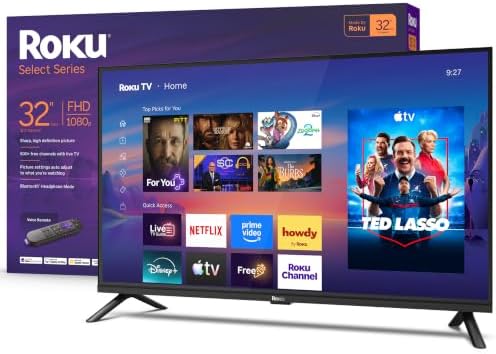
- Roku 32-Inch Select Series Smart TV
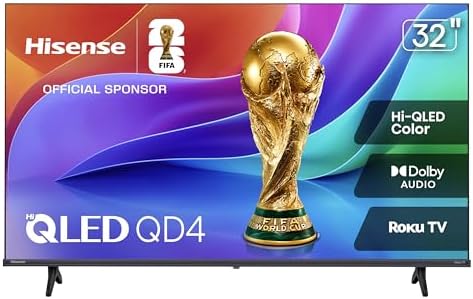
- Hisense 32-Inch Hi-QLED QD4SR Roku TV
- Amazon Ember 32-Inch 2-Series Fire TV
- Hisense 32-Inch A4NF Smart Fire TV
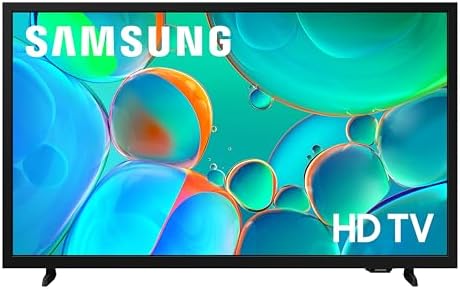
- Samsung 32-Inch Full HD F6000 Smart TV
- Samsung 32-Inch HD H5000F Smart TV


Comparison Table
Product Name | Type | Best For | Standout Feature |
Samsung QLED Q8F | 4K QLED | Best overall picture | 144Hz VRR gaming |
Roku Select Series | 1080p LED | Quiet-hour streaming | Bluetooth Headphone Mode |
Hisense Hi-QLED QD4SR | HD Hi-QLED | Casual gaming and sports | 16ms Game Mode |
Amazon Ember 2-Series | HD LED | Tight budgets | Wi-Fi 6, fast setup |
Hisense A4NF | FHD LED | Voice control fans | Alexa built-in |
Samsung F6000 | Full HD LED | Security-minded users | Knox Security, HDR10+ |
Samsung H5000F | HD LED | Bare-bones streaming | 7 years of OS updates |
At a Glance
Best Overall: Samsung 32-Inch QLED Q8F
Best Value: Roku 32-Inch Select Series
Best Budget Pick: Amazon Ember 32-Inch 2-Series
Best for Gaming: Hisense 32-Inch Hi-QLED QD4SR
Best for Voice Control: Hisense 32-Inch A4NF
Key Features to Compare
When you shop for the best smart tvs for dorm rooms apartments, focus on a few things first. Resolution changes how sharp shows look up close, and dorm desks put you close to the screen. Refresh rate matters if you play games. The operating system decides which apps you get and how fast menus load. Connectivity, like the number of HDMI ports, decides how many devices you can plug in. Last, check for headphone or quiet-mode support, since dorm walls are thin.
Top 7 Product Reviews
Samsung 32-Inch QLED Q8F Smart TV — Sharp Color in a Small Frame
Opening: This TV brings 4K detail and quantum dot color to a screen size that fits most dorm desks with room to spare.
Overview: The Q8F is a 32-inch QLED TV with 4K resolution and a slim, edge-lit design. It runs on Samsung’s Q4 AI Processor and Tizen software. Its quantum dot layer produces a wide color range, and its higher refresh rate supports smoother motion than most TVs this size.
Key Features:
- Display: 4K QLED panel with quantum dot color technology.
- Refresh Rate: Up to 144Hz with VRR support for gaming.
- Processor: Q4 AI Processor for upscaling and color tuning.
- Ports: Three HDMI ports plus Ethernet, USB, and Wi-Fi.
- Audio: 4.1-channel sound with Dolby Digital Plus.
- Software: Tizen OS with over 2,700 free channels through Samsung TV Plus.
What Makes It Different?
This is the only TV on this list with a true 4K panel. That matters for detail in text and fine patterns, which helps when you sit close to the screen in a small room. The 144Hz refresh rate with VRR also sets it apart, since none of the other picks support variable refresh rate gaming.
Compared with the Roku Select Series or the Hisense A4NF, the Q8F costs more to buy. But it also offers the sharpest image and the most advanced processor in this group.
Performance Analysis
Based on the listed specifications, the Q8F should handle fast motion and bright scenes better than the standard LED models on this list. Its quantum dot layer is designed to hold color accuracy at higher brightness, which can help with sports and gaming. The 144Hz refresh rate is well suited to console gaming, though a 32-inch 4K screen may show fewer added benefits for pure streaming compared with 1080p content.
Pros
- Sharpest resolution on this list.
- Supports high refresh rate gaming with VRR.
- Wide free channel library through Samsung TV Plus.
Cons
- Higher upfront cost than the other picks.
- Edge-lit backlight instead of full-array LED.
- Fewer USB ports than some competitors.
Best For
Students who game on a console or PC and want the sharpest picture in a small footprint.
Who Should Skip It?
Buyers on a tight budget, or anyone who mainly streams standard shows and does not need 4K or high refresh rates, may find better value elsewhere on this list.
Why It Ranks #1
The Q8F combines the highest resolution, the fastest refresh rate, and the most capable processor in this group. No other TV here matches its gaming features or color technology. Its main downside is price, which keeps it from being the top budget pick, but as an overall performer it leads the group.
Bottom Line
If you want the clearest picture and the smoothest gaming this list offers, the Q8F is worth the extra cost. It is the most future-proof option here.
Roku 32-Inch Select Series Smart TV — Quiet Hours Made Simple
Opening: Built-in Bluetooth Headphone Mode lets you watch late without waking a roommate, making this a smart dorm pick.
Overview: The Roku Select Series is a 1080p Full HD LED TV running Roku OS. It focuses on simple navigation, fast app loading, and a clean remote. Its headphone mode is a standout for shared living spaces.
Key Features:
- Display: 1080p Full HD LED with Roku Smart Picture processing.
- Audio: Dolby Audio with Bluetooth Headphone Mode.
- Software: Roku OS with a simple home screen and thousands of channels.
- Ports: Three HDMI ports and Bluetooth connectivity.
- Voice Control: Works with Roku Voice, Siri, Alexa, and Google Assistant.
- Mounting: Supports table or wall mounting.
What Makes It Different?
The Bluetooth Headphone Mode is rare among budget-friendly 32-inch TVs. It lets you connect wireless headphones directly to the TV without extra hardware. This is useful in a dorm, where late-night viewing can bother a roommate.
Unlike the Samsung Q8F, this TV sticks to 1080p resolution and a standard refresh rate. But it makes up for that with an easy interface and broad voice assistant support across Roku Voice, Siri, Alexa, and Google Assistant.
Performance Analysis
The listed 1080p resolution and Roku Smart Picture processing suggest a clean, well-optimized image for standard streaming content. Roku OS is known for a lightweight interface, which should help with fast app loading on Wi-Fi networks common in dorms. This setup is not built for high-end gaming, but it should work well for daily streaming and casual use.
Pros
- Full HD resolution at a reasonable price point.
- Bluetooth Headphone Mode for quiet viewing.
- Works with multiple voice assistants.
Cons
- Standard 60Hz refresh rate, not suited for advanced gaming.
- No 4K resolution.
- Fewer picture enhancement features than the QLED models here.
Best For
Students sharing a room who want a full HD picture and a way to watch TV without disturbing others.
Who Should Skip It?
Gamers looking for high refresh rates, or buyers who want 4K resolution, should consider the Samsung Q8F instead.
Why It Ranks #2
The Select Series offers the best balance of price and dorm-specific usefulness on this list, thanks to its headphone mode and full HD screen. It ranks behind the Q8F only because it lacks 4K resolution and advanced gaming features.
Bottom Line
This TV solves a real dorm problem: watching TV late without bothering a roommate. Combined with full HD picture quality, it is a strong all-around value pick.
Hisense 32-Inch Hi-QLED QD4SR Roku TV — Built for Casual Gaming and Sports
Opening: A 16-millisecond game mode and AI sports enhancement make this Hisense model stand out for active dorm entertainment.
Overview: This Hisense model pairs Hi-QLED color technology with Roku OS. It is aimed at buyers who want richer color than a standard LED panel plus features built for gaming and sports viewing.
Key Features:
- Display: HD Hi-QLED panel with wide color gamut.
- Gaming: Game Mode reduces input lag to 16 milliseconds.
- Sports Mode: AI Sports Mode sharpens fast motion and crowd audio.
- Software: Roku OS with over 5,000 free movies and shows.
- Audio: Dolby Audio with noise reduction processing.
- Ports: Three HDMI ports plus USB and Wi-Fi.
What Makes It Different?
This is the only TV on the list built specifically around a fast game mode and a dedicated sports viewing mode. The Hi-QLED layer adds richer color than the basic LED panels on the Samsung F6000 or H5000F, without moving up to full 4K pricing.
Compared with the Roku Select Series, this Hisense model trades some resolution detail for gaming speed and color enhancement, since it runs at HD rather than full 1080p.
Performance Analysis
The listed 16ms Game Mode suggests quick response for casual console gaming, which can matter in a shared dorm setup with a single screen used for both games and shows. The AI Sports Mode is designed to clarify fast motion, which may help with live sports streams. As with any HD panel, fine text and detail will look less sharp than on a 1080p or 4K screen.
Pros
- Fast game mode for casual gaming.
- Hi-QLED color technology for richer visuals.
- Large free content library through Roku OS.
Cons
- HD resolution instead of full 1080p or 4K.
- Smaller speaker output than some competitors.
- No Ethernet port listed, so it relies on Wi-Fi only.
Best For
Students who split time between casual gaming, sports streams, and everyday shows.
Who Should Skip It?
Buyers who want the sharpest possible picture for reading text or watching detailed content should look at the Roku Select Series or Samsung Q8F instead.
Why It Ranks #3
This TV ranks just behind the Roku Select Series because it trades full 1080p resolution for gaming and sports-specific features. For a dorm room used for both entertainment and light gaming, it is a strong middle-tier pick.
Bottom Line
If gaming speed and sports clarity matter more to you than pure resolution, this Hisense model is worth a look.
Amazon Ember 32-Inch 2-Series Fire TV — Fast Setup on a Tight Budget
Opening: Wi-Fi 6 support and a new quad-core processor keep this budget Fire TV model feeling quick for everyday dorm streaming.
Overview: The Ember 2-Series is a compact HD Fire TV built for essential streaming. It runs the newest Fire TV interface and includes Alexa+ voice search, aimed at buyers who want fast setup without paying for extra resolution.
Key Features:
- Display: HD resolution (1366 x 768) with HDR10 and HLG support.
- Processor: New quad-core chip paired with Wi-Fi 6.
- Software: Newest Fire TV interface with Alexa+ recommendations.
- Ports: Two HDMI ports, one supporting eARC, plus one USB port.
- Voice Remote: Alexa Voice Remote Enhanced with preset app buttons.
- Extras: AirPlay support and access to Amazon Luna cloud gaming.
What Makes It Different?
This is the most budget-focused TV on the list, built around speed and simplicity rather than picture resolution. Wi-Fi 6 support is a real advantage in a dorm building where many devices share the same network, since it can handle congestion better than older Wi-Fi standards.
Unlike the Hisense A4NF, which also runs Fire TV, this model uses the newest 2026 Fire TV interface and a more current processor, though it drops down to HD resolution instead of Full HD.
Performance Analysis
Based on the listed specifications, the quad-core processor and Wi-Fi 6 support should keep menus and app switching responsive, even on a busy dorm network. The HD resolution is a step below the Full HD and 4K options on this list, so text and detail will look softer, especially on a larger viewing distance.
Pros
- Wi-Fi 6 for better performance on crowded networks.
- Fast, modern Fire TV interface.
- Compact size and light weight for easy setup.
Cons
- HD resolution only, not Full HD or 4K.
- Just two HDMI ports.
- Smaller built-in speakers than the QLED models here.
Best For
Budget-conscious students who want a fast, simple streaming setup without paying for extra resolution.
Who Should Skip It?
Buyers who want sharper detail for reading or gaming should consider the Roku Select Series or Samsung Q8F instead.
Why It Ranks #4
This model ranks in the middle of the list because it prioritizes speed and price over resolution. It is a sound budget choice, but its HD screen keeps it behind the Full HD and 4K options above it.
Bottom Line
For a no-frills, fast-loading TV that won’t strain a tight budget, the Ember 2-Series gets the basics right.
Hisense 32-Inch A4NF Smart Fire TV — Simple Voice Control for Everyday Streaming
Opening: Built-in Alexa and a bezel-less design make this Fire TV model an easy pick for hands-free, everyday dorm viewing.
Overview: The A4NF is a Full HD 1080p Fire TV with a slim bezel design. It includes DTS Virtual:X audio processing and built-in Alexa, aimed at buyers who want simple voice control without extra cost.
Key Features:
- Display: 1080p Full HD LCD with full array LED backlight.
- Audio: DTS Virtual:X for enhanced surround sound.
- Voice Control: Built-in Alexa for hands-free search and smart home control.
- Software: FireOS with access to major streaming apps.
- Ports: Three HDMI ports plus USB and Bluetooth 5.0.
- Gaming: Game Mode reduces lag to 16 milliseconds.
What Makes It Different?
Built-in Alexa sets this TV apart from the Roku and Tizen models on this list, since you do not need a separate remote press-and-hold for full voice search. Its DTS Virtual:X audio processing is also unique among the Full HD options here.
Compared with the Amazon Ember 2-Series, the A4NF offers a sharper Full HD screen, though it uses an older Fire TV interface.
Performance Analysis
The listed Full HD resolution and full array LED backlight suggest a solid, evenly lit picture for everyday shows. The DTS Virtual:X processing is designed to widen the sense of surround sound from built-in speakers, which can help in a room without external speakers. The 16ms Game Mode adds light gaming support, though this TV is not built as a dedicated gaming display.
Pros
- Full HD resolution with full array LED backlight.
- Built-in Alexa for hands-free control.
- DTS Virtual:X audio for fuller sound from built-in speakers.
Cons
- Standard 60Hz refresh rate.
- Older Fire TV interface compared with the Ember 2-Series.
- Only one USB port.
Best For
Students who want hands-free voice control and Full HD picture quality without paying a premium.
Who Should Skip It?
Buyers focused purely on the newest software interface may prefer the Amazon Ember 2-Series instead.
Why It Ranks #5
The A4NF earns a solid mid-list spot for its Full HD screen and built-in Alexa, but its older software interface and standard refresh rate keep it behind the higher-ranked picks.
Bottom Line
A dependable, voice-controlled Full HD TV that covers the everyday streaming basics well.
Samsung 32-Inch Full HD F6000 Smart TV — Security-Focused Everyday Streaming
Overview: The F6000 is a Full HD 1080p Tizen TV with HDR10+ support and Samsung Knox Security built in. It targets buyers who want a secure, no-fuss streaming setup with a clean design.
Key Features:
- Display: 1080p Full HD LED with HDR10+ support.
- Security: Samsung Knox Security protects against harmful apps and phishing.
- Software: One UI Tizen platform with over 2,700 free channels.
- Audio: Object Tracking Sound Lite for spatial audio from built-in speakers.
- Ports: Two HDMI ports plus Ethernet, USB, and Wi-Fi.
- Design: Slim, bezel-less profile.
What Makes It Different?
Samsung Knox Security is a standout feature here, since it is built to guard personal data and connected smart home devices, a detail not listed on the other TVs in this group. HDR10+ support also gives it an edge in contrast over the standard LED models like the H5000F.
Compared with the Roku Select Series, the F6000 offers HDR support but fewer HDMI ports and no dedicated headphone mode.
Performance Analysis
Based on the listed specifications, HDR10+ support should widen the contrast range in supported content, adding more visible detail in bright and dark scenes. Object Tracking Sound Lite is designed to make on-screen audio feel more directional from the built-in speakers. Two HDMI ports may feel limiting if you plan to connect a game console and a streaming stick at the same time.
Pros
- HDR10+ support for improved contrast.
- Samsung Knox Security for connected device protection.
- Clean, bezel-less design.
Cons
- Only two HDMI ports.
- Standard 60Hz refresh rate.
- No dedicated headphone or quiet-mode feature.
Best For
Students who want extra security for connected smart home gear alongside a dependable Full HD screen.
Who Should Skip It?
Anyone who needs three or more HDMI ports, or a dedicated headphone mode, should look at the Roku Select Series instead.
Why It Ranks #6
The F6000 offers solid HDR performance and useful security features, but its limited port count and lack of a headphone mode place it below the other Full HD and HD options on this list.
Bottom Line
A dependable, security-focused Full HD TV, best suited to buyers who value Samsung’s software ecosystem.
Samsung 32-Inch HD H5000F Smart TV — The Basic Starter Option
Opening: Seven years of promised OS updates give this entry-level Samsung model long-term software support at a starter price point.
Overview: The H5000F is an HD 768p Tizen TV built for straightforward streaming. It includes Samsung Knox Security and HDR10+ support, positioned as the most basic model in the Samsung lineup on this list.
Key Features:
- Display: 768p HD LED with HDR10+ support.
- Security: Samsung Knox Security for connected devices.
- Software: One UI Tizen with long-term OS update support.
- Audio: Object Tracking Sound Lite for spatial audio.
- Ports: Two HDMI ports plus Ethernet, USB, and Wi-Fi.
- Design: Sleek, minimal-bezel profile.
What Makes It Different?
This model’s biggest differentiator is long-term software support, with updates promised for years after purchase. That said, its 768p resolution is the lowest on this list, below even the HD Ember 2-Series and Hisense QD4SR.
Compared with the Samsung F6000, the H5000F drops resolution further and offers a lower-power speaker, making it the most basic option in this group.
Performance Analysis
The listed 768p resolution suggests a softer image than every other TV on this list, most noticeable when viewed up close on a dorm desk. HDR10+ support may add some contrast benefit, but the lower base resolution limits how much extra detail it can show. This model is best suited to buyers who prioritize price over picture sharpness.
Pros
- Long-term software update support.
- Samsung Knox Security included.
- Simple, minimal-bezel design.
Cons
- Lowest resolution on this list at 768p.
- Only two HDMI ports.
- Lower-power built-in speaker.
Best For
Buyers who want a basic, low-cost Samsung TV mainly for background streaming or casual news viewing.
Who Should Skip It?
Anyone who wants a sharp picture for gaming, movies, or close-up desk viewing should choose a Full HD or 4K model higher on this list instead.
Why It Ranks #7
The H5000F ranks last because its 768p resolution is the softest image in this comparison. Its long-term software support and security features are useful, but they do not outweigh the lower picture quality compared with every other TV here.
Bottom Line
A workable entry-level pick if price is the only priority, but most dorm buyers will get more value from a Full HD or 4K model on this list.
How These Products Compare
Best picture quality: The Samsung Q8F wins with its 4K QLED panel, well ahead of the Full HD and HD models here.
Best for gaming: The Hisense Hi-QLED QD4SR and Samsung Q8F both stand out, with the Q8F offering VRR support and the Hisense model offering a very low 16ms input lag.
Best for quiet dorms: The Roku Select Series leads with its Bluetooth Headphone Mode, a feature none of the other six TVs list.
Best budget option: The Amazon Ember 2-Series offers the lowest resolution tier paired with the newest Fire TV software, making it the clearest budget pick.
Best software ecosystem for smart home fans: The Hisense A4NF and Amazon Ember 2-Series both offer strong Alexa integration, while the Samsung models lean on Tizen with broader smart TV app support.
How We Evaluated These Products
We compared each TV’s listed display technology, resolution, refresh rate, and processor. We reviewed the operating system each model runs, since this affects app selection and menu speed. We also looked at connectivity, including HDMI port count, Wi-Fi standard, and Bluetooth support, along with any standout audio or gaming features.
We did not rely on customer feedback or star ratings for these rankings. Every comparison point above comes from the manufacturer-listed specifications for each model. We did not personally test these TVs, so performance notes are based on what the specifications suggest for typical dorm use, not hands-on results.
How to Choose the Best Smart TV for a Dorm Room
Picking the right TV starts with your budget. A 4K QLED model like the Samsung Q8F costs more, but it also lasts longer as your standards for picture quality grow. A Full HD or HD model saves money now but may feel dated sooner.
Next, think about resolution and viewing distance. Dorm rooms are small, and you often sit close to the screen. A 768p or 720p panel can look soft up close, while a Full HD or 4K panel holds detail better at short range.
Consider your streaming platform too. If you already use Alexa devices, a Fire TV model like the Hisense A4NF or Amazon Ember 2-Series will feel familiar. If you prefer Roku’s simple menu, the Roku Select Series or Hisense Hi-QLED QD4SR are strong fits. Samsung’s Tizen platform suits buyers who want extra security features like Knox.
Sound matters more in a dorm than most people expect. Thin walls mean your roommate hears everything. A TV with a headphone mode, like the Roku Select Series, solves this problem directly. Without that feature, you may want a separate pair of Bluetooth headphones as a backup plan.
Finally, check HDMI port count if you plan to connect a game console, streaming stick, or laptop. Three ports give you more flexibility than two, especially in a shared room where multiple devices may need a connection at once.
A larger 4K screen may offer sharper detail, but it can also cost more and use more power. A smaller HD screen saves money but shows less fine detail. Weigh these trade-offs against how you plan to use the TV most often.
Benefits of a Dorm Room Smart TV
- Built-in streaming apps mean no separate box is needed.
- Voice remotes make searching for shows faster.
- Compact 32-inch screens fit small desks and dressers.
- Wall-mount options free up desk space.
- Wi-Fi connectivity keeps setup simple in a dorm room.
- Headphone modes support quiet, late-night viewing.
- Multiple HDMI ports support consoles and laptops.
- Free channel libraries reduce the need for extra subscriptions.
Common Mistakes to Avoid
- Buying a screen too large for your desk or wall space.
- Ignoring the number of HDMI ports you actually need.
- Choosing resolution based on price alone.
- Overlooking Wi-Fi standard in a crowded dorm building.
- Skipping the check for a headphone or quiet-mode feature.
- Assuming every “smart” TV runs the same software.
- Focusing only on screen size instead of picture technology.
- Forgetting to check the TV’s power consumption for shared utility costs.
Who Should Buy a Dorm Room Smart TV?
- Students moving into a dorm for the first time.
- Roommates who need quiet-hour viewing options.
- Casual gamers who want a screen for both shows and games.
- Budget-conscious buyers replacing an older TV.
- Streaming-first viewers without cable access.
- Buyers who want voice control for hands-free searching.
- Small-apartment renters with limited wall or desk space.
- Anyone upgrading from a laptop screen for daily viewing.
Frequently Asked Questions
What makes a dorm room smart TV different from a basic model?
A dorm-friendly smart TV combines a compact size with built-in streaming apps, so you skip extra boxes and cables in a small room.
Which resolution is best for a dorm room?
Full HD or 4K looks sharper up close, which matters since dorm desks put you near the screen. HD screens work but show less detail.
What size TV fits a typical dorm room?
A 32-inch screen is the most common dorm size. It fits most desks, dressers, and wall mounts without overwhelming the room.
Is a Fire TV, Roku, or Tizen model better for beginners?
All three are simple to set up. Roku has the most basic menu, Fire TV pairs well with Alexa devices, and Tizen adds extra security features.
How should I connect this kind of TV in a dorm?
Most models just need a Wi-Fi connection and a power outlet. A wall mount or a stand on a dresser both work well in tight spaces.
What features matter most for shared dorm rooms?
Look for a headphone mode or Bluetooth audio support so late-night viewing doesn’t disturb a roommate.
Is a 4K model worth the extra cost for a small screen?
It depends on viewing distance and gaming needs. Close-range viewing and VRR gaming both benefit from 4K, but casual streaming may not need it.
Which option works best in a small apartment instead of a dorm?
The best smart tvs for dorm rooms apartments are the same compact 32-inch models here, since apartment living rooms and bedrooms often face similar space limits.
Final Verdict
Choosing among the best smart tvs for dorm rooms comes down to what you value most: picture quality, price, or dorm-specific features like quiet-hour audio.
Tight Budget: Amazon Ember 32-Inch 2-Series
Everyday Use: Roku 32-Inch Select Series
Best Features: Samsung 32-Inch QLED Q8F
Small Space: Hisense 32-Inch Hi-QLED QD4SR
The Ember 2-Series keeps costs low while still feeling fast. The Roku Select Series balances price with a genuinely useful headphone mode. The Samsung Q8F leads on picture quality and gaming for buyers ready to spend more. The Hisense Hi-QLED model fits well for a mix of casual gaming and everyday streaming in a tight room.
Pick the one that fits your room, your streaming habits, and your budget.
Check the Amazon links above for the latest product details and availability.