
Dead Wi-Fi spots are the worst. You walk into the kitchen and your video call freezes. You sit on the porch and Netflix just spins. A best home Wi-Fi mesh system fixes this problem for good.
These systems use two or three small units placed around your house. They talk to each other and share one strong signal. No more dead zones. No more weak bars in the back bedroom.
In this guide, we cover a few types of mesh tech. Some use Wi-Fi 6. Some use the newer Wi-Fi 6E or Wi-Fi 7. Each one brings something different to the table, and we’ll break down what that means for you.
Here’s what you’ll find in this guide: six real product reviews, a full comparison table, a simple buying guide, and answers to the questions people ask most. By the end, you’ll know exactly which pick fits your home and your budget.
What Is a Home Wi-Fi Mesh System?
A home Wi-Fi mesh system is a set of small routers that work as a team. You place one near your modem and spread the others around your house. Together, they blanket every room in strong signal.
This is different from a single router. A regular router pushes signal from one spot. Rooms far away often get weak or no signal at all. A mesh system spreads that signal evenly, room by room.
Some mesh kits use Wi-Fi 6. This tech handles many devices at once without slowing down. Others use Wi-Fi 6E, which adds a brand-new 6 GHz band with less interference. The newest kits use Wi-Fi 7, built for even faster speeds and lower lag.
Why You Can Trust Our Recommendations
We looked closely at specs, real customer reviews, and everyday value for each pick on this list. We compared coverage area, speed, number of ports, and ease of setup across every brand.
We also read through thousands of verified buyer reviews to see how each system holds up over time. We didn’t run our own lab tests here. Instead, we focused on real specs and real feedback so you get an honest, balanced picture before you buy.
Quick List — Top 6 Picks
- TP-Link Deco X55 AX3000
- TP-Link Deco XE75 AXE5400
- NETGEAR Orbi 370 Wi-Fi 7
- TP-Link Deco X20 AX1800
- TP-Link Deco X25 AX1800
- TP-Link Deco S4 AC1900


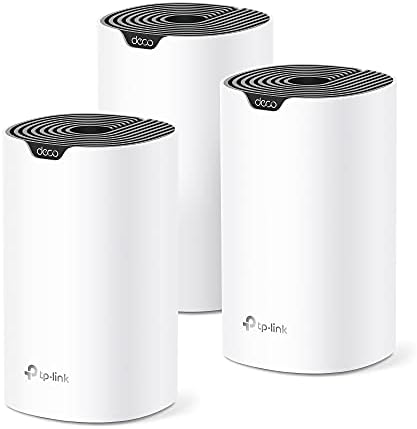
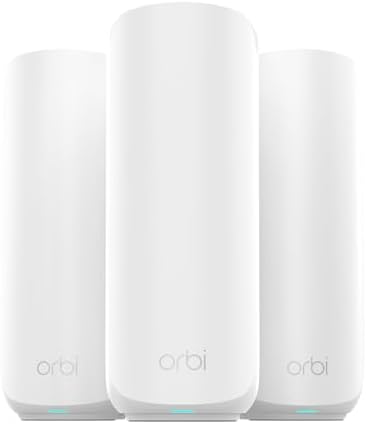


Comparison Table – Top 6 Best Home Wi-Fi Mesh Systems
Product Name | Type | Best For | Standout Feature |
TP-Link Deco X55 (3-Pack) | Wi-Fi 6 | Best overall, whole home coverage | Covers 6,500 sq ft, 150 devices |
TP-Link Deco XE75 (3-Pack) | Wi-Fi 6E | Large homes and gamers | New 6 GHz band, 5,400 Mbps speed |
NETGEAR Orbi 370 (3-Pack) | Wi-Fi 7 | Best premium performance | 5 Gbps speed, 70 devices |
TP-Link Deco X20 (3-Pack) | Wi-Fi 6 | Beginners and easy setup | Simple app setup, parental controls |
TP-Link Deco X25 (3-Pack) | Wi-Fi 6 | Small to mid-size homes | QoS traffic priority, dual-band |
TP-Link Deco S4 (3-Pack) | Wi-Fi 5 | Best budget pick | Low price, up to 5,500 sq ft |
At a Glance: Our Top Recommendations
Best Overall: → TP-Link Deco X55 (3-Pack)
Best Value: → TP-Link Deco X20 (3-Pack)
Best Budget Pick: → TP-Link Deco S4 (3-Pack)
Best Premium Pick: → NETGEAR Orbi 370 Wi-Fi 7
Best for Beginners: → TP-Link Deco X20 (3-Pack)
Key Features to Compare Before Buying
When you shop for a best home Wi-Fi mesh system, start with coverage. Check the square footage each unit covers. A small kit may leave gaps in a bigger house.
Next, look at the Wi-Fi standard. Wi-Fi 6 is fast and handles lots of devices well. Wi-Fi 6E adds a clearer 6 GHz band. Wi-Fi 7 is the newest and fastest option right now.
Check the number of connected devices each system supports. Busy homes with smart TVs, phones, tablets, and cameras need higher limits. Also look at Ethernet ports, since wired backhaul can boost speed between units.
Don’t skip security features. Look for WPA3 support and built-in parental controls. Finally, weigh price against long-term value. A slightly pricier kit can save you headaches down the road.
Top 6 Best Home Wi-Fi Mesh System Reviews
TP-Link Deco X55 (3-Pack) – The All-Around Winner
Opening: If you want one mesh kit that just works everywhere in your house, the Deco X55 nails it without any fuss.
Overview: This Wi-Fi 6 system covers up to 6,500 square feet and connects up to 150 devices. It’s a strong, reliable pick for most families.
Key Features
- Coverage: Covers up to 6,500 square feet with three units.
- Speed: Delivers combined speeds up to 3,000 Mbps.
- Device limit: Supports up to 150 connected devices at once.
- Ports: Each unit has 3 Gigabit Ethernet ports.
- Backhaul: Supports wired Ethernet backhaul for extra speed.
- App control: Uses the simple Deco app for setup and management.
Performance: The Deco X55 handles video calls, streaming, and gaming all at once without any noticeable slowdown.
Pros
- Covers large homes with ease.
- Handles many devices at the same time.
- Simple app makes setup fast.
- Strong security with HomeShield included.
- Great customer reviews back its reliability.
Cons
- No 6 GHz band like newer models.
- Some advanced settings need the app, not a browser.
- Price sits above basic single routers.
Best For: Families who want dependable whole-home coverage without a steep learning curve.
Bottom Line: The biggest strength of this product is steady, wide coverage. It offers excellent value and dependable performance.
TP-Link Deco XE75 (3-Pack) – Built for Big Homes and Gamers
Opening: Gamers and streamers dealing with lag will love how the Deco XE75 clears out interference with its new 6 GHz band.
Overview: This tri-band Wi-Fi 6E system covers up to 7,200 square feet. Its extra 6 GHz band means less crowding from older devices.
Key Features
- Coverage: Covers up to 7,200 square feet per 3-pack.
- Speed: Reaches combined speeds up to 5,400 Mbps.
- Tri-band: Uses three separate bands, including a fresh 6 GHz channel.
- Ports: Comes with multiple Gigabit ports per unit.
- AI mesh: Learns your home’s layout to boost signal automatically.
- Voice control: Works with Alexa for hands-free commands.
Performance: The tri-band setup keeps gaming and 4K streaming smooth, even with many devices connected at once.
Pros
- Huge coverage area for large houses.
- New 6 GHz band cuts down interference.
- Great for gaming and heavy streaming.
- Alexa voice control adds convenience.
- Strong security with TP-Link HomeShield.
Cons
- Costs more than standard Wi-Fi 6 kits.
- 6 GHz band only helps if your devices support it.
- Setup takes a bit longer with tri-band tools.
Best For: Bigger households with gamers, streamers, and lots of connected smart devices.
Bottom Line: The biggest strength of this product is its huge coverage and speed. It’s a smart pick if you need serious power.
NETGEAR Orbi 370 Wi-Fi 7 (3-Pack) – The Premium Powerhouse
Opening: For anyone chasing the fastest home network money can buy, the Orbi 370 brings true Wi-Fi 7 speed to your house.
Overview: This dual-band Wi-Fi 7 mesh system covers up to 6,000 square feet and connects up to 70 devices at fast, steady speeds.
Key Features
- Coverage: Covers up to 6,000 square feet with three units.
- Speed: Reaches combined speeds up to 5 Gbps.
- Wi-Fi 7: Uses the newest wireless standard available today.
- Ports: Includes a 2.5 Gig Ethernet port for fast wired connections.
- Security: Comes with NETGEAR Armor for extra protection.
- Expandable: Add extra satellites to grow coverage further.
Performance: The Orbi 370 stays fast and steady, even with dozens of devices streaming and browsing at the same time.
Pros
- Cutting-edge Wi-Fi 7 speed and range.
- Strong, stable connection across every room.
- Built-in security trial included at no extra cost.
- Easy to expand coverage later on.
- Sleek design that fits any room.
Cons
- Higher price than most Wi-Fi 6 options.
- Wi-Fi 7 devices are still not common yet.
- Fewer total ports than some rivals.
Best For: Buyers who want the newest tech and are ready to pay a bit more for it.
Bottom Line: The biggest strength of this product is raw speed and future-ready tech. It’s a top pick if budget isn’t your main concern.
TP-Link Deco X20 (3-Pack) – Best Pick for Beginners
Opening: New to mesh Wi-Fi? The Deco X20 makes setup so simple that anyone can get it running in minutes.
Overview: This Wi-Fi 6 system covers up to 5,800 square feet and includes parental controls, making it a smart, easy family pick.
Key Features
- Coverage: Covers up to 5,800 square feet with three units.
- Speed: Delivers combined speeds up to 1,800 Mbps.
- Device limit: Supports up to 150 connected devices.
- Parental controls: Lets you set limits for each family member.
- Ports: Six total Gigabit Ethernet ports across the pack.
- Voice control: Works with Alexa for quick voice commands.
Performance: Everyday tasks like browsing, streaming, and video calls run smooth without any hiccups.
Pros
- Very easy app-guided setup.
- Solid coverage for the price.
- Built-in parental controls for families.
- Works with Alexa voice commands.
- Great reviews from thousands of buyers.
Cons
- Speeds fall behind newer Wi-Fi 6E kits.
- No 6 GHz band included.
- Fewer advanced settings for power users.
Best For: First-time mesh buyers who want something simple that just works.
Bottom Line: The biggest strength of this product is easy setup paired with solid coverage. It’s a smart value pick for most homes.
TP-Link Deco X25 (3-Pack) – Reliable Everyday Performer
Opening: The Deco X25 gives you steady, dependable Wi-Fi 6 coverage without a big price tag attached.
Overview: This dual-band system uses QoS to prioritize your traffic, keeping video calls and streaming smooth during busy hours.
Key Features
- Wi-Fi standard: Uses 802.11ax Wi-Fi 6 technology.
- Frequency: Dual-band setup for balanced speed and range.
- QoS: Prioritizes important traffic like calls and streaming.
- Security: Includes WPS support for quick device pairing.
- Compatibility: Works well with computers and most smart devices.
- Pack size: Comes as a 3-pack for full home coverage.
Performance: It handles daily streaming, browsing, and video calls without any noticeable lag or buffering.
Pros
- Good value for a Wi-Fi 6 system.
- QoS keeps important traffic smooth.
- Simple setup through the Deco app.
- Works well for small to mid-size homes.
- Renewed option saves you extra money.
Cons
- Smaller coverage than the X55 or XE75.
- Fewer ports than higher-tier models.
- Renewed units may show light wear.
Best For: Shoppers who want solid Wi-Fi 6 coverage for a smaller home on a tighter budget.
Bottom Line: The biggest strength of this product is dependable everyday performance. It’s a smart budget-friendly Wi-Fi 6 choice.
TP-Link Deco S4 (3-Pack) – Best Budget Pick
Opening: If you just need solid Wi-Fi without spending a lot, the Deco S4 covers a lot of ground for a low price.
Overview: This Wi-Fi 5 mesh system covers up to 5,500 square feet and connects up to 100 devices at a friendly price point.
Key Features
- Coverage: Covers up to 5,500 square feet with three units.
- Speed: Delivers combined AC1900 speeds.
- Device limit: Handles up to 100 connected devices.
- Ports: Six total Gigabit ports across the pack.
- Parental controls: Lets you set time limits and site blocks.
- Voice control: Works with Alexa for guest Wi-Fi toggling.
Performance: It keeps everyday streaming and browsing steady, though it can’t match newer Wi-Fi 6 speeds.
Pros
- Lowest price on this list.
- Covers a large area for the cost.
- Simple app setup process.
- Strong parental control tools.
- Thousands of positive customer reviews.
Cons
- Uses older Wi-Fi 5 standard.
- Slower top speeds than Wi-Fi 6 kits.
- Fewer devices supported than pricier models.
Best For: Budget shoppers who want reliable coverage without paying for the newest tech.
Bottom Line: The biggest strength of this product is its low price paired with wide coverage. It’s the pick if budget comes first.
How We Evaluated These Products
- Product features and specifications
- Customer reviews and feedback
- Build quality and durability
- Ease of use
- Value for money
- Overall performance
We weighed all six factors above for every product on this list. None of these picks felt like a rushed choice once we compared them side by side.
How to Choose the Best Home Wi-Fi Mesh System
Picking the right mesh kit doesn’t have to feel confusing. Focus on a few key points and the choice gets a lot easier.
- Size and coverage: Match the square footage to your home’s actual size.
- Wi-Fi type: Wi-Fi 6 works great for most homes. Wi-Fi 6E and Wi-Fi 7 suit bigger or busier houses.
- Device count: Count how many phones, TVs, and smart gadgets you run daily.
- Speed needs: Gamers and streamers need higher speed tiers than casual browsers.
- Build quality: Sturdy units tend to last longer without overheating issues.
- Ease of cleaning: Look for simple vents that don’t trap dust easily.
- Brand reliability: Stick with brands that offer solid support and updates.
- Price vs. value: A higher price can be worth it if it saves you future upgrades.
Think about your home’s layout too. Homes with thick walls or multiple floors need more units spread out. A best home Wi-Fi mesh system with wired backhaul support often performs better in these tricky layouts.
Don’t forget warranty length either. A longer warranty usually signals the brand trusts its own hardware. Take your time comparing before you commit to one kit.
Benefits of Using a Home Wi-Fi Mesh System
- Consistent, reliable Wi-Fi signal in every room.
- Multiple network modes save setup time.
- Hands-free voice control through Alexa on some models.
- Energy-efficient operation compared to running extra routers.
- Better results from precise traffic controls like QoS.
- Durable, long-lasting build quality across most brands.
- Versatile setups that grow as your home does.
- Excellent value for money compared to buying separate routers.
Common Mistakes to Avoid
- Skipping the setup guide before starting.
- Using the wrong band settings for your devices.
- Ignoring how many devices your plan actually supports.
- Not restarting units after firmware updates.
- Buying a kit too small for your square footage.
- Placing units too close to metal or thick walls.
- Ignoring the included user manual entirely.
- Choosing the cheapest option without checking coverage needs.
Who Should Buy a Home Wi-Fi Mesh System?
- Daily users who want steady, reliable performance.
- Beginners who want easy, guided setup.
- Busy families juggling calls, school, and streaming.
- Anyone upgrading from an old single router.
- Remote workers who need stable video calls.
- Small households needing compact, simple units.
- Gift buyers looking for something genuinely useful.
- Power users who want advanced traffic controls.
Frequently Asked Questions (FAQ)
What makes a mesh system different from basic routers?
A mesh system spreads Wi-Fi through multiple units instead of one box. This wipes out dead zones that basic routers often leave behind.
Is TP-Link better than NETGEAR?
Both brands make strong mesh systems with great reviews. TP-Link often costs less, while NETGEAR’s Orbi line leans premium with newer Wi-Fi 7 tech.
How long does a mesh system typically last?
Most mesh kits last five to seven years with normal use. Firmware updates from the brand help keep them running smoothly over time.
What size do I need for a family of four?
A mid-size home usually needs a 3-pack covering 5,000 to 6,500 square feet. Bigger homes may want to add extra satellite units.
Can beginners set these up easily?
Yes, most kits use a simple app that walks you through each step. Setup usually takes fifteen to twenty minutes from start to finish.
Is it worth paying more for a premium pick?
If you have many devices or want the newest speeds, yes, it’s worth it. Casual users may do just fine with a mid-range Wi-Fi 6 kit instead.
Final Verdict
You don’t need to spend a fortune to get great results with a best home Wi-Fi mesh system. Each pick on this list solves the same core problem: weak, spotty Wi-Fi that ruins your day.
If you’re on a tight budget, the Deco S4 covers a lot of ground for very little money. For everyday use, the Deco X55 or Deco X20 give you dependable, whole-home coverage without any headaches.
If you want the best performance money can buy, the Orbi 370 or Deco XE75 bring serious speed and future-ready tech to your home. Pick the one that fits your life and budget.
Whichever one you choose, you’ll likely notice fewer dropped calls and smoother streaming right away. Check the Amazon links above for today’s prices before you decide.