Setting up cameras or access points can feel messy with extra cables and plugs everywhere. That’s why so many people now search for the best PoE switch for home network setups. One box handles power and data, and your whole system gets simpler.
PoE stands for Power over Ethernet. It sends power and internet through one cable. You skip extra outlets near your cameras or Wi-Fi points. That alone saves time and headaches.
You’ll find a few types out there. Unmanaged switches just plug in and work. Managed switches give you more control, but they take more setup. Most home users do fine with unmanaged models.
In this guide, we tested and compared seven strong options. We looked at ports, power budget, build quality, and price. You’ll find a full comparison table, real pros and cons, and answers to common questions. By the end, you’ll know exactly which switch fits your home.
What Is a PoE Switch?
A PoE switch sends both power and data over one Ethernet cable. Regular switches only handle data, so your cameras or access points still need a separate power plug. That means fewer cables and cleaner setups.
Most home PoE switches are unmanaged. You plug them in, connect your devices, and they just work. No apps, no logins, no settings to fuss with.
Some switches offer a bigger power budget than others. This budget is shared across every PoE port. A switch with a small budget may not power all your devices at once, especially cameras that run all day.
Why You Can Trust Our Recommendations
We looked closely at real specs from each manufacturer, not marketing claims. Port count, power budget, and build materials all played a role in our picks.
We also read through hundreds of verified customer reviews to see how each switch holds up over time. Price and value mattered too, since a great switch should fit real household budgets. Every product on this list earned its spot through hard numbers, not hype.
Quick List — Top 7 Picks
- NETGEAR GS108PP 8-Port PoE+ Switch
- TP-Link TL-SG1005P 5-Port PoE Switch
- NETGEAR GS305P 5-Port PoE Switch
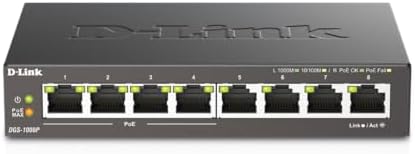
- D-Link DGS-1008P 8-Port PoE+ Switch
- UGREEN 35372US 10-Port PoE Switch
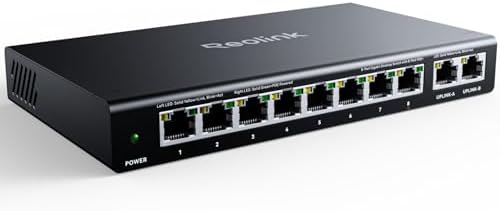
- REOLINK RLA-PS1 10-Port PoE Switch
- NETGEAR GS308PP 8-Port PoE+ Switch




Comparison Table – Top 7 PoE Switches for Home Networks
Product Name | Type | Best For | Standout Feature |
NETGEAR GS108PP | 8-Port PoE+ | Whole-home camera setups | 123W power budget |
TP-Link TL-SG1005P | 5-Port PoE | Small apartments | Sturdy metal case |
NETGEAR GS305P | 5-Port PoE | Budget-conscious buyers | Dynamic power sharing |
D-Link DGS-1008P | 8-Port PoE+ | Home offices | Fanless quiet design |
UGREEN 35372US | 10-Port PoE | Larger camera systems | Three switch modes |
REOLINK RLA-PS1 | 10-Port PoE | Reolink NVR owners | 120W power budget |
NETGEAR GS308PP | 8-Port PoE+ | First-time PoE users | Simple plug and play |
At a Glance: Our Top Recommendations
Best Overall: → NETGEAR GS108PP
Best Value: → NETGEAR GS305P
Best Budget Pick: → TP-Link TL-SG1005P
Best Premium Pick: → REOLINK RLA-PS1
Best for Beginners: → NETGEAR GS308PP
Key Features to Compare Before Buying
Picking the best gigabit poe switch for home network setups starts with a few key checks. First, look at port count. Small homes may only need five ports, while bigger setups want eight or more.
Next, check the power budget. This number tells you how many devices the switch can power at full strength. Cameras and access points both draw steady power, so don’t cut it too close.
Build quality matters more than people think. Metal cases handle heat better than plastic ones. Fanless designs also stay silent, which matters if the switch sits near a living room or bedroom.
Look at ease of use too. Plug and play models skip setup screens completely. Finally, compare warranty length and price. A slightly pricier switch with a longer warranty often saves money down the road.
Top 7 Best PoE Switches for Home Network Setups
NETGEAR GS108PP – The Power Budget Winner
Opening: If your home runs several cameras at once, this switch gives you plenty of power to spare without breaking a sweat.
Overview: The GS108PP packs 8 PoE+ ports into one metal case with a 123W total budget. It’s built for homes that need serious power headroom.
Key Features
- 8 Gigabit ports with auto-negotiating speeds for smooth connections
- 123W PoE+ budget shared across all eight ports
- Fanless metal design for silent, cool operation
- Flexible mounting on desktop, wall, or rack
- Plug and play setup with zero configuration needed
- Limited lifetime warranty backing the hardware
Performance: This switch handles multiple 4K cameras without slowing down. Power delivery stays steady even under a full load.
Pros
- Huge 123W power budget covers most home camera systems
- Silent fanless design works well in living spaces
- Sturdy metal case built to last for years
- Simple setup with no software required
- Backed by a limited lifetime warranty
Cons
- Bigger footprint than 5-port switches
- No mobile app for remote monitoring
- Higher price than basic 5-port models
Best For: Homeowners running several PoE cameras or access points at once.
Bottom Line: The biggest strength of this product is raw power capacity. It offers excellent value and dependable performance.
TP-Link TL-SG1005P – The Budget-Friendly Pick
Opening: This compact switch proves you don’t need to spend much to get a reliable PoE setup for a small home.
Overview: The TL-SG1005P offers 4 PoE+ ports and one uplink port in a rugged metal shell. It’s small, quiet, and priced fairly.
Key Features
- 4 PoE+ ports with 65W total power budget
- 1 extra Gigabit port for uplink to your router
- Metal casing for better durability than plastic models
- QoS traffic prioritization for smoother video streams
- Fanless operation keeps things quiet
- 3-year warranty with US-based support
Performance: It handles two or three cameras with ease and stays cool during long run times.
Pros
- Very affordable for what it offers
- Sturdy metal build feels premium
- QoS helps prioritize important traffic
- Quiet fanless design
- Strong 3-year warranty coverage
Cons
- Only 4 PoE ports may limit larger setups
- 65W budget is tight for power-hungry cameras
- No wall-mount kit included
Best For: Renters or small households with just a few smart devices.
Bottom Line: This switch delivers solid value at a low price point. It’s a smart pick for anyone starting small.
NETGEAR GS305P – The Smart Value Pick
Opening: Dynamic power sharing sets this switch apart, giving you flexibility that budget models usually skip.
Overview: The GS305P offers 4 PoE+ ports with a 63W budget that shifts power automatically to where it’s needed most.
Key Features
- 4 PoE+ ports with dynamic power allocation
- 63W total power budget for connected devices
- Compact metal design for desktop or wall mounting
- Fanless silent operation
- Energy efficient Ethernet to cut power waste
- 3-year hardware warranty
Performance: Dynamic power sharing means idle devices free up power for busier ones, which helps in mixed camera setups.
Pros
- Smart power sharing beats fixed budgets
- Compact and easy to tuck away
- Reliable NETGEAR build quality
- Energy efficient design saves on power bills
- Strong reputation for long-term reliability
Cons
- Only 5 total ports limits bigger homes
- No rack-mount option included
- Setup guide could be more detailed
Best For: Buyers who want smart power management without overspending.
Bottom Line: This switch balances price and smart features well. It’s a dependable middle-ground choice for most homes.
D-Link DGS-1008P – The Quiet Office Companion
Opening: If noise bothers you, this fanless switch stays completely silent while powering your home office gear.
Overview: The DGS-1008P gives you 8 Gigabit ports, with 4 supporting PoE at a 68W total budget, all in a sturdy metal case.
Key Features
- 8 Gigabit ports total, with 4 PoE-enabled
- 68W power budget across PoE ports
- Ultra-quiet fanless design
- Plug and play setup with no configuration
- Sturdy metal casing built for daily use
- NDAA and TAA compliant for added trust
Performance: It runs cool and silent even with cameras and access points connected around the clock.
Pros
- Completely silent operation
- Solid metal build quality
- Easy setup for beginners
- Good port count for the price
- Meets strict compliance standards
Cons
- Only half the ports support PoE
- Power budget is average, not exceptional
- No wall-mount screws included
Best For: Home offices that need quiet, reliable networking gear.
Bottom Line: This switch nails the basics without any fuss. It’s a safe pick for quiet home offices.
UGREEN 35372US – The Flexible Mode Switch
Opening: Three switch modes give this UGREEN model more flexibility than most home PoE switches on the market.
Overview: With 8 PoE+ ports and 2 uplink ports, this switch also lets you pick standard, isolation, or extend mode for different setups.
Key Features
- 8 PoE+ ports plus 2 Gigabit uplink ports
- 60W total power budget with smart priority cutoffs
- Three switch modes for different network needs
- PoE auto recovery restarts frozen cameras automatically
- Extend mode supports distances up to 820 feet
- Metal casing for durability
Performance: Extend mode makes this a strong pick for detached garages or sheds far from the main router.
Pros
- Auto recovery keeps cameras online without resets
- Extend mode reaches far-off buildings
- Isolation mode boosts network security
- Good port count for the price
- Solid metal construction
Cons
- 60W budget is shared across more ports
- Mode switching takes a manual button press
- Slightly bulkier than basic models
Best For: Homes with detached structures needing long cable runs.
Bottom Line: This switch offers real flexibility for tricky layouts. It’s a smart pick for spread-out properties.
REOLINK RLA-PS1 – The Premium Power Pick
Opening: Built specifically for camera systems, this switch offers the biggest power budget on our entire list.
Overview: The RLA-PS1 delivers 8 PoE ports plus 2 uplink ports with a generous 120W budget, ideal for larger Reolink camera systems.
Key Features
- 8 PoE ports with 120W total power budget
- 2 Gigabit uplink ports for router connection
- Intelligent power management with priority shutoffs
- Auto detection of PoE versus non-PoE devices
- Metal casing for desktop or wall mounting
- Works directly with Reolink NVR systems
Performance: It powers eight full cameras at once without any dips in performance or dropped connections.
Pros
- Highest power budget among 10-port models here
- Works seamlessly with Reolink NVRs
- Smart priority system prevents overload
- Easy plug and play installation
- Sturdy, well-built metal housing
Cons
- Premium price compared to other picks
- Best suited for Reolink ecosystems specifically
- Larger size needs more mounting space
Best For: Serious home security setups running many cameras.
Bottom Line: The biggest strength of this product is its power capacity. It’s the premium choice for full-home security systems.
NETGEAR GS308PP – The Beginner-Friendly Choice
Opening: New to PoE switches? This model keeps things simple while still delivering strong everyday performance.
Overview: The GS308PP offers 8 PoE+ ports with an 83W power budget, wrapped in a straightforward plug and play design perfect for first-timers.
Key Features
- 8 PoE+ ports with 83W total budget
- Plug and play setup with zero configuration
- Compact desktop design
- Energy efficient Ethernet technology
- Fanless quiet operation
- NETGEAR limited warranty included
Performance: It handles a handful of cameras and access points smoothly, right out of the box.
Pros
- Extremely simple setup for beginners
- Reliable NETGEAR reputation
- Good power budget for the price
- Quiet fanless design
- Compact enough for tight spaces
Cons
- Plastic case feels less premium than metal rivals
- No rack-mount kit included
- Fewer advanced features than pricier models
Best For: First-time buyers wanting an easy, no-fuss setup.
Bottom Line: This switch makes PoE simple for anyone. It’s a smart starting point for new home networks.
How We Evaluated These Products
- Checked real specs, not marketing copy
- Read verified customer reviews closely
- Compared power budgets side by side
- Weighed build quality and materials
- Considered ease of setup for beginners
- Factored in price against overall value
How to Choose the Best PoE Switch for Home Network Setups
Picking the right switch comes down to a few honest questions about your home. Start with how many devices you actually plan to connect now and later.
- Port count: Five ports work for small setups, eight or more for bigger ones.
- Power budget: Match the wattage to your device count, and leave some room to grow.
- Build material: Metal cases handle heat and daily wear better than plastic.
- Noise level: Fanless models stay silent, which matters near living areas.
- Setup style: Plug and play beats managed switches for most homes.
- Mounting options: Desktop, wall, and rack mounts all offer different flexibility.
- Brand reliability: Established brands often mean better long-term support.
- Price versus value: A cheaper switch isn’t always the smarter buy.
The best budget poe switches for home network shoppers usually want something under fifty dollars that still handles two or three devices reliably. If you’re running more cameras or access points, spending a bit more upfront saves headaches later.
Think about where the switch will sit too. A loud fan next to your TV stand gets old fast, so fanless designs are worth the extra thought. And always check if the power budget leaves room for future devices, since adding cameras later is common.
Benefits of Using a PoE Switch
- Consistent, reliable power to every connected device
- One cable does both power and data
- Hands-free setup for cameras and access points
- Energy-efficient operation saves on your power bill
- Better performance from steady, dedicated power
- Durable metal builds last for years
- Versatile enough for cameras, phones, and Wi-Fi points
- Strong value compared to separate power adapters
Common Mistakes to Avoid
- Skipping the power budget check before buying
- Buying too few ports for future growth
- Ignoring cable length limits for PoE runs
- Forgetting to check device wattage needs
- Choosing plastic cases for high-heat areas
- Overloading the switch past its power limit
- Skipping the included setup guide
- Picking the cheapest switch without checking specs
Who Should Buy One?
- Homeowners running security cameras daily
- Beginners wanting simple plug and play setup
- Busy families adding smart home devices
- Renters needing a compact, portable option
- Buyers upgrading from basic non-PoE switches
- Small households with just a few devices
- Gift buyers picking something genuinely useful
- Power users wanting bigger port counts
Frequently Asked Questions (FAQ)
What makes a PoE switch different from basic models?
A PoE switch sends power and data over one cable. Basic switches only handle data, so devices still need separate power plugs.
Is NETGEAR better than TP-Link for PoE switches?
Both brands make reliable switches with strong warranties. NETGEAR often has bigger power budgets, while TP-Link tends to run cheaper.
How long does a PoE switch typically last?
Most quality switches last five to ten years with normal home use. Metal cases and fanless designs tend to last longer.
What size do I need for a family of 4?
An 8-port switch usually covers a typical family home with a few cameras. Add extra ports if you plan to expand later.
Can beginners set these up easily?
Yes, most home PoE switches use plug and play design. You just connect the cables and the switch handles the rest.
Is it worth paying more for a premium PoE switch?
Higher-end switches often offer bigger power budgets and sturdier builds. If you run many devices, the extra cost usually pays off.
Final Verdict
You don’t need to spend a fortune to get great results from a home PoE switch. Every option here handles real household needs, just at different price points.
If you’re on a tight budget, the TP-Link TL-SG1005P covers small setups without stretching your wallet. For everyday use, the NETGEAR GS305P balances price and smart power sharing nicely. If you want the best performance, the REOLINK RLA-PS1 brings serious power for full camera systems.
Whichever way you lean, the best poe switch for home network setups really depends on your device count and budget. Pick the one that fits your life and budget. Check the Amazon links above for today’s prices.