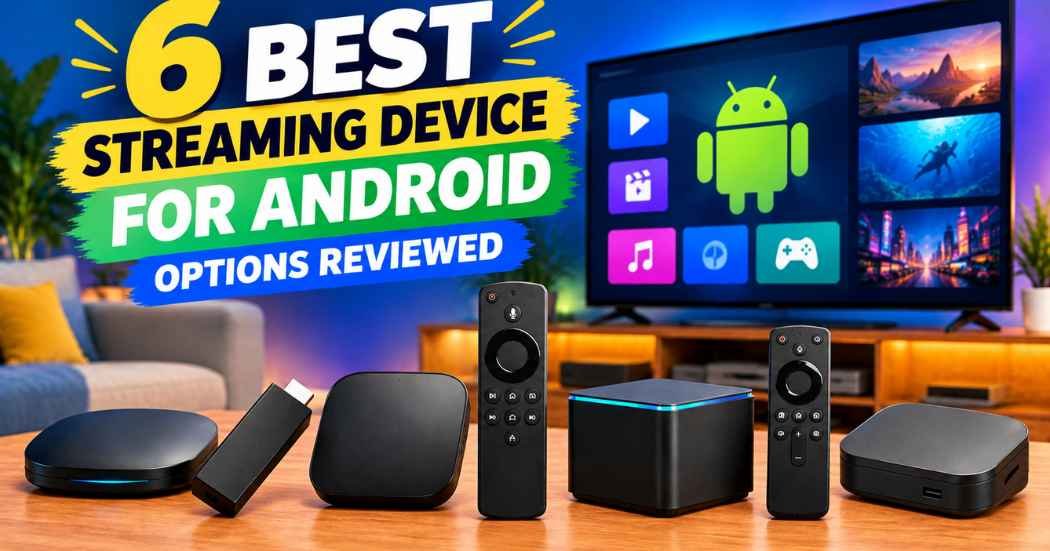
Choosing the right streaming device for your television is about matching hardware to your specific viewing habits. Factors like storage capacity, connection speed, and app usage determine which model fits your home. The decision typically splits between the feature-packed onn. 4K Pro Streaming and the reliable, minimalist Google TV Streamer 4K.
1. onn 4K Pro Streaming Device

Best for: Someone who wants a powerful hub for both streaming and gaming.
This device aims to be the center of your entertainment system. It features 3GB of RAM, which is 50% more than the 4K Plus model. This upgrade is designed to keep apps running smoothly when you’re multitasking or navigating through large libraries.
The inclusion of an Ethernet port is a major benefit for anyone who wants a rock-solid, wired connection. If you prioritize buffer-free gaming or high-bitrate video, use the Ethernet port for the fastest, most reliable connectivity.
The 32GB of storage provides plenty of space for your favorite apps, while Dolby Vision and Atmos support ensure you get a modern cinema experience.
It’s likely not for the casual viewer who only watches one app and prefers a device that hides completely behind the TV. If your primary goal is a minimalist setup, the physical footprint of this unit may be more than you require.
Good if:
- You want a wired Ethernet connection for speed.
- You need extra RAM for smooth app performance.
- You want a remote that’s easy to find with backlighting.
- You need 32GB of storage to house a large library of applications.
Skip it if:
- You want a device that’s invisible and mounts directly to the back of a TV.
- You don’t need large storage for many apps.
- You’re a casual viewer who only uses one streaming service and requires no extra processing power.
2. Google TV Streamer 4K

Best for: A household that wants personalized recommendations from many different services.
Google’s own hardware is built to pull content from all your subscriptions into one home screen. It focuses on tailoring suggestions based on what your family likes to watch, which cuts down on the time spent searching through different apps. The design is sleek and meant to be placed on a shelf rather than hidden behind your screen.
Performance is snappy, and the interface is designed to make finding live TV or new movies straightforward. It supports 4K HDR with Dolby Vision, making it a strong choice for modern televisions. You can even connect speakers that support Dolby Atmos for more immersive 3D sound. It isn’t for the user who wants a hidden “stick” style device that plugs into a port and disappears.
If you find an interesting show or movie on your mobile app or Google search, you can add it to your watchlist. It will be ready for you when you return to the home screen. You also gain access to over 800 free channels from services like Pluto TV and Tubi.
Good if:
- You want a centralized hub for all your streaming services.
- You value personalized recommendations for everyone in the home.
- You want smart home control integrated into your TV remote.
- You need 32 GB of storage for your apps.
Skip it if:
- You prefer a compact device that plugs directly into an HDMI port.
- You require a pre-included HDMI cable in the box; you must buy an HDMI 2.1 cable separately.
3. Xiaomi TV Box S 3rd Gen

Best for: Users who want a compact, capable device that stays out of the way.
The Xiaomi TV Box S 3rd Gen balances performance with a very small footprint. Its quad-core processor and 2GB of RAM keep the Google TV interface moving quickly, while the 32GB of storage ensures you have room for all your essential apps. It’s a reliable, straightforward box that includes everything you need to get started right away.
The design is discrete, measuring 95.25 x 95.25 x 16.7 mm, which makes it easy to tuck into any entertainment center. It supports high-quality audio and video formats, including Dolby Vision, HDR10+, and DTS:X, providing a complete package for most viewers.
Decide based on your network environment. If your router is near the TV, the dual-band Wi-Fi handles 4K streaming at 60FPS easily. However, because this unit lacks a dedicated Ethernet port, those with unstable wireless signals may experience buffering during high-bitrate content.
It isn’t for someone who needs massive amounts of RAM for intense gaming or complex background tasks. If you prioritize raw power for heavy gaming, look for a device with higher memory specifications.
Good if:
- You need a small device that fits in tight spaces.
- You want a complete setup with an HDMI cable included.
- You prefer a device with Bluetooth 5.2 for connecting accessories.
Skip it if:
- You want the absolute highest RAM capacity for heavy multitasking.
- You require a wired Ethernet connection for your streaming setup.
4. ONN Android TV 4K UHD Streaming Device with Voice Remote
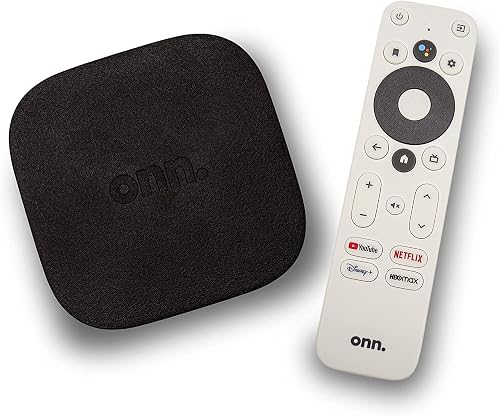
Best for: A first-time buyer who wants a simple, straightforward upgrade to their TV.
This is the quintessential entry-level device. It plugs directly into your HDMI port using the included cable, making it perfect for older TVs that need a boost in functionality. It runs the standard Android TV interface, which gives you access to a huge library of apps via the Google Play Store.
The voice remote is a standout feature at this level. By pressing the Google Assistant button, you can search for content or control your playback without navigating complex menus. It’s a basic, functional tool that does exactly what it promises without unnecessary complexity.
However, this device isn’t for the power user who requires the latest high-speed Wi-Fi standards or massive storage capacity. If you prioritize raw processing speed for heavy gaming or high-end streaming, you should look elsewhere.
Good if:
- You’re setting up a TV for the first time.
- You want simple, voice-controlled search functionality.
- You need a device that’s easy to move between different rooms, such as an ONN, Samsung, Sony, RCA, Vizio, Hisense, TCL, Philips, or Magnavox television.
Skip it if:
- You need the fastest possible Wi-Fi 6 connectivity.
- You want to store a large number of high-definition apps.
- You require advanced hardware specifications beyond standard 4K Ultra HD resolution, which offers four times the clarity of Full HD.
If you need a plug-and-play solution for standard streaming, this is a suitable choice. If you require cutting-edge networking hardware, choose a more advanced model.
5. TiVo Stream 4K

Best for: Someone who spends most of their time watching live television.
TiVo is famous for its guide, and this device brings that experience to streaming. It consolidates your various streaming services into a single, unified interface, so you don’t have to jump in and out of Netflix, Disney+, or Prime Video just to see what is on. It’s an excellent choice for people who miss the traditional feel of a cable box but want modern streaming options.
The device is small and powered by Android TV, which means it’s compatible with all the usual apps. It handles Dolby Vision and Atmos, ensuring your content looks and sounds great.
The decision rule is simple: if you want a centralized place for searching, browsing, and creating watch lists across all your apps, this is the tool for you. However, it isn’t for a user who prefers a pure, stock Google interface without the TiVo layer on top.
You can use voice control to launch apps or even dim your lights, which saves time compared to manual navigation.
Good if:
- You want a single guide for all your streaming apps.
- You prefer the TiVo style of content recommendations based on what you love, not where the content lives.
- You want a simple, portable streaming solution that consumes a maximum of 5 W.
Skip it if:
- You prefer a standard, unmodified Google TV interface.
- You need high-end hardware for gaming.
- You operate in environments outside the 0˚C to 40˚C temperature range.
6. Android 14 TV Box

Best for: A tech enthusiast who wants the latest software and high-resolution support.
This device stands out because it ships with Android 14, the newest version of the OS among these options. It’s built for people who want to experiment with higher resolutions, including 8K, and who value the ability to expand their storage using a TF card slot. The two USB ports also allow for more flexibility when connecting keyboards, mice, or extra storage.
The hardware is designed for those who want to move beyond the limitations of standard streaming boxes. It’s a more “open” device that caters to users who like to customize their setup. It isn’t for someone who wants a plug-and-play experience with a polished, consumer-friendly interface from a major brand like Google or Xiaomi.
The RK3518 chipset powers this unit, providing the necessary processing for 8K video decoding. If your primary goal is high-definition playback, this device excels by supporting most audio and video formats.
To ensure a stable connection, the box features Wi-Fi 6 for both 2.4 GHz and 5.8 GHz bands. You can also utilize the RJ-45 Ethernet port for a wired connection. The device features integrated Bluetooth 5.4 for pairing speakers or controllers.
Good if:
- You want the latest Android 14 operating system.
- You need expandable storage up to 128GB for local media files.
- You want multiple ports for connecting external accessories.
Skip it if:
- You want a simple, unified interface for family use.
- You prefer a brand with a long history of support for streaming apps.
Choosing the Best Streaming Device for Android
Many of these devices occupy the same space, making the choice feel narrower than it is. The onn. 4K Pro Streaming, Xiaomi TV Box S, and Google TV Streamer 4K all prioritize a 32GB storage capacity. This is a major step up from older streaming sticks that often limit your app library. If you’re choosing between these three, the decision comes down to the form factor. You must decide if you want a box for a shelf or a device that hides away behind your screen. You should also check if you need a dedicated Ethernet port for the most reliable connection.
The entry-level options, such as the original onn. 4K Streaming Device, are very similar to older models from other brands. Their core job is to provide access to apps, and they do this well enough for most casual viewers. The differences here are mostly about the remote, the specific version of the operating system, and the physical design.
If the technical specifications are nearly identical, the brand reputation and the quality of the remote control are the deciding factors. Features like backlight or voice control can significantly change your daily experience. If you require advanced features like Dolby Vision or Atmos, verify that your specific model supports them, as not every entry-level device includes these cinematic standards.
Still Not Sure?
How often will I really use it?
If this is for a main living room TV used every single day, you want to prioritize speed and reliability. A device with higher RAM, like the onn. 4K Pro Streaming, will feel much faster when you’re switching between apps or searching for content. If you’re just setting up a guest room TV that gets used once a month, a basic, minimalist device is all you need.
What do I already own that this has to work with?
Think about your current home setup before you buy. If you have a high-end sound system, make sure the device you choose supports the audio formats you need, such as Dolby Atmos. If you have an older TV without a smart interface, almost any of these will work, but verify your TV has an available HDMI port first. If you want to use a wired internet connection for your High Efficiency Video Coding streams, the onn. 4K Pro Streaming is the clear choice.
What am I most likely to regret choosing?
The most common regret is buying a device with too little storage. Once you download a few streaming apps and maybe a game or two, 8GB can fill up very quickly. Choosing a device with 32GB of storage, like the Xiaomi TV Box S, saves you from having to delete apps later. It’s almost always better to have more space than you think you need when buying a device for the long term.
Frequently Asked Questions
What does it ask of its owner week to week?
Most of these devices are low-maintenance, but they do require a stable internet connection to function well. You might occasionally need to restart the device if an app hangs or the interface feels slow. Aside from that, these boxes update their software automatically in the background, so you rarely have to do anything beyond using the remote to choose your next show.
What has to be replaced or renewed to keep it working?
There’s very little to replace on these devices. The most common item to renew is the batteries in your remote control, which usually happens every few months depending on usage. If you have a rechargeable remote, you’ll simply need to plug it into a power source when the charge gets low. No other parts require regular replacement or maintenance to keep the device running.
What happens when it’s outgrown or used up?
When a device feels sluggish or you run out of storage space, it’s usually time to clear your cache or uninstall unused apps. If the hardware can no longer keep up with new app updates, you may eventually need to replace the unit. Upgrading every few years to get the latest chipsets and software features is a common way to stay current.
Would the more capable one on this list have suited me better?
If you find yourself waiting for apps to load or experiencing buffering during high-resolution playback, you likely would have benefited from a more capable device. Models with more RAM and faster Wi-Fi or Ethernet options are designed specifically to eliminate these bottlenecks. If your current device is frustrating you, upgrading to a model like the onn. 4K Pro Streaming can offer a much smoother experience.
Closing
The best device for you depends on whether you value a simple, all-in-one experience or a high-performance system with extra features. If you want a powerful hub that handles everything from 4K streaming to gaming with ease, the onn. 4K Pro Streaming is the logical choice, as its 3GB of RAM offers 50% more memory than the 4K Plus model for smooth multitasking.
If you prefer a premium, personalized interface that brings all your services together, look at the Google TV Streamer 4K. It excels at consolidating your watchlists across apps. For those needing maximum storage for apps, the onn. 4K Pro, Google TV Streamer, and Xiaomi TV Box S all provide 32GB of space.
Start by checking your TV’s available ports and your current internet connection speed. If you have a high-speed connection, prioritize devices with Wi-Fi 6, such as the onn. 4K Pro or Xiaomi TV Box S, for the most reliable performance.