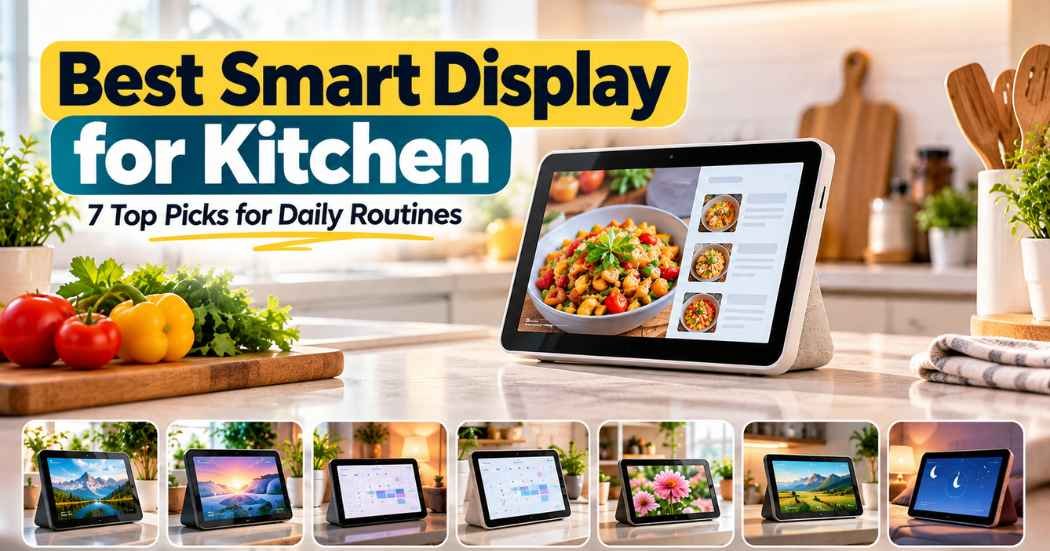
The real difference between these devices isn’t just screen size or sound quality; it’s how well they handle daily routines like meal planning, chore tracking, and family coordination. Among all options, the Amazon Echo Show 11 stands out as the best smart display for kitchen because it delivers the most powerful combination of large-screen clarity, strong smart home control, and built-in features that actually work together — especially for families juggling schedules, groceries, and meals.
Head to Head on What Matters
What to look for in a smart display for kitchen
The Amazon Echo Show 11** has an 11-inch Full-HD touchscreen, giving it 60% more viewing area than the Echo Show 8 and far more space than the 5.5-inch Echo Show 5. This larger screen makes recipes, shopping lists, and video calls much easier to use in a busy kitchen. The Like-New Echo Spot uses a smaller circular display, which limits what you can see at once.
The Digital Calendar 10.1″ Smart Calendar and Smart Digital Calendar 10.1 Inch both have 10.1-inch IPS HD screens, but their resolution is lower than the Echo Show 11’s Full-HD standard. The Cozyla Calendar Neo-15.6″** offers the largest screen at 15.6 inches, but its resolution isn’t specified, so image sharpness remains unknown. Only the Echo Show 11 clearly states it supports vibrant Full-HD visuals with spatial audio.
Smart Home Integration and Control
All Amazon devices — Echo Show 5, Echo Show 11, and Like-New Echo Spot — include built-in support for controlling compatible smart devices like lights, thermostats, and cameras using Alexa. The Echo Show 11 adds Omnisense technology, which lets routines trigger based on motion, temperature, or visual ID detection — a feature not mentioned in any other listing. The digital calendars from TIKVITO, Linkdaze, CYPID, and Cozyla rely on syncing with calendar apps (Google, iCloud, Outlook) but don’t claim direct integration with smart home devices beyond basic voice commands. None of the digital calendars list compatibility with smart locks, plugs, or sensors. Only Amazon’s devices offer full smart home hub functionality without needing a separate device.
Family Scheduling and Task Management
The Cozyla Calendar Neo-15.6″, Linkdaze Digital Calendar 10.1″, and CYPID Smart Digital Calendar all include dedicated chore charts, reward systems, and task management tools designed for families. These are rare in Amazon’s lineup — only the Echo Show 11 mentions “family” in its description, but doesn’t include a chore tracker or rewards system. The TIKVITO model also includes a chore tracker and points-based rewards for kids. The Echo Show 5 and Echo Spot focus on alarms, weather, and reminders, but don’t offer structured task or habit-tracking features. For parents who want to manage chores and weekly plans, the digital calendars win — especially those with built-in rewards.
What the Numbers Mean for You
A bigger screen isn’t just about looking impressive — it changes how you use the device every day. The 10.1-inch screens on the digital calendars are close in size, but without full HD resolution, text and images may appear slightly softer.
Kids tap a box to check off a task, earn points, and unlock small rewards. It’s a real behavioral tool — not just a reminder. But if your home doesn’t use Google Calendar or iCloud, setting this up takes extra effort.
1. Amazon Echo Show 5 (newest model)

Best for: Powerful kitchen assistant with smart home control
Its large Full-HD touchscreen delivers clear visuals for recipes, weather updates, and video calls, while spatial audio enhances music and voice prompts with richer depth. When not in use, it showcases a dynamic slideshow of your favorite images, helping keep cherished moments in view.
Pros
- Vibrant 11″ Full-HD touchscreen
- Spatial audio with deeper bass and wider sound stage
- Built-in smart home hub with Omnisense automation
- Auto-framing camera with 3.3x zoom and noise reduction
- Supports end-to-end encrypted Ring video for privacy
Cons
- No built-in chore chart or reward system
- Can’t generate grocery lists from meal plans
- Requires Wi-Fi for full functionality
2. Amazon Echo Show 11 (newest model)

Best for: Large-format family command center
It syncs with Google, Apple, and Outlook calendars in real time, so everyone’s schedule stays updated. It includes a fun chore chart with avatars and point-based rewards — great for motivating kids to clean up or help with dishes. You can even stream video tutorials directly on the screen to learn new recipes, and it auto-generates grocery lists based on your meal plan. The Cozyla Voice Agent lets you add events or to-dos by voice, making it hands-free.
However, it lacks a built-in camera, so no video calls. Its resolution isn’t listed, so image quality may vary. It also doesn’t integrate with smart home devices like lights or thermostats — you can only control them via your phone or voice assistant outside the device. If you need a kitchen display that doubles as a family planner, this is excellent. But if you want to control your lights or check your doorbell feed, it falls short.
Pros
- 15.6-inch wall-mountable touchscreen
- Built-in chore chart with rewards and avatars
- Auto-generates grocery lists from meal plans
- Voice-controlled with Cozyla Voice Agent
- Continuous OTA updates and 1-year warranty
Cons
- No built-in camera or video calling
- Resolution not specified
- No smart home device integration
3. Like-New Amazon Echo Spot (newest model)

Best for: Feature-rich family organizer
This Linkdaze model combines a calendar, photo frame, chore tracker, and to-do list in one sleek 10.1-inch touchscreen. It syncs with Google Calendar, Outlook, iCloud, Cozi, and Yahoo via URL link, so it works with many platforms. The chore system assigns tasks, tracks completion, and awards points — a real motivator for kids. You can upload photos and videos directly using the AiMOR app, and the device turns into a digital photo frame when idle. Meal planning is simple: save recipes and build weekly menus right on the screen.
But it requires a separate app (AiMOR) to set up and manage tasks, and users must manually update the firmware to version 4.0.0 for best sync performance. There’s no built-in microphone or camera, so no voice control or video calls. It also doesn’t connect to smart home devices. If you’re okay with managing everything through an app and don’t need voice control, this is a solid choice. But if you want to say “Alexa, turn on the kitchen light,” this won’t work.
Pros
- All-in-one family command center
- Color-coded calendars and custom avatars
- Built-in chore chart with reward system
- 32GB internal memory for photos and videos
- Syncs with multiple calendar apps
Cons
- No voice assistant or camera
- Requires app setup and firmware update
- No smart home integration
4. Digital Calendar 10.1 Inch Wall

Best for: Compact kitchen clock with Alexa that fits small spaces and offers smart features
The Like-New Echo Spot is a refurbished version of Amazon’s older smart alarm clock. It’s compact and comes with the same limited warranty as a new device. It has a small circular display that shows time, weather, song titles, and basic info. You can control smart devices, set alarms, and play music through Alexa. It includes a mic-off button and privacy controls.
But it’s not meant for kitchens with high activity. The small screen limits visibility, and there’s no built-in camera or video calling. It doesn’t support advanced features like recipe viewing, chore tracking, or meal planning. It’s better suited for nightstands or offices. If you already own other Echo devices and want a second screen for quick checks, it’s a decent backup. But it’s not a true kitchen hub.
Pros
- Compact design fits on small counters
- Includes privacy shutter and mic-off button
- Works with existing Alexa ecosystem
Cons
- Small circular display
- No camera or video calling
- Limited to basic Alexa functions
5. Digital Calendar 10.1″ Smart Calendar
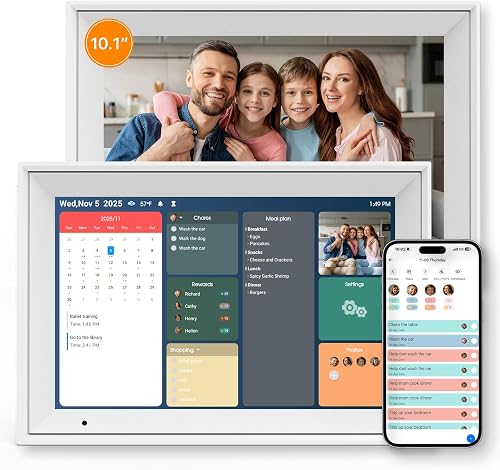
Best for: Compact kitchen display with reliable basics
The Echo Show 5 has a 5.5-inch screen, good sound with deeper bass, and a built-in camera for video calls. It’s easy to set up and integrates smoothly with Alexa. You can view photos, check weather, and control smart devices. The privacy features include a physical camera shutter and mic-off button. It’s made from recycled materials, which appeals to eco-conscious buyers.
But it’s too small for serious kitchen use. Reading recipes or checking long shopping lists is difficult. It lacks a chore system, meal planner, or auto-generated grocery lists. While it can show your calendar, it doesn’t organize tasks or track progress. If you only need a basic smart display for music, news, and occasional calls, it’s fine — but not the best for active kitchens.
Pros
- 5.5-inch display with clear visuals
- Strong sound with 2x bass
- Privacy shutter and mic-off button
- Recycled materials used in build
Cons
- Too small for detailed kitchen tasks
- No chore or meal planning tools
- Limited to basic Alexa features
6. Digital Calendar 10.1 Inch Wall

Best for: Simple, wall-mounted family planner
This TIKVITO model is a simple digital calendar featuring a responsive touchscreen that keeps your schedule, photos, and family tasks front and center. It syncs across major platforms, supports photo slideshows, and includes tools for tracking chores, rewarding kids, and planning meals—all designed for everyday visibility and ease of use.
But it lacks a camera, voice assistant, or smart home control. You can’t ask it to play music or turn on lights. It also doesn’t mention resolution, so image quality may be inconsistent. It’s great for families who want a paperless planner but aren’t invested in smart home tech.
Pros
- Wall-mountable design
- Real-time calendar sync
- Built-in chore tracker with rewards
- Photo slideshow mode
Cons
- No voice assistant or camera
- Resolution not specified
- No smart home integration
If your family needs a shared space to track appointments, chores, and meals without distractions, this device delivers exactly that—no extra features to manage, no setup complexity. The touch interface responds quickly, and tasks appear instantly across devices once added. Children engage with the chore chart by tapping completed items, earning points that can be tracked visually. When not showing schedules, it automatically switches to a photo frame, cycling through images uploaded via the companion app.
The lack of a camera means you can’t take snapshots directly on the device, but you can send photos from any phone. Without a voice assistant, you must tap to add events, but that keeps the focus on visual planning. If you’re using it in a kitchen or hallway, the screen stays readable under bright light. The absence of smart home integration means it won’t respond to commands like “turn off the living room lights,” but it also avoids accidental triggers. For homes where simplicity is key, this calendar does one thing well: keep everyone on the same page.
7. Cozyla Calendar Neo-15.6″ Smart Digital Calendar Wall Touch Screen &

Best for: Interactive family life management
The CYPID model offers a full suite of tools: real-time calendar sync, chore tracking, meal planning, and to-do lists. It supports Google, iCloud, Outlook, Cozi, and Yahoo. The interactive touchscreen lets kids tap to complete tasks, and the device transitions into a digital photo frame when idle. It’s designed for desks or walls, with a stand included.
But it relies heavily on the companion app for setup and management. No voice control is mentioned, and it doesn’t connect to smart home devices. If you prefer a hands-on approach and don’t mind using an app, it’s effective. But if you want voice commands, it won’t deliver.
Pros
- Multi-platform calendar sync
- Fun, interactive chore system
- Turns into digital photo frame
- Fits on counter or wall
Cons
- No voice assistant
- Requires app for full use
- No smart home support
Frequently Asked Questions
Is a larger screen always better for kitchen use?
Not necessarily. While larger screens offer more space, they don’t guarantee better visibility if resolution is low. The Echo Show 11’s high-definition display ensures sharp, clear images for recipes and video calls, even from a distance. Opt for screen size based on how far you’ll be sitting and what kind of content you’ll be viewing.
Does a device without a camera still offer value?
Yes. Devices like the Linkdaze and TIKVITO calendars lack cameras but excel at scheduling, chore tracking, and photo display. They’re ideal for homes that prioritize organization over video calls. Just remember: no camera means no face-to-face communication.
Can I use a digital calendar with my existing Google Calendar?
Yes — models from Linkdaze, CYPID, and Cozyla sync with Google Calendar, iCloud, Outlook, and others. However, some require manual firmware updates or URL-based setup. Always check compatibility before buying.
Why do some devices mention “AI” or “voice agent” but not a smart assistant?
AI features like auto-scheduling or recommendations are often part of a standalone app or cloud service. The Cozyla Voice Agent lets you add events by voice, but it doesn’t use Alexa or Google Assistant. This means no access to music, web search, or smart home control unless integrated separately.
Closing Best smart display for kitchen
The Amazon Echo Show 11 stands out as the top smart display for kitchens due to its ideal balance of screen clarity, rich sound, intuitive controls, and seamless smart home integration—key for managing daily routines. Its high-resolution touchscreen provides ample space for reading recipes, checking schedules, and viewing live feeds, while spatial audio ensures voices and music fill the room with crisp detail.
You can manage lights, thermostats, and security cameras via touch or voice, and automated routines respond to movement, temperature changes, or facial recognition to simplify kitchen operations. With Alexa+, you can stream content, order supplies, and schedule appointments effortlessly. While other models offer larger screens, few match this device’s full suite of smart features, including video calling, live camera access, and deep compatibility with music, video, and third-party apps.