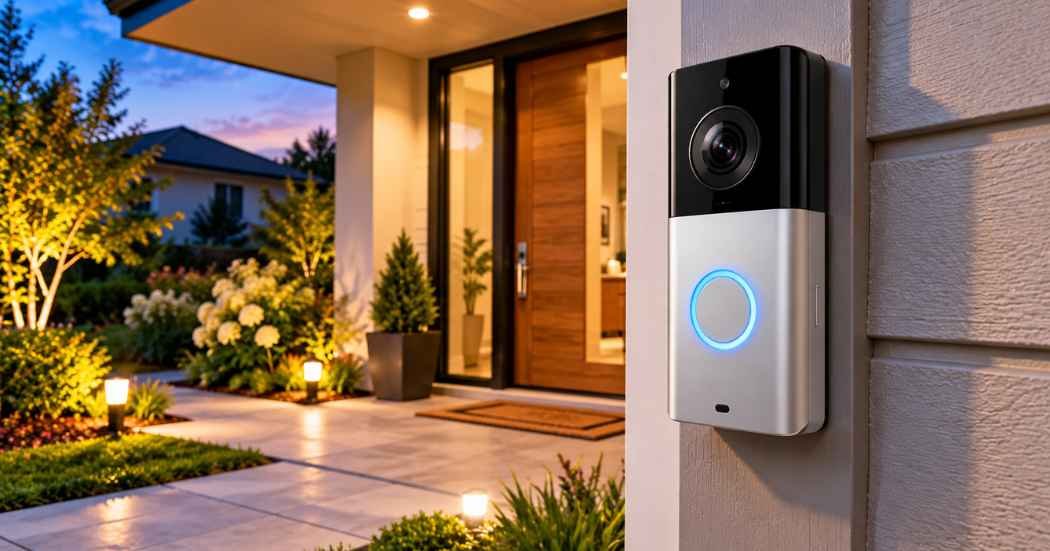
A video doorbell shows you who is at the door before you get up. It can also show you a package sitting on the porch while you are at work. The Ring Battery Doorbell 4K Pro is Ring’s top battery-powered model, and it records in 4K. That means a much sharper picture from a doorbell with no required wiring. This Ring Battery Doorbell 4K Pro review covers the video, night view, motion alerts, battery, setup, privacy, and subscription questions. We also point out who may want something else. One note first: we did not run our own hands-on test. This review is built on Ring’s published specs and independent reports.
Ring Battery Doorbell 4K Pro Review: Quick Overview
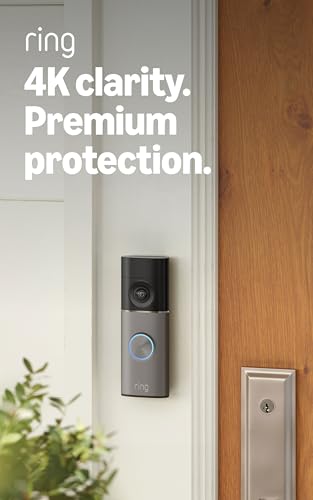
Ring sells this model as the Battery Doorbell 4K Pro. Some stores still list it as the Battery Doorbell Pro (2nd Gen). Ring says the two names mean the same product.
It is a smart doorbell camera with a removable battery. It records in Retinal 4K, sees a wide 140-degree view, and uses radar for motion detection. You also get two-way talk, night vision, and live view in the Ring app. Ring estimates about 10 minutes for installation.
Feature | Details |
Product type | Battery-powered smart video doorbell |
Video resolution | Retinal 4K with up to 10x Enhanced Zoom |
Power | Removable Quick Release Ultra Battery Pack; can also be hardwired to existing doorbell wiring |
Field of view | 140° horizontal, 140° vertical (head-to-toe) |
Night vision | True-color low-light view; switches to black and white in near darkness |
Motion detection | Radar-based 3D Motion Detection with adjustable motion zones |
Two-way audio | Two-Way Talk with Audio+ |
Battery | USB-C rechargeable; works with earlier Ring Quick Release battery packs |
Connectivity | Wi-Fi 6, dual-band 2.4GHz and 5GHz |
Installation | DIY; wiring is optional |
Best use | Front doors where running new wire is hard |
See the current Amazon listing to confirm the version, color, and bundle you want.
What Makes the Ring Battery Doorbell 4K Pro Stand Out?
Plenty of doorbells claim to be smart. These are the features that set this one apart, and what each means at your door.
4K video. You get more pixels to work with. In daily life, that means you can zoom into a clip and still see something useful, like a label on a box.
Wide, head-to-toe view. The 140-degree view in both directions is meant to show a visitor’s whole body and the ground near the door. That helps you spot a package sitting low on the step.
Radar motion detection. Many doorbells rely on heat sensors alone. This one uses radar, which Ring says gives more precise alerts. For you, that could mean fewer pings about a car passing on the street.
Removable battery. You pop the pack out and charge it by USB-C. You do not have to take the whole doorbell off the wall.
Two-way talk. You can speak to whoever is outside from your phone.
4K Video Quality: What Can You Actually Expect?
Resolution is the number of tiny dots in a picture. More dots can mean more detail. A 4K doorbell can show faces, clothes, and small objects more clearly than a lower-resolution one, mostly when you zoom in.
Still, 4K is not magic. Footage depends on light, distance, and your internet. A person standing at the edge of your yard will look smaller than one at the door. Glare from a bright porch light or a sunny day can wash out detail too. Ring also says video quality can change with your internet speed, and it recommends at least 15 Mbps of upload speed for its 4K devices.
We have no test footage of our own, so we will not promise how it looks in your setup. The safest view is this: 4K gives you more room to zoom, but good lighting and a strong Wi-Fi signal still matter.
Night Vision and Low-Light Performance
Most front doors get visitors after dark, so night view matters. Ring says this doorbell shows true color when some light is around, and that streetlights nearby can be enough. In near darkness, it switches to black and white.
Expect a difference between day and night clips. Night footage usually has less detail and more grain than daytime video. A bright light right next to the camera can also hurt the image. Night vision can help you see who came by, but it cannot promise that you will identify every person.
Motion Detection and Smart Alerts
Motion detection tells you when something moves in front of the camera. Ring says this model can sort alerts into person, package, and vehicle events. You can also draw motion zones in the app. That lets you watch your porch and driveway while ignoring the public sidewalk.
Zones are worth setting up on day one. They can cut down on useless notifications, which is the main reason people turn alerts off.
One caution. A motion alert means something moved. It does not mean someone is a threat. Treat alerts as a heads-up and check the video yourself. Package alerts also require a Ring subscription, according to Ring.
Battery Life and Power Options
Battery power is the big selling point for renters and anyone without doorbell wiring. You can mount it with the included hardware and skip the electrical work.
Ring does not give a battery-life number we can verify, so we will not guess one. These things usually shorten battery life on any battery doorbell:
- Busy doorsteps that trigger lots of motion events.
- Frequent live view checks.
- Weak Wi-Fi, which makes the camera work harder.
- Very cold or very hot weather.
When the pack runs low, remove it, charge it with USB-C, and snap it back in. Ring says it works with older Quick Release packs, so a spare could keep you covered. Want constant power? Ring says you can hardwire it to a compatible doorbell system.
Installation and Everyday Use
Spend five minutes planning before you drill. Pick a spot where the camera sees the step and any packages. Avoid pointing it straight at the street, since that can trigger many alerts. Check your Wi-Fi at the door with your phone first. A weak signal causes more trouble than a low-resolution camera does.
Setup runs through the Ring app. Ring’s box includes a mounting plate, a corner kit, tools, and hardware. Ring says it works in temperatures from -4°F to 122°F and is weather resistant.
Hardwiring is optional. If you go that route, Ring lists a doorbell system of 8 to 24 volts AC. Turn off power at the breaker first and follow Ring’s instructions. If you feel unsure, hire a licensed electrician.
Two-Way Talk and Visitor Communication
Two-way talk lets you speak to people at your door from your phone. You can tell a courier where to leave a box. You can also answer when you are away, or ask an unexpected visitor what they need. Ring also lists Quick Replies, which let a visitor leave a message, but those need a subscription.
This model uses Audio+, which Ring says improves sound. We have not tested how it sounds, so check customer reviews on Amazon for real-world comments.
App Experience and Smart Home Features
Everything runs through the Ring app. Ring lists live view, real-time alerts, motion zones, and shared access for family members. It also has a Control Center for security and privacy settings.
Saved video is where the subscription comes in. Ring says basic features work without a plan, but recording, person alerts, and other advanced features need a Ring Protect plan. The product page mentions a free 30-day trial and up to 180 days of video history on a plan. We have not listed plan prices because they change. Check Ring’s plans page before you buy.
We could not confirm a full list of smart-home integrations. If you need a certain voice assistant or hub, check the listing first.
Privacy Considerations
A camera at your door sees more than your doorstep. Aim it at your own entry, not your neighbor’s window. Motion zones and privacy zones can help you keep the view limited. Ring says the doorbell supports end-to-end encryption and privacy zones.
Renters and apartment residents should think about shared hallways too. Check your lease or building rules, and be considerate of people walking past. Protect your account with a strong, unique password and any extra sign-in protection the app offers. Share access only with people you trust. Trim your notifications so the camera is helpful and not noisy.
Ring Battery Doorbell 4K Pro Pros and Cons
Pros | Cons |
Sharp 4K video with up to 10x Enhanced Zoom | The battery needs periodic charging |
Wide head-to-toe view | Ring does not give a verified battery-life figure |
Radar motion detection and adjustable zones | Recording and some smart alerts need a subscription |
Removable, USB-C rechargeable battery | Wi-Fi quality and upload speed matter for 4K |
Easy DIY install, with optional wiring | 4K may be more than some doors need |
Who Should Buy the Ring Battery Doorbell 4K Pro?
For this Ring Battery Doorbell 4K Pro review, the best fits are people who want a sharper picture without rewiring.
- Homeowners who want better detail on faces and packages, and who can get decent Wi-Fi at the door.
- Renters who cannot cut into walls or touch the wiring.
- Apartment residents with a door that allows a doorbell camera, after checking the building’s rules.
- Package-heavy households that want clear footage of the porch.
Check the latest price on Amazon if you fit one of these groups.
Who Should Skip It?
Look elsewhere if you want a doorbell that never needs charging. Ring also sells a Wired Doorbell 4K Pro, which may suit homes with existing wiring.
Skip it if you dislike subscriptions, since recording needs a plan. If your Wi-Fi at the door is weak, fix that first. And if 4K does not matter to you, Ring’s own listing shows lower-cost 2K models, which could save money.
Ring Battery Doorbell 4K Pro vs Other Video Doorbells
Doorbells vary a lot, so this table uses general categories, not exact competitor specs.
Feature | Ring Battery Doorbell 4K Pro | Typical 2K Doorbell | Basic Battery Doorbell |
Video | 4K | 2K | Varies |
Power | Battery (wiring optional) | Varies | Battery |
Night vision | True-color low light, then black and white | Varies | Varies |
Installation | Flexible | Varies | Usually simple |
Smart features | Radar motion, zones, Audio+ | Varies | Basic to advanced |
Best for | Detail and flexible mounting | Everyday monitoring | Simple, low-cost setups |
Before you decide, compare the same points on any rival: resolution, power, subscription terms, and Wi-Fi support.
Is the Ring Battery Doorbell 4K Pro Worth It?
It depends on what you value. The people who get the most from it want clear video at the door and cannot easily wire a doorbell.
Is 4K useful on a doorbell? It can be. Extra detail helps when you zoom into a clip. But it only pays off with good light and a strong connection.
Is battery power worth the trade-off? For renters and no-wire homes, usually yes. For owners with working wiring, a wired model may be easier to live with.
The biggest advantages are the sharp image, wide view, radar alerts, and easy install. The biggest limits are battery upkeep, subscription needs, and Wi-Fi demands.
Before buying, check your upload speed, the signal at your door, and the current Ring Protect terms. Check customer reviews on Amazon too, since real owners can describe daily use better than a spec sheet.
Final Verdict
This Ring Battery Doorbell 4K Pro review comes down to a simple trade. You get a sharp 4K picture, a wide view, radar-based alerts, and a doorbell you can mount without wires. You give up some convenience, because the battery needs charging and Ring does not give a battery-life figure we can confirm. Recording and some smart alerts also need a subscription, and strong Wi-Fi is a must.
It suits renters, homeowners without wiring, and anyone who wants more detail from a front door security camera. It is not a cure-all, and no doorbell can guarantee a safe home. If you want zero charging, no subscription, or just a basic picture, a different model may fit better. See the current Amazon listing to check today’s price and options.
Frequently Asked Questions
Is the Ring Battery Doorbell 4K Pro worth buying?
It can be, if you want sharper video and cannot easily wire a doorbell. Renters and homes without doorbell wiring get the most value. If you want a doorbell that never needs charging, dislike subscriptions, or have weak Wi-Fi at the door, look at other options first. Check the current price and owner feedback before you decide.
Does the Ring Battery Doorbell 4K Pro really record in 4K?
Ring lists Retinal 4K video with up to 10x Enhanced Zoom. Ring also says video quality can change with your internet speed, and it recommends at least 15 Mbps of upload speed for its 4K devices. So the camera supports 4K, but your connection affects what you see in the app.
How long does the battery last?
We cannot give a number, because Ring does not publish one we can verify. Battery life depends on how often the doorbell sees motion, how often you open live view, your Wi-Fi strength, and the weather. The pack is removable and charges by USB-C, so recharging does not mean taking the doorbell off the wall.
Does the Ring Battery Doorbell 4K Pro work at night?
Yes, it has night vision. Ring says it shows true color when a little light is nearby and switches to black and white in near darkness. Night footage usually has less detail than daytime video. No night vision system can promise that every person will be easy to identify, so treat the footage as a helpful clue.
Does it require a subscription?
Ring says basic features work without a plan. Video recording, person alerts, and other advanced features need a Ring Protect plan. Package alerts and Quick Replies also need one. Ring’s product page mentions a free 30-day trial. We do not list plan prices because they can change, so check Ring’s plans page before buying.
Can you talk to visitors through the doorbell?
Yes. It has Two-Way Talk with Audio+, so you can speak to people at your door from your phone and hear their replies. That helps with deliveries, visitors, and checking on unexpected knocks while you are away. We have not tested the sound quality, so read owner comments on Amazon if audio matters to you.
Is the Ring Battery Doorbell 4K Pro good for apartments?
It can be, because the battery model needs no wiring and mounts with the included hardware. Still, check your lease and building rules first. Shared hallways raise privacy questions, and some buildings limit what you can attach to a door or wall. Also make sure you have a Wi-Fi signal that reaches your door.
What should I check before installing a battery video doorbell?
Test your Wi-Fi at the door and check your upload speed. Pick a mounting spot with a clear view of the step. Plan how you will charge the battery. Look at subscription terms, and think about neighbors’ privacy. If you hardwire it, turn off power first and call an electrician if unsure.