Want an outdoor camera that lights up a dark side yard and records sharper video than a basic 1080p model? The Ring Spotlight Cam 2K is built for that job. This Ring Spotlight Cam 2K review is for US homeowners and renters who want to know if it is worth the money. It is a Ring 2K security camera with two lights built in.
We will look at video, lights, power, setup, and the Ring app. We will also cover the part many buyers miss: what you can and cannot do without a subscription.
A quick note on sources. I used Ring’s official specs and a published test by Tom’s Guide. I have not tested the camera myself. When a point comes from a reviewer, I say so.
Ring Spotlight Cam 2K at a Glance
This table is the quick view for this Ring Spotlight Cam 2K review. All specs come from Ring’s product page.
Feature | Details |
Video Resolution | 2K (2560 × 1440 pixels) |
Camera Type | Outdoor spotlight camera |
Indoor/Outdoor Use | Designed for outdoor use; IP65 weather resistance |
Night Vision | Yes |
Spotlight | Two motion-activated LED spotlights, up to 550 lumens |
Motion Detection | Advanced motion detection with customizable motion zones |
Two-Way Audio | Yes, with noise cancellation |
Field of View | 140° horizontal, 85° vertical |
Power Options | Battery, plug-in, wired, or solar |
Wi-Fi | Wi-Fi 4, 2.4 GHz |
Storage | Cloud storage with a Ring plan; local storage not listed |
Subscription | Live view and alerts available without a plan; saving/reviewing recordings requires a Ring plan |
Smart-Home Compatibility | Works with Alexa |
Ring also sells this camera as the Ring Spotlight Cam (2nd Gen). Ring says only the name changed. The features are the same.
Ring Spotlight Cam 2K Review: What Is This Camera?
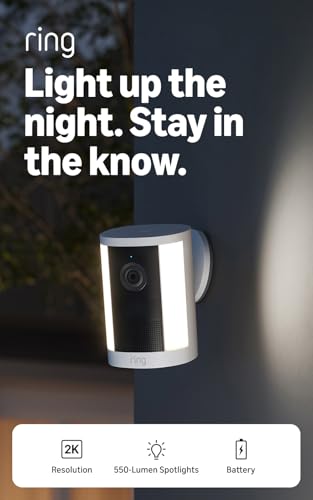
The Ring Spotlight Cam 2K is an outdoor security camera with spotlight lights built in. Ring released it in June 2026, according to Tom’s Guide.
A standard outdoor camera records and sends alerts. This one also turns on its lights when it sees motion. It has a siren you can set off from the app, too.
Ring says it suits smaller areas, like side yards, alleys, and patios. For bigger spaces, like a driveway or backyard, Ring points buyers to its Floodlight Cam 2K.
The other big selling point is power. You can use a battery, a plug-in cord, home wiring, or a solar panel.
Video Quality
Ring says this camera records at 2560 x 1440 pixels. That makes it a security camera with 2K video. It holds more detail than 1080p, so faces, packages, and cars can look clearer, especially when you zoom in. Ring adds up to 6x enhanced zoom in the app.
More pixels do not promise clear footage, though. Lighting, distance, and Wi-Fi all matter.
What Tom’s Guide saw:
- Daytime video was colorful. The reviewer could make out some features of a person about 20 feet away.
- A face in shadow on a bright day was hard to read.
- The video was less sharp than Ring’s Floodlight Cam. In one sample, roof shingles showed up on the floodlight camera but looked like plain gray on this one.
Ring also says quality can change with internet speed and device temperature. It recommends an upload speed of at least 5 Mbps. The camera lowers quality on its own when your bandwidth drops.
Night Vision and Spotlight
Ring lists night vision on this camera. It also has two LED spotlights rated at 550 lumens. The light is a warm 3000 Kelvin. Ring says the lights switch on when the camera detects motion.
What Tom’s Guide saw: Without the lights, night video was infrared. It was decent, but it lacked the detail of color night vision. When the lights came on, color returned to objects up to about 15 feet away.
That is the real trade-off. Infrared video is fine for spotting movement. The lights add color and detail, but only where they reach.
A bright light may make someone think twice. No camera can promise to stop a crime, so treat the light as a bonus, not a shield. Aim it away from neighbors’ windows too. A light that flashes every time a cat walks by gets old fast.
Motion Detection
Ring lists advanced motion detection with customizable motion zones. In the Ring app, you choose which parts of the view the camera should watch. A walkway can count. A busy street can be left out. Alerts reach your phone in real time, and privacy zones block parts of the scene you do not want to record.
Unwanted alerts are the usual problem with any motion camera. Cars, branches, and animals can all set it off. Tight motion zones are the first fix.
Some extra tools need a Ring plan:
- Single Event Alert (beta): Combines similar motion into one alert.
- Video descriptions: Short text that says what the camera saw. Ring notes these are not offered in Illinois.
Tom’s Guide liked the descriptions but said they were not perfect. The AI once mistook a dog for a goat. Tom’s Guide also noted that the older Spotlight Cam Pro has 3D motion detection. This model does not.
Two-Way Talk
Ring lists two-way audio with noise cancellation. You talk through the Ring app. It helps in small, everyday moments, like telling a delivery driver where to leave a box or speaking to a visitor without opening the door.
Quick Replies are pre-recorded messages that play when the camera sees a person. They need a Ring plan. Audio laws differ by state, so check your local rules.
Design and Outdoor Use
Tom’s Guide describes a simple cylinder shape with a light strip on each side. It measures about 4.84 by 3.15 by 3.27 inches. You can pick white or black.
Ring rates the camera IP65 for weather resistance. It lists an operating range of -4°F to 122°F in the shade. In extreme heat with strong direct sun, Ring says the camera may switch off for a while. If you live somewhere very hot, give it shade when you can.
For mounting, Ring says you need a vertical surface. The wired version needs an existing junction box.
Good spots include a side gate, a patio door, or a dark corner. Keep it within easy Wi-Fi range, and avoid pointing it at a bright streetlight.
Installation and Setup
Ring estimates 5 to 10 minutes for the battery and plug-in models. The wired model can take up to an hour. Ring also sells professional installation, starting at $129.99 per device.
The general steps look like this:
- Choose your power type.
- Pick a spot on a vertical surface that your Wi-Fi reaches.
- Add the camera in the Ring app and connect it to your 2.4 GHz network.
- Mount the bracket with the included hardware.
- Attach the camera and adjust the angle.
- Set your motion zones.
Ring’s setup guide in the box has the exact order. The box includes a mount, hardware, a USB-C power adapter, and a security sticker. The battery model adds one battery pack.
Which Power Option Fits?
Power Type | What Ring Lists | Best For | What to Watch For |
Battery | Quick Release battery pack, 1 included, with room for 2 | Locations without a nearby outlet | The battery needs to be recharged |
Plug-In | 20W USB-C adapter with a 17.8-ft cord | Locations near an outlet | The power cord will be visible |
Wired | Connects to existing home wiring | A clean installation with no battery recharging | Requires a junction box and more installation time |
Solar | 4W solar panel | Sunny walls and locations | Ring recommends 2–3 hours of direct sunlight per day |
Tom’s Guide pointed out one small annoyance. The battery still charges over micro USB. You can also charge it through the camera’s USB-C port.
Ring App Experience
The Ring app is free. Ring says you can use it for live view, real-time alerts, motion zones, and privacy zones. Control Center holds your security settings, and one dashboard shows your Ring devices. Community tools, like the Neighbors app, are optional. Ring says you choose whether to share anything.
Without a plan, the dashboard shows the last image the camera captured. Watching past video takes a subscription.
Storage and Subscription
Of everything in this Ring Spotlight Cam 2K review, this is the section to read twice.
- Local storage: Ring’s page does not list it. Tom’s Guide says the camera lacks local storage. Wyze’s Battery Cam Pro, which it compares, does support it.
- Cloud recording: Yes, with a Ring Protect plan. Ring says plans can keep video for up to 180 days.
- Works without a plan: Real-time notifications, live view, and two-way talk.
- Needs a plan: Reviewing missed events, saving video, sharing video, video descriptions, and Quick Replies.
- 24/7 recording: Only when the camera is plugged in. It needs a plan plus a Continuous Recording add-on. Ring lists the add-on at $3 a month per camera.
Tom’s Guide put plan prices at about $5 a month for one camera and $10 a month for unlimited cameras at one home. It listed $20 a month for the top AI tier. Prices change, so check Ring’s site before you decide.
Tom’s Guide also said plenty of equally capable cameras do not charge to save video. Honestly, that is where I would pause and run the numbers.
Smart Home Compatibility
Ring’s page says the camera works with Alexa. It does not name other platforms, such as Google Home or Apple Home. If you use one of those, confirm support before you buy.
Pros and Cons
Pros
- Clear 2K video, a step up from 1080p.
- Four power options, plus room for a second battery.
- Bright 550-lumen lights turn on with motion.
- Wide 140° by 85° field of view.
- Two-way talk and a siren you can trigger from the app.
- IP65 weather resistance.
- Quick battery setup, about 5 to 10 minutes per Ring.
Cons
- Saving and reviewing video needs a subscription.
- Local storage is not listed.
- Wi-Fi 4 on the 2.4 GHz band only.
- Night video is infrared unless the lights turn on.
- Less sharp than Ring’s Floodlight Cam, per Tom’s Guide.
Who Should Buy the Ring Spotlight Cam 2K?
After this Ring Spotlight Cam 2K review, here is who may like it. This camera may suit you if:
- You want an outdoor security camera with spotlight coverage for a side yard, patio, or alley.
- You want light and video for a side yard, patio, or alley.
- You already use Ring devices or Alexa.
- You rent and want a battery model with no wiring.
- You do not mind paying a monthly fee for saved video.
Who Should Skip It?
Look at other cameras if:
- You want to save video with no monthly cost.
- You need local storage, like a memory card.
- You need to watch a large driveway or backyard. Ring suggests a floodlight camera for that.
- You want the sharpest picture. Ring’s 4K models offer higher resolution.
- Your Wi-Fi is 5 GHz only, or the signal is weak outside.
Ring Spotlight Cam 2K vs Other Outdoor Security Cameras
Ring now sells several Ring Spotlight Cam models, and a few rivals exist too. This table uses specs from Ring and Tom’s Guide.
Camera | Resolution | Field of View | Power | Standout Point |
Spotlight Cam 2K | 2K | 140° x 85° | Battery, plug-in, wired, solar | 550-lumen spotlights, Wi-Fi 4 only |
Spotlight Cam Plus | 1080p | 140° x 78° | Battery, plug-in, wired, solar | Lower resolution |
Spotlight Cam Pro (1st gen) | 2K | 140° x 80° | Battery, plug-in, wired, solar | Dual-band Wi-Fi, 3D motion detection |
Spotlight Cam 4K Pro | 4K | 140° x 85° | Plug-in, wired, PoE | Highest resolution, Wi-Fi 6 |
Wyze Battery Cam Pro | 2K | Narrower | Battery | Local storage, weaker spotlight |
There is no single winner. The 4K Pro suits people who want maximum detail and have a power source. The older Pro suits people who want 3D motion detection. The Wyze suits people who care about local storage. The Spotlight Cam 2K sits in the middle with flexible power and strong lights. Ring often discounts its models, so compare current prices.
Important Things to Consider Before Buying
- Camera placement: Pick a spot with a clear view of the area you care about.
- Wi-Fi strength: This Ring 2K security camera uses 2.4 GHz only. Check your signal where you plan to mount it.
- Power needs: Choose battery, plug-in, wired, or solar first. It shapes the rest.
- Subscription needs: Add the monthly plan to your total cost.
- Privacy: Use privacy zones so you do not record a neighbor’s property.
- Storage: If you want local recordings, this is not the pick.
- Nighttime coverage: The lights only reach so far.
- Local weather: Very hot, sunny walls may need shade. Ring rates it down to -4°F.
Final Verdict
This Ring Spotlight Cam 2K review comes down to one question. Do you want Ring’s lights, app, and flexible power, and are you fine paying for saved video?
If yes, this is a solid Ring security camera for a small outdoor area. The 2K picture is a real step up from 1080p, and this Ring Spotlight Cam 2K is easy to place. The lights are bright, and setup is quick.
If you want free video storage, local recording, or the sharpest picture possible, another camera may fit better. My take: check current prices on the older Spotlight Cam Pro before you buy. It has a few features this one lacks.
FAQ
Is the Ring Spotlight Cam 2K worth it?
It can be, if you want a 2K outdoor security camera with lights for a smaller area and you accept a monthly plan. If you want free storage, look elsewhere.
Does Ring Spotlight Cam 2K require a subscription?
No. Ring says live view and real-time alerts work without one. You need a plan to review, save, or share video.
Does Ring Spotlight Cam 2K record in 2K?
Yes. It is a security camera with 2K video, and Ring says it captures 2560 x 1440 pixels. Quality can change with your internet speed. Saving recordings needs a plan.
Does Ring Spotlight Cam 2K have night vision?
Yes. Tom’s Guide found the night video was infrared and decent, with color coming back when the lights turned on.
Does Ring Spotlight Cam 2K have a spotlight?
Yes. It has two LED spotlights rated at 550 lumens that turn on with motion.
Can Ring Spotlight Cam 2K be used outdoors?
Yes. It is a 2K outdoor security camera rated IP65. Ring lists a range of -4°F to 122°F.
Does Ring Spotlight Cam 2K work with Alexa?
Yes. Ring’s page says it works with Alexa.
Can I use Ring Spotlight Cam 2K without a subscription?
Yes, with limits. You get live view, real-time alerts, and two-way talk. You cannot review or save past video.
Does Ring Spotlight Cam 2K have two-way talk?
Yes. Ring lists two-way audio with noise cancellation.
What should I consider before buying a Ring outdoor camera?
For any Ring security camera, think about power, Wi-Fi, placement, and the monthly plan. Also decide if you need local storage or higher resolution.