Picking a video doorbell can feel harder than it should. You want a clear picture, easy setup, and no drilling into your wiring. You also don’t want a bill that grows every month.
The Ring Battery Doorbell 2K is a battery-powered video doorbell from Ring. It records in 2K, has a tall “head-to-toe” view, and works with the Ring app. Ring also calls it the Ring Battery Doorbell (2nd Gen).
This Ring Battery Doorbell 2K review covers the features, the video, the install, and the subscription question. You will also see who it fits, who should skip it, and how it compares with other battery doorbells.
Ring Battery Doorbell 2K Overview
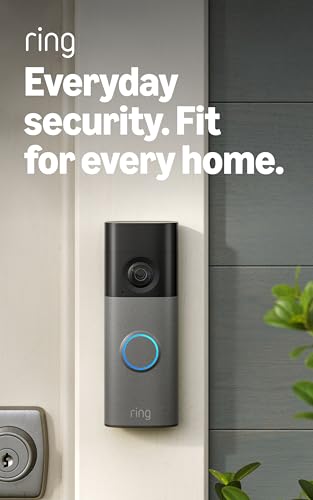
The Ring Battery Doorbell 2K is a video doorbell that runs on a built-in rechargeable battery. You don’t need to run new wires to use it. You mount it, charge it, and connect it to your Wi-Fi.
It is made for people who want to see who is at the door from a phone. That includes homeowners, renters, and apartment residents. Its main job is simple: show you visitors and packages, and let you talk to people without opening the door.
Here are the key features from Ring’s official specs:
- 2K video (1920 x 1920) with HDR
- Head-to-toe view
- Two-way talk and Live View
- Motion detection
- Night vision
- Dual-band Wi-Fi (2.4 GHz and 5 GHz)
- Weather resistant (IP65 rated)
One thing to watch: this is not the Ring Battery Doorbell Plus. The Plus has a removable battery. The 2K model has an embedded battery, so you charge it while it stays on the mount or take the whole doorbell off the wall.
[Check Price on Amazon]
Ring Battery Doorbell 2K Features
Retinal 2K Video
Resolution is how many tiny dots make up the picture. More dots mean more detail. This doorbell records at 1920 x 1920, which Ring calls Retinal 2K.
For a doorbell, that matters when you look at faces, packages, and license plates on a parked car. Ring says video quality can change with your internet speed and the device’s temperature. It suggests at least 10 Mbps of upload speed for full 2K.
6x Enhanced Zoom
Enhanced zoom lets you pinch the screen and get a closer look at something far away. Ring lists up to 6x enhanced zoom for this doorbell. Zoom works best when the original video is sharp, and 2K gives it more to work with. It won’t act like a telescope, though. Very far objects will still be small.
Head-to-Toe Video
The camera view is square, not wide like a movie screen. Ring lists the view at 140 degrees across and 140 degrees up and down. The diagonal view is 173 degrees.
That tall view helps you see a person from head to toe. It also helps you spot a package sitting near the door.
Two-Way Talk
Two-way talk works like a phone call through the doorbell. You can hear the visitor and speak back from the Ring app. It is handy when a delivery driver is at the door and you’re not home. Ring says Live View and Two-Way Talk work without a subscription.
Motion Detection and Motion Zones
Motion detection sends an alert when the camera sees movement. Motion zones let you pick which parts of the picture count. That way a busy street doesn’t set off alerts all day.
Ring lists Advanced Motion Detection for this model. Many buyers care about zones, because too many alerts get annoying fast.
Night Vision
Ring lists night vision for this doorbell. In the dark, the camera uses it to keep the picture visible. Details are usually softer at night than in daylight, and a porch light can help. I could not find Ring stating color night vision for this model, so check the current page if that matters to you.
Built-In Rechargeable Battery
The battery is built in. Ring’s page lists a USB-C charging port for it. You don’t need a wall outlet at your door, but you will need to charge it now and then.
I did not find a fixed battery life number from Ring. Battery life depends on how many motion events you get, how much you use Live View, the weather, and your Wi-Fi. Cold weather can also affect batteries. Ring’s box list does not mention a charging cable, so keep a USB-C cable handy.
Wi-Fi Connectivity
The doorbell connects to both 2.4 GHz and 5 GHz Wi-Fi. That gives you more choices for your home network. A steady signal at your front door matters a lot. A weak signal can mean slow alerts or lower video quality.
[See Customer Reviews]
Ring Battery Doorbell 2K Design and Installation
The doorbell is small and slim. Ring lists the size as about 5.78 inches tall, 2.11 inches wide, and 1.41 inches deep. That is roughly the size of a large phone. It has an IP65 weather rating and an operating range of -4°F to 122°F.
Setup is meant to be a DIY job. The box includes a universal mounting plate, a push pin, install hardware, a quick start guide, and a security sticker. You screw the plate to the wall, attach the doorbell, and finish setup in the Ring app.
Some other choices for power:
- Hardwired: If you already have a doorbell transformer, you can connect it. Ring lists a range of 8 to 24 VAC and 10 to 40 VA. Use only a compatible power source, since the wrong one can damage the device.
- Solar: Ring lists a Solar Charger for Battery Doorbells as a compatible accessory.
- Mounting extras: Wedge and corner kits and a no-drill mount are also listed as compatible.
Because the battery is embedded, you can’t swap in a spare. Keep that in mind if charging sounds like a chore.
Ring Battery Doorbell 2K Video Quality
I can’t share my own test footage here, so I’ll stick to what the specs say and how this type of camera usually behaves.
Daytime: The 2K resolution with HDR is built to show more detail. HDR helps when part of the scene is bright and part is in shadow, like a sunny porch.
Clarity and zoom: More pixels give you more room to zoom in. Faces and packages should look sharper than on 1080p doorbells, though your internet speed still matters.
Viewing angle: The tall, wide view covers the doorstep and the person standing there. You see more of the ground than with a standard wide picture.
At night: Expect a clear enough view to see who is there, but with less detail than daytime. Lighting changes a lot. A bright light behind a visitor, or a dark porch, can make faces harder to see.
Ring Battery Doorbell 2K Smart Features
Free with the app: Live View, Two-Way Talk, and motion alerts. Ring’s plan page says features like Live View and Two-Way Talk work without a subscription. Other sources also list customizable motion detection and zones as free on supported cameras.
With a compatible Ring plan: Ring’s spec page marks several features as needing a subscription. These include Extended Live View, Video Descriptions, Single Event Alert, Unusual Event Alert, and Video Search. Person and package alerts, plus saved video history, also sit on the paid side of Ring’s plans.
Other app extras: Quick Replies and Snapshot Capture are listed too. Snapshot photos in the cloud are kept for up to 14 days, and storage depends on your plan.
Some AI features are not available in every state. Ring notes Illinois as one example, so check that before you count on them.
Does Ring Battery Doorbell 2K Require a Subscription?
No. The doorbell works without one. You can watch a live view, talk to visitors, and get basic alerts.
What you can’t do without a plan is save and replay video. Ring’s Protect plans add video history, which Ring says can be kept for up to 180 days. Some smart alerts and search tools also need a plan.
So the answer is not “everything needs a subscription.” It is closer to “the live features are free, and the recording features cost extra.” Ring Protect Basic covers one device, and Plus covers all devices at one location. Prices have changed over time and sources list them differently, so check Ring’s plan page for the current number.
Add that monthly cost to the doorbell price before you buy. Over a few years, it can equal or beat the price of the doorbell.
Ring Battery Doorbell 2K Pros and Cons
Pros | Cons |
2K video with HDR | Saving video requires a Ring Protect plan |
Battery-powered, so no new wiring is needed | The battery needs to be recharged |
Up to 6x enhanced zoom | The built-in battery is not swappable |
Head-to-toe view | Wi-Fi quality can affect performance |
Two-way talk | Some smart features require a paid plan |
Motion detection with customizable zones | A stronger upload speed of 10 Mbps is recommended for 2K video |
Ring Battery Doorbell 2K vs Traditional Doorbells
Traditional doorbell: It rings a chime and that’s it. No video, no phone alerts, no monthly cost. It’s simple, but you can’t see who is there.
Battery video doorbell: This is the 2K model’s category. You get video and alerts on your phone. It’s easy to install, but you have to keep the battery charged.
Hardwired video doorbell: It uses your home’s doorbell wiring, so you don’t have to charge it. The install can be harder, and it needs power at your door.
The Ring 2K sits in the battery group, but it can also connect to existing doorbell wiring. That gives you a middle path if you have the wires.
Who Should Buy the Ring Battery Doorbell 2K?
It may be a good fit if you are:
- A homeowner who wants clear video and doesn’t want to run wire.
- A renter who wants something you can mount without big changes. Check your lease first.
- An apartment resident who needs a simple setup and a view of the door.
- Someone who wants easy installation. The DIY setup is a big plus.
- Someone who wants 2K video with a tall view of people and packages.
- Someone who likes battery power and doesn’t mind recharging.
[Internal link: Best Wireless Video Doorbell System]
Who Should Skip the Ring Battery Doorbell 2K?
You may want to look elsewhere if you:
- Don’t want any subscription cost and still want saved video.
- Prefer a full local-storage setup.
- Have weak Wi-Fi at your front door.
- Want a removable battery. The Ring Battery Doorbell Plus has one, and this model doesn’t.
None of these are flaws for everyone. They are just different needs.
Ring Battery Doorbell 2K Alternatives
Product | Video Quality | Power | Key Feature | Subscription Consideration |
Ring Battery Doorbell 2K | 2K (1920 x 1920) | Built-in rechargeable battery, can connect to doorbell wiring | Head-to-toe view, 6x zoom | Video history needs Ring Protect |
Ring Battery Doorbell Plus | 2K | Removable battery | Swappable battery | Same Ring Protect setup |
eufy Video Doorbell E340 | 2K, dual camera | Battery or wired | Second camera shows the ground, 8 GB local storage | Sold as no monthly fee for local storage |
Google Nest Doorbell (battery) | 960 x 1280 | Battery or wired | Works with Google Home | Some free event history, more with Nest Aware |
Blink Video Doorbell | 1080p | AA lithium batteries | Lower price, local storage with Sync Module 2 | Cloud needs a plan, local storage needs extra hardware |
Specs for the other products come from retailer and maker pages and may have changed, so confirm on the current listing. This table compares features only. It isn’t a ranking.
Ring Battery Doorbell 2K Price and Value
At launch, Tom’s Guide reported a list price of $99.99 for the Ring Battery Doorbell (2nd Gen). I have not verified today’s price, and Amazon prices change, so use the button below to see what it costs right now.
For that money you get the doorbell, a mounting plate, and install hardware. Think about three other costs too. First, a Ring Protect plan if you want saved video. Second, a USB-C cable if you don’t have one. Third, a chime if you want a sound inside your home.
On features alone, 2K video, a tall view, and battery power add up to solid value for buyers who are fine with the Ring app and a plan. If you never want to pay monthly, the value math looks different.
Final Verdict Ring Battery Doorbell 2K review
The Ring Battery Doorbell 2K is a strong option for buyers who want sharp video and an easy install. The tall view, 2K picture, zoom, and two-way talk cover what most people need at a front door.
The limits are real too. The battery needs charging, and it can’t be swapped. Saved video and some smart alerts need a Ring Protect plan. And weak Wi-Fi will hurt results.
It may be a good fit if you already like Ring’s app, or want something simple to mount. Before you buy, check the current price, decide if you’ll pay for a plan, and test the Wi-Fi signal at your door.
Frequently Asked Questions
Is the Ring Battery Doorbell 2K worth it?
It can be, if you want 2K video and an easy battery install and you’re fine with a Ring plan for recorded video. If you want saved video with no monthly fee, look at other options first.
Does Ring Battery Doorbell 2K require a subscription?
No. Live View, Two-Way Talk, and basic alerts work without one. A Ring Protect plan is needed for saved video and some smart features.
How long does the Ring Battery Doorbell 2K battery last?
Ring doesn’t give one fixed number that I could find. It depends on motion events, Live View use, weather, and Wi-Fi. Check Ring’s current product page for their guidance.
Does Ring Battery Doorbell 2K record without a subscription?
Not in a way you can replay later. Without a plan you can watch live and get alerts, but saved video history needs Ring Protect.
Is Ring Battery Doorbell 2K wireless?
Yes. It runs on a built-in rechargeable battery and connects over Wi-Fi.
Can Ring Battery Doorbell 2K be hardwired?
Yes, it can connect to an existing doorbell transformer, 8 to 24 VAC, 10 to 40 VA. Use only compatible power sources.
Does Ring Battery Doorbell 2K work at night?
Yes. Ring lists night vision. Detail is usually lower than daytime, and lighting can change the results.
Does Ring Battery Doorbell 2K have two-way talk?
Yes. You can hear and speak to visitors through the Ring app.
Does Ring Battery Doorbell 2K work without Wi-Fi?
No. It needs Wi-Fi for alerts, Live View, and the app. Ring recommends at least 10 Mbps upload speed for 2K.
Is Ring Battery Doorbell 2K good for apartments?
It can be. Setup is DIY and needs no new wiring. Check your lease or building rules before you mount anything.