
What Actually Matters
Local storage vs. cloud plans
The whole point of the best indoor wireless security camera without subscription is that the footage has to live somewhere you already own. That means a microSD card slot, or built-in memory. The catch is that the card is often sold separately, so the real question is what the camera does the moment you plug one in. Some models record continuously, others only when they see movement. Before ordering, check the maximum card size the listing states, and check whether playback in the app is free or locked behind a paid tier.
Resolution and zoom
More pixels sounds better, and up to a point it is. A 2K or 4K sensor lets you zoom into a face or read a label across a room, which a 1080p camera can’t do cleanly. But resolution also eats storage and bandwidth, so a bigger number means the card fills faster. The thing to check for yourself is simple: how far is the camera from what you actually want to see? If it’s across a large room, resolution and optical zoom earn their place. If it sits on a shelf two feet away, it won’t change much.
Power and placement
A wired camera needs an outlet nearby, which limits where it can go. A battery camera goes anywhere but has to be recharged, and how often depends on how much it records. A camera that only wakes for people and pets stretches a charge much further than one recording constantly. Before buying, walk the room and find your outlet, or decide where the camera would sit if it had no cord at all. That single rules out half the options.
Motion detection that doesn’t cry wolf
This is the feature that decides whether you keep the camera switched on. Basic motion detection fires at every passing shadow, every car headlight, every leaf. Person and pet detection cuts that noise down, and on-device AI keeps it free. The number to check is how many detection types the listing names, and whether alerts are included or need a subscription. A camera that pings you forty times a night gets muted within a week, and a muted camera protects nothing.
1. Tapo 1080P Indoor Security Camera

Best for: Simple, dependable everyday indoor monitoring
The Tapo C100 is the straightforward pick here. The listing describes it as a wired indoor camera, which suits a fixed spot like a shelf or windowsill. The card route works on its own, with no recurring fee.
That’s the “motion detection that doesn’t cry wolf” decision handled reasonably well. If you need to follow a pet around the room, this isn’t the one.
Pros
- Wired power means no recharging, ever
Cons
- Solar charging requires temperatures above 32°F, so winter days below freezing leave it on the battery alone.
2. eufy Security 4K Indoor Cam S350

Best for: Reading fine detail across a whole room
The S350 is the detail champion. It runs dual lenses with 4K clarity and 8× hybrid zoom. In practice that means you can watch the whole room and zoom into a crib or a medication label on the same screen, which is the resolution-and-zoom decision taken about as far as it goes indoors. It also offers 360° coverage and tracks moving people and pets automatically.
The trade-off is complexity. Two lenses, auto-tracking, auto-zoom presets and AI sound detection are a lot of moving parts, and you’ll spend real time in the app setting presets before it earns its keep. It’s also a camera for someone who wants that detail — if you just want to glance at the dog at lunchtime, most of this is wasted.
Pros
- Dual-lens 4K plus 2K telephoto
- 8× hybrid zoom for close detail
- 360° coverage with auto-tracking
- Sound and motion detection built in
- No subscription required
Cons
- Many features to configure before it’s useful
- Overkill for basic check-in monitoring
3. Tapo 2K Pan Tilt Security Camera
Best for: Covering a whole room with two cameras
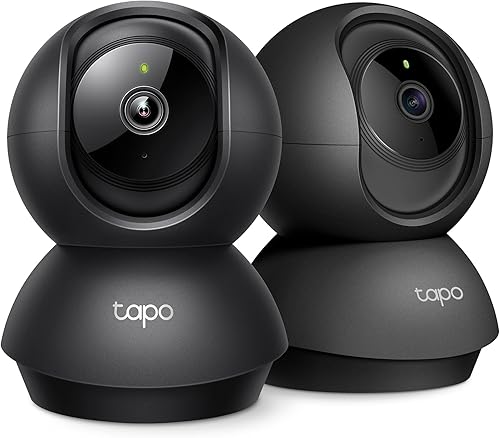
This is a pair of 2K pan and tilt cameras, which answers the coverage question differently: instead of a single unit sweeping a space, you get two fixed points you can aim. Each pans 360° horizontally and tilts 114° vertically, so a pair covers a lot of ground. Detection covers motion, person and baby crying, all without a fee, and storage runs to a 512GB card or Tapo Care cloud.
The catch is the card. It isn’t included, and the listing itself points you to TP-Link’s compatibility page before you buy one — worth doing, because not every card works. Setup is 2.4GHz Wi-Fi only, so a 5GHz-only network needs adjusting. For a setup spanning two rooms, or a nursery plus hallway, the pair makes sense.
Pros
- Two cameras in one purchase
- 2K resolution with 360° pan and 114° tilt
- Free motion, person and baby crying alerts
- Local storage up to 512GB
- Works with Alexa and Google Assistant
Cons
- microSD card not included
- 2.4GHz Wi-Fi only
- Card compatibility needs checking first
4. Kasa 1080p Indoor Pan/Tilt Wired Security Camera

Best for: Getting set up fast with minimal fuss
The EC71 keeps things plain. It’s 1080p, wired, and pans 360° with 113° tilt, so a single unit can watch an entire room. Motion tracking follows people automatically, and alerts cover motion, person and baby crying. Storage takes a microSD card up to 256GB or Kasa Care cloud. The Patrol Mode is the nice touch — you set the camera to sweep between regions on a schedule you choose.
Where it gives ground is resolution, at 1080p, and the 256GB card ceiling is the lowest here. Night vision reaches 30 feet, which is fine for a normal room. It’s the pick for someone who wants the app to make sense on the first try and doesn’t need to read a license plate from across the house.
Pros
- Straightforward app and setup
- 360° pan with 113° tilt
- Patrol Mode sweeps set regions on a schedule
- Free person, motion and crying detection
- Two-way audio for pets and family
Cons
- 1080p resolution only
- 256GB maximum card size
- 2.4GHz Wi-Fi only
5. youkey Magnetic Indoor Security Camera Wireless

Best for: Renters who can’t drill into walls
The youkey S320 solves a problem the others don’t touch: mounting without damage. A strong magnet holds the camera, so there are no screws, no tools and no holes — and you can lift it off and carry it to another room. It’s fully wire-free on a 6400mAh battery, with PIR wake-up so it only records when it sees a person or pet, which is what makes the charge last months rather than days.
Storage is built in at 8GB, with free in-app playback and no card to buy. The catch is that 8GB fills faster than a 512GB card, so it suits someone recording events rather than running continuous video. Detection is on-device, splitting people from pets with no fee. This is the one for a rental, a dorm room, or anyone who moves the camera around.
Pros
- Magnetic mount, no screws or wall damage
- Fully wire-free with 6400mAh battery
- 8GB built-in storage, no card needed
- Free on-device person and pet detection
- One-tap privacy shutoff in the app
Cons
- 8GB built-in storage fills faster than a card
- Battery needs periodic recharging
- 2K resolution, not 4K
6. Anona 4K UHD Indoor Camera

Best for: Homes with crowded Wi-Fi
The Anona pair brings Wi-Fi 6 and dual-band 2.4GHz/5GHz to the table, which matters if your router is already carrying phones, laptops and a TV. Wi-Fi 6 handles that congestion better, and being able to switch bands means you can move to whichever signal is stronger in that room. Video is 4K with 8× zoom, and it pans 360° with 110° tilt and auto-tracking.
Detection covers people, pets and baby crying, with instant app alerts. Storage is a microSD card up to 512GB or AES-128 encrypted cloud. The bundle covers two rooms, but note that both cameras share your network — on an older router, two 4K streams at once is a lot to ask. Check what your router supports before committing.
Pros
- Wi-Fi 6 with dual-band 2.4GHz and 5GHz
- 4K UHD with 8× zoom
- 360° pan and 110° tilt with auto-tracking
- Person, pet and crying detection
- Two cameras included
Cons
- Two 4K streams need a capable router
- microSD card not included
- Setup asks more of your network than 1080p
7. SensForge 2.5K Indoor Pan-Tilt Security Camera
Best for: Getting started with no extras to buy
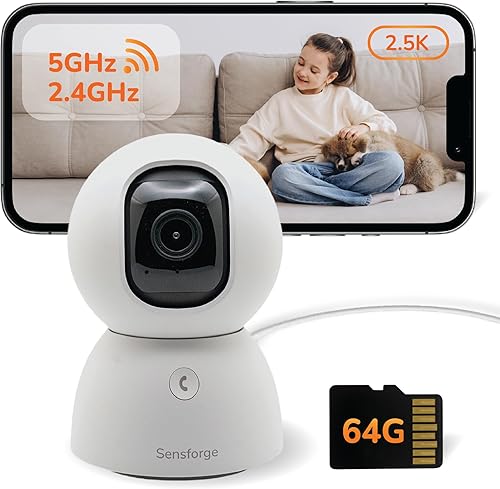
The SensForge stands out for one practical reason: the 64GB SD card is already in the box. You unbox it, plug it in, and recording works — no second order, no compatibility check. That’s the local-storage decision made for you. It’s 2.5K, pans 360° and tilts 90°, with dual-band 2.4GHz and 5GHz Wi-Fi for a steadier connection.
AI detection covers humans, pets and motion, and you can share access with family members through the app. There’s also an optional Pro Membership for AI video summaries and highlight reels — optional being the word, since the camera records and alerts without it. It’s the sensible first camera: modest resolution, card included, nothing to figure out. If you want 4K detail, look at the eufy or Anona instead.
Pros
- 64GB SD card included in the box
- 2.5K resolution with 360° pan, 90° tilt
- Dual-band 2.4GHz and 5GHz Wi-Fi
- AI human and pet detection
- Family sharing through the app
Cons
- 2.5K, not 4K
- Pro Membership needed for AI summaries
- Vertical tilt is 90°, less than some rivals
Who Should Buy Which
Match yourself to the job, not the spec sheet. If you’ll use it hardest — checking in constantly, recording all day — the Tapo C100 is the one, because wired power means it never stops to recharge. Buying your first camera and want the least to think about? The SensForge 2.5K Pan-Tilt arrives with its SD card fitted, so recording works on day one.
Want the fewest things to go wrong? The Kasa EC71 keeps its feature list short and its app simple, and the Tapo C100 is close behind. Replacing something that let you down — a camera that missed motion, or died mid-week? The eufy Indoor Cam S350 and the Anona 4K Indoor Camera both bring sharper detail and stronger detection. And if you rent, or move a camera room to room, the youkey Magnetic Indoor Camera is the only one here that mounts without a single hole.
Mistakes That Catch Buyers Out
- Buying for the resolution number alone, when the camera sits close to what it’s watching and 1080p would show the same thing.
- Paying attention to pan and tilt while ignoring storage, then discovering the card is sold separately and the camera records nothing until it arrives.
- Assuming a camera works on your Wi-Fi without checking — several here connect on 2.4GHz only, and a 5GHz-only network needs a settings change first.
- Taking “no subscription” at face value without checking what’s free: alerts and local playback usually are, but extras like motion tracking or AI summaries sometimes sit behind a paid tier.
Frequently Asked Questions
Do I need a subscription to use these cameras?
No. Every camera here records to local storage — a microSD card or built-in memory — and sends alerts without a fee. Subscriptions like Tapo Care, Kasa Care or Anona Cloud are optional extras that add cloud backup and a few features. You can run any of them on local storage alone, which is the whole point of choosing one without a plan.
What size microSD card should I get?
It depends on resolution and how much you record. The Tapo C100 and Tapo C211 accept cards up to 512GB, the Anona up to 512GB, and the Kasa EC71 up to 256GB. Higher resolution fills a card faster, so a 4K camera needs more space than a 1080p one for the same number of days. Check the listing’s stated maximum before buying.
Can I use these cameras as a baby monitor?
Several are built for it. The Tapo C211, Kasa EC71 and Anona 4K all list baby crying detection with free alerts, and the eufy Indoor Cam S350 names elder and child monitoring directly. Two-way audio lets you speak back through the app.
Will a battery camera last long enough to be practical?
It depends on how often it wakes. The youkey Magnetic Indoor Camera uses PIR wake-up so it only records when it sees a person or pet, which is what stretches a charge to months rather than days. A camera recording continuously would drain far faster, so event recording is the key.
Do these cameras work with Alexa and Google?
Most do. The Tapo C211, Kasa EC71 and youkey Magnetic Indoor Camera all list Alexa and Google Assistant support, letting you pull up a live view on an Echo Show or a Google display. Check the specific listing if voice control matters to you.
Closing
For most people, the Tapo C100 is the pick: wired power so it never needs a charge, free person and motion detection, and local storage up to 512GB with no plan required. Before you order, do one thing — measure the distance from where the camera will sit to what you want to see clearly. That number tells you whether 1080p is enough or whether you need the 4K detail of the eufy or Anona.