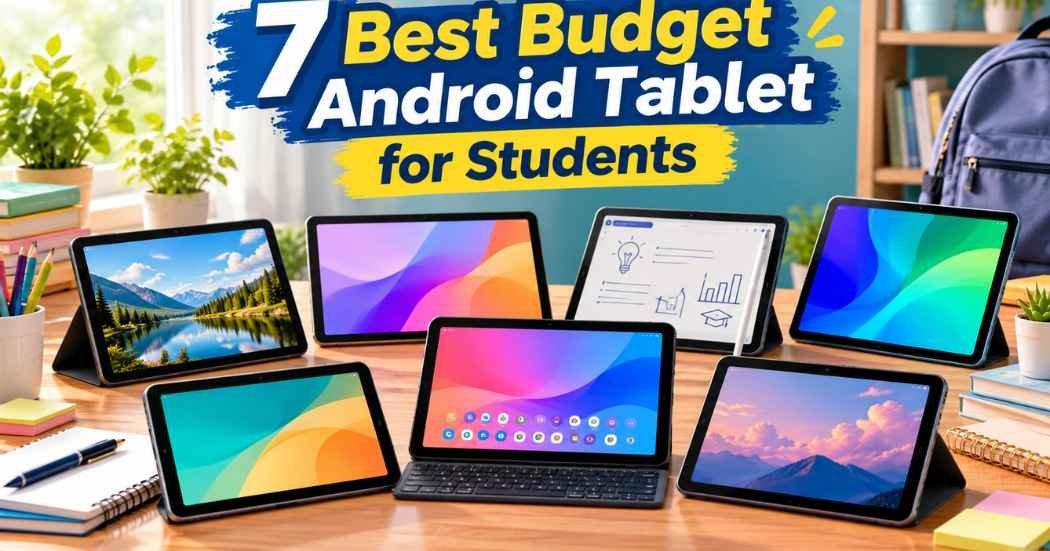
When you’re looking for the best budget android tablet for students, screen size and what comes in the box separate these options fast. Buyers often focus on memory numbers that don’t change much in daily use. The real split is between 11-inch displays with included pens and smaller screens you carry one-handed. The Lenovo Idea Tab leads here because it bundles a stylus and case together, saving you from hunting down extras later. A bigger screen matters more for long reading sessions than raw processor speed does. Judge these on what’s built in, what they include, and how long the battery lasts.
Head to Head on What Matters
Screen Size and Resolution
The display is where you’ll spend every hour of your coursework. The Lenovo Idea Tab and Lenovo Idea Tab 256GB both use an 11-inch 2.5K IPS touchscreen running at 90Hz. That resolution gives you sharp text for heavy reading loads. The TCL TAB 10 Gen 4 sits close behind with a 10.1-inch FHD panel at 1920×1200. It also uses IPS technology for wide viewing angles.
If you want something smaller, the Samsung Galaxy Tab A11 has an 8.7-inch screen at 1340 x 800. The Lenovo Tab One matches that 8.7-inch size but sticks to an HD panel at 60Hz. Both the ECOPAD 10.1 Tablet and the NOVOJOY Android 10 Inch Tablet land at 10.1 inches with 1280×800 IPS displays. Only the two Lenovo 11-inch models and the Samsung mention their exact refresh rates, so treat the rest as unknown rather than assuming they’re slower.
What’s Included in the Box
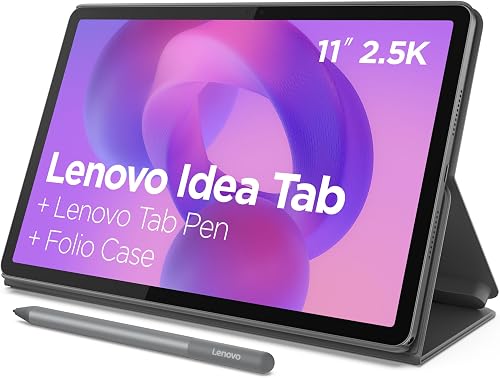
What arrives with your tablet changes how fast you can start working. The Lenovo Idea Tab ships with a Tab Pen and a folio case right out of the box. The Lenovo Idea Tab 256GB includes those exact same accessories. You don’t need to hunt for compatible styluses or protective covers before your first class.
The Lenovo Tab One also bundles a folio case with a built-in stand for hands-free viewing. The NOVOJOY Android 10 Inch Tablet goes further by including both a foldable protective case and a stylus. In contrast, the Samsung Galaxy Tab A11 listing notes clearly that the charger isn’t included. The TCL TAB 10 Gen 4 states its compatible fast charger is required but not included either.
Storage and Memory Capacity
Storage determines how many textbooks, videos, and apps you can keep offline. The Lenovo Idea Tab 256GB stands out with 256 GB of internal storage paired with 8 GB of memory. The standard Lenovo Idea Tab offers 128 GB of storage and 4 GB of memory. The TCL TAB 10 Gen 4 matches that 128 GB capacity but adds support for microSD cards up to 1TB alongside 4GB physical RAM plus 8GB expandable RAM.
The Samsung Galaxy Tab A11 provides 64GB ROM and 4GB RAM, yet its MicroSD slot accepts up to 2TB of expanded memory. The Lenovo Tab One keeps things simple with 64 GB of storage and 4 GB of memory. The ECOPAD 10.1 Tablet starts with 64GB ROM but supports SD card expansion up to 1TB using 12GB total RAM (4+8). Finally, the NOVOJOY model lists 32GB ROM with 8GB RAM (including 5GB expansion) and supports 1024GB expansion.
What the Numbers Mean for You
A bigger screen sounds great until you’re holding it on a crowded campus bus. The 11-inch panels on the Lenovo models give you room to split documents side by side without squinting. But a display wide enough for side-by-side documents means a heavier bag and fewer places to set it down during lectures. The 8.7-inch tablets like the Lenovo Tab One slip into a jacket pocket easily. They force you to scroll more when reading PDFs though.
More storage stops mattering once you rely on cloud drives for everything. If your university requires offline access to massive video files, that 256 GB drive becomes essential. For most students just downloading a few textbooks, 64 GB works fine. Refresh rates like 90Hz make scrolling through long web pages feel smoother. Yet a faster screen drains your battery quicker during marathon study sessions. Don’t chase the highest number if your classes run all day without an outlet nearby. Sometimes a simpler setup serves you better than maximum specs.
1. Lenovo Idea Tab

Best for: Students needing a pen and large screen together.
This tablet earns its spot by combining an 11-inch 2.5K IPS touchscreen with a bundled Tab Pen and folio case. Having the stylus ready out of the box means you can annotate lecture slides immediately without buying extra gear. The MediaTek Dimensity 6300 processor handles AI-enhanced multitasking smoothly across four built-in learning apps like Squid and Nebo.
You get up to 12 hours of YouTube playback, which carries you through back-to-back seminars without hunting for wall outlets. The quad Dolby Atmos-tuned speakers make streaming breaks genuinely immersive after a long writing session. However, this isn’t the right pick if you commute mostly on foot and prefer a device that fits inside a small sling bag, since the large frame demands serious backpack space.
Pros
- Includes Tab Pen and folio case for immediate note-taking
- 11-inch 2.5K display with TÜV Rheinland Low Blue Light hardware
- Up to 12 hours of battery life with a 20W charger included
- Four pre-loaded learning apps designed for student workflows
Cons
- Larger footprint takes up significant bag space
2. Samsung Galaxy Tab A11 WiFi Model (International Version)

Best for: Buyers wanting familiar software with massive expandable storage.
Samsung pairs its One UI 7 interface with an 8.7-inch 90Hz display that feels responsive during quick note reviews. The Mediatek Helio G99 processor is built on a 6nm process, keeping power draw reasonable for the 5100 mAh battery inside. What really sets this apart is the MicroSD card slot supporting up to 2TB of expanded memory, letting you hoard entire semester archives locally.
The inclusion of a 3.5mm earjack means you can plug in existing wired headphones for library study sessions without draining Bluetooth batteries. Just remember the charger isn’t included, so you’ll need to supply your own USB Type-C brick. This tablet doesn’t suit someone who needs a manufacturer warranty out of the box, because this specific international version carries no warranty coverage according to the listing.
Pros
- 90Hz refresh rate on the 8.7-inch TFT display
- MicroSD slot expands storage up to 2TB
- Runs Android 15 with One UI 7 and updates coming
- Retains a 3.5mm stereo earjack for wired audio
Cons
- Charger not included in the box
- International Latin American model with no warranty
- Wi-Fi only with no SIM card slot available
3. Lenovo Tab One
Best for: Carrying everywhere thanks to sub-one-pound weight.
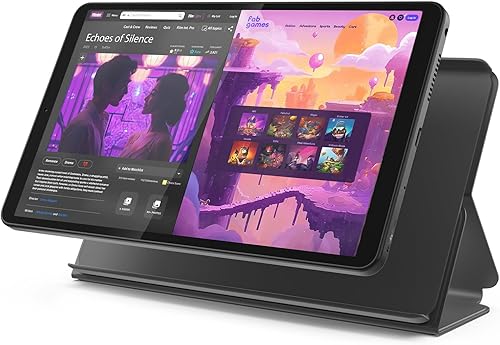
Weighing less than a pound makes this 8.7-inch tablet effortless to hold during long reading assignments on the couch. The HD display pushes 480 nits of brightness, which helps when you’re studying near bright dorm windows. Lenovo includes a folio case that doubles as a built-in stand, so you can prop it up for video calls without buying extra mounts. Battery life reaches up to 12.5 hours of unplugged YouTube streaming, outlasting even some larger tablets in this lineup.
The MediaTek Helio G85 processor runs at a 60Hz refresh rate, keeping everyday browsing fluid enough for basic coursework. It’s not built for students who juggle dozens of heavy PDFs simultaneously, since the 64 GB of storage fills up fast without any listed expansion option.
Pros
- Weighs less than a pound so you can hold it up with a single hand without fatigue
- Up to 12.5 hours of battery life for extended unplugged use
- Included folio case features a built-in stand
- Display reaches 480 nits of brightness for well-lit rooms
Cons
- Limited to 64 GB of internal storage
4. TCL TAB 10 Gen 4 Android Tablet

Best for: Reading heavy course materials on a sharp metal build.
The 10.1-inch IPS FHD display at 1920×1200 resolution delivers crisp text that reduces eye strain during long research sessions. TCL wraps this screen in a slim 0.30-inch unibody metal construction weighing only 0.87 lb, giving it a rigid feel that survives backpack tossing. The 6000mAh battery supports daily learning, while 18W fast charging gets you back online quickly when you find an open outlet.
You get 128GB internal storage plus microSD support up to 1TB, ensuring your downloaded lectures never hit a ceiling. Running Android 15 means everyday tasks respond quickly thanks to TCL NXTURBO hardware-software enhancements optimizing power consumption. Students who rely entirely on stylus input for math equations should look elsewhere, since no pen is included or mentioned for this specific model.
Pros
- 10.1-inch FHD display with 1920×1200 resolution
- Unibody metal design weighs only 0.87 lb
- Supports microSD cards up to 1TB alongside 128GB internal storage
- Face Unlock and Eye Comfort mode add daily convenience
Cons
- 18W fast charger required but not included in the box
5. Lenovo Idea Tab 256GB
Best for: Hoarding offline media and handling intense multitasking.
Doubling the memory to 8 GB and quadrupling storage to 256 GB transforms the base Idea Tab into a powerhouse for heavy academic workloads. That extra RAM lets the MediaTek Dimensity 6300 keep multiple research tabs and AI-powered apps open without forcing reloads. You still get the high-resolution IPS touchscreen running at 90Hz, making handwritten notes via the included Tab Pen look incredibly sharp.
The bundle retains the folio case and quad Dolby Atmos-tuned speakers found on the smaller storage variant. Circle to Search with Google works seamlessly whether you use the pen or your fingertip to translate foreign language papers instantly. This configuration isn’t meant for casual readers who only check emails occasionally, as the sheer capacity goes wasted on light daily tasks.
Pros
- 8 GB of memory supports demanding multitasking workflows
- 256 GB of storage holds massive offline file libraries
- Includes Tab Pen and folio case just like the standard model
- Smart Connect transitions tasks across devices without cables
Cons
- High capacity may exceed the needs of light coursework users
6. ECOPAD 10.1 Inch Tablet
Best for: Expanding storage massively on a straightforward Android 15 system.
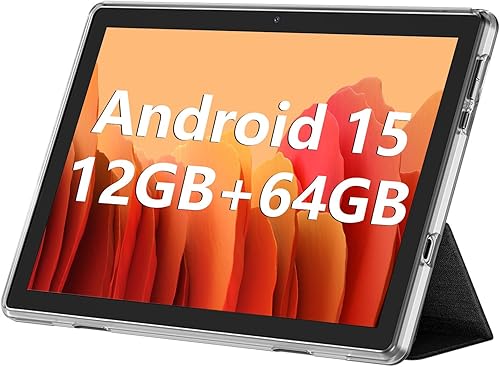
ECOPAD backs the device with a 1-year warranty and comprehensive support for repairs or replacements during your studies.
Pros
- Supports SD card expansion up to 1TB for massive file storage
- 12GB total RAM (4+8) helps manage background applications
- Built-in 6000mAh battery lasts up to 8 hours of video
- Covered by a 1-year warranty with dedicated customer support
Cons
- 1280×800 resolution limits sharpness for detailed document reading
7. Android 10 Inch Tablet

Best for: Starting immediately with a case and stylus already packed.
NOVOJOY removes the guesswork by shipping this 10.1-inch tablet with both a foldable protective leather case and a stylus ready to go. You can enter text directly using the included stylus right out of the box, skipping the hassle of pairing third-party accessories. The device runs Android 15.0 powered by a Quad-core processor and 8GB RAM (including 5GB expansion) over 32GB ROM. Storage stretches up to 1024GB via expansion, giving you plenty of room for e-books and music collections.
Its 6000mAh battery charges through a 5V2A Type-C port and stands by for up to 360 hours when you leave it in your dorm drawer. Students who need high-resolution displays for graphic design courses will find the 1280*800 full HD IPS screen lacking the detail required for precise visual work.
Pros
- Ships with both a stylus and a foldable protective leather case
- Supports up to 1024GB storage expansion for large media libraries
- Five-point capacitive touch G+G ensures smooth interaction
- Charges via standard 5V2A Type-C port for easy cable replacement
Cons
- Starts with only 32GB ROM before relying on expansion
- 1280*800 resolution falls short for detailed creative projects
Several other devices caught our attention during research but didn’t make the final cut. The PRITOM Tablet offers a 10-inch HD IPS screen and 6000mAh battery with 64GB storage, presenting a straightforward option for basic media consumption. Another interesting entry is the Android Tablet Keyboard, which bundles a keyboard with a 10.1-inch Android 15 screen, 18GB RAM, and 128GB storage for typing-heavy workflows. Finally, the URAO Tablet stands out with an 11-inch Android 16 display, octa-core processor, 36GB+128GB configuration, and Gemini AI integration for forward-looking software support.
If you want to understand how display standards affect eye strain during long study sessions, reviewing TÜV Rheinland’s low blue light certification criteria explains exactly what hardware-level protection means for your vision. Knowing this helps you weigh why certain screens cause less fatigue over a full semester.
The Lenovo Idea Tab 256GB wins outright on the axis that matters most for heavy students: raw memory and bundled tools. Its 8 GB RAM and included stylus remove friction from complex workflows immediately. If you aren’t sure whether you need maximum storage or ultimate portability, the TCL TAB 10 Gen 4 is the safer middle ground. Its metal build, FHD screen, and 1TB expansion handle almost anything a typical degree throws at it. Click through to the product pages to verify current availability and decide which screen size actually fits your daily backpack routine.
Related guides
- 6 Best Streaming Devices for Side Loading: Our Top Picks in 2026
- 7 Best Streaming Devices for Side Loading: Our Top Picks in 2026
Frequently Asked Questions
Is a bigger screen always better for studying?
No, a larger screen isn’t automatically superior for every student. A larger display like the Lenovo Idea Tab gives you comfortable split-screen multitasking for research papers. An 8.7-inch tablet like the Lenovo Tab One fits into tighter spaces and weighs less than a pound. Your choice depends on whether you read mostly at a desk or carry the device across campus all day. Match the size to your actual movement habits.
What does “expandable RAM” actually mean?
Expandable RAM borrows internal storage space to act as temporary memory. When a listing says 12GB RAM (4+8), 4GB is physical hardware memory while 8GB is virtual space carved from the ROM. Physical RAM operates significantly faster than virtual memory, so don’t assume a higher combined number guarantees identical speed to pure physical memory.
Does missing a charger in the box matter?
It matters if you don’t already own a compatible power brick at home. The Samsung Galaxy Tab A11 and TCL TAB 10 Gen 4 both state chargers aren’t included, requiring a USB Type-C cable and wall adapter. If your existing adapters use older connectors or lower output, you won’t achieve supported fast charging speeds.
How do I compare different storage expansion limits?
Look at the maximum microSD capacity each listing explicitly supports rather than guessing. The Samsung Galaxy Tab A11 accepts cards up to 2TB, while the TCL TAB 10 Gen 4, ECOPAD 10.1 Tablet, and NOVOJOY model cap at 1TB expansion. Choose based on the largest card you actually plan to purchase during your degree program.
Conclusion Best budget android tablet for students
Don’t just compare specs online; visit a store to hold each tablet and test the stylus yourself. You’ll quickly feel which screen size suits your backpack and study habits best. Trust your hands over spec sheets, and you won’t regret your choice later.