
Picking the best surveillance hard drive sounds easy until you read the specs. Cameras record all day and all night. A normal desktop drive isn’t built for that nonstop job. Pick the wrong one and you could miss footage right when you need it.
Surveillance drives are tuned for steady writing from many camera streams. Some suit small home recorders. Others are made for big multi-bay systems with AI video analytics. Capacity ranges a lot too. This guide covers drives from 1TB up to 10TB.
All seven drives here are 3.5-inch SATA models. That fits most standard DVR and NVR bays. If your recorder uses 2.5-inch drives, we’ll cover that too, so you don’t buy the wrong size.
We compare the seven using listed specs, workload ratings, warranty details and recorder fit. We haven’t run hands-on tests, and we’ll say so plainly. Below, you’ll learn how each drive differs, who it suits and who should skip it. You’ll also find a buying guide, common mistakes and answers to common questions.
What Is a Surveillance Hard Drive?
A surveillance hard drive is an internal drive made to record video from security cameras. It connects to a DVR or NVR through a SATA port. The recorder writes video to it around the clock.
Regular desktop drives are built for short bursts of use. Surveillance drives are tuned for steady writing from many streams at once. Makers often add special firmware, vibration sensors for multi-bay systems and higher yearly workload ratings.
Most are mechanical drives with spinning platters. They give you lots of space for the money. They’re slower than an SSD, but video recording doesn’t need SSD speeds.
The main differences are capacity, spin speed, cache size, workload rating and warranty. If you’re not sure which recorder you own, read about DVR vs NVR differences first. Small home systems can use smaller drives. Large business systems with many cameras need more capacity and a higher workload rating.
Why These Products Made Our List
We picked these seven drives to cover the real choices a buyer faces. You get small, mid-size and large capacities. You get drives with and without AI-focused features. You also get different warranty terms and data recovery options.
We compared listed capacity, spin speed, workload rating, interface, size and warranty. We also looked at recorder fit and extras like vibration sensors and health tools. Each fact comes from the details supplied for that exact model.
We didn’t run hands-on tests. Our picks come from specs and design, not lab results. Where listing details didn’t agree, we left the number out or told you to check it. That keeps this best hard drive for surveillance list honest and easy to compare.
Quick List: Top 7 Surveillance Hard Drives
- Western Digital 10TB WD Purple Pro Surveillance Internal Hard Drive HDD – SATA 6 Gb/s, 256 MB Cache, 3.5″ – WD101PURP
- Seagate Skyhawk AI 10TB Surveillance Internal Hard Drive HDD–3.5 Inch SATA 6Gb/s 256MB Cache for DVR NVR Security Camera System with Drive Health Management-Frustration Free Packaging (ST10000VE0004)
- Western Digital 8TB WD Purple Surveillance Internal Hard Drive HDD – SATA 6 Gb/s, 128 MB Cache, 3.5″ – WD84PURZ
- Seagate Skyhawk 6TB Video Internal Hard Drive HDD – 3.5 Inch SATA 6Gb/s 256MB Cache for DVR NVR Security Camera System with in-House Rescue Services (ST6000VXZ09/009)
- Seagate SkyHawk 6TB Surveillance Internal Hard Drive HDD – 3.5 Inch SATA 6GB/s 256MB Cache for DVR NVR Security Camera System with Drive Health Management – Frustration Free Packaging (ST6000VX001)
- SEAGATE ST4000VX007 Skyhawk 4TB Surveillance Hard SATA 6Gb/s 64MB Cache 3.5-Inch Internal Drive-Frustration Free Packaging (ST4000VXZ07) Mechanical Hard Disk
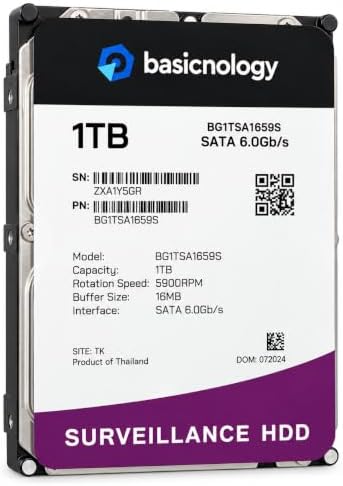
- 1TB 5900RPM 64MB Cache SATA 6.0Gb/s 3.5-inch Internal Hard Drive for Surveillance (BG1TSA1659S)
Jump to the full review below.


Best Hard Drive for Surveillance Comparison Table
Product Name | Type | Best For | Standout Feature |
WD Purple Pro 10TB (WD101PURP) | 10TB, 7200 rpm, 3.5-inch internal | Busy recorders and AI-enabled systems | 550TB per year workload rating and 5-year warranty |
Seagate SkyHawk AI 10TB (ST10000VE0004) | 10TB, 7200 rpm, 3.5-inch internal | Many cameras with AI analytics | Support for up to 16 AI streams |
WD Purple 8TB (WD84PURZ) | 8TB, 5640 rpm, 3.5-inch internal | Multi-bay recorders | Support for more than eight bays |
Seagate SkyHawk 6TB (ST6000VXZ09) | 6TB, 5400 rpm, 3.5-inch internal | Mid-size DVR and NVR systems | 3-year in-house data recovery |
Seagate SkyHawk 6TB (ST6000VX001) | 6TB, 5400 rpm, 3.5-inch internal | Mid-size DVR and NVR systems | Drive health management tools |
Seagate SkyHawk 4TB (ST4000VXZ07) | 4TB, 5900 rpm, 3.5-inch internal | Small and compact systems | Surveillance firmware at lower capacity |
Basicnology 1TB (BG1TSA1659S) | 1TB, 5900 rpm, 3.5-inch internal | Very small storage needs | Backward compatible SATA drive |
At a Glance: Best Buy Surveillance Hard Drive Picks
Best Overall: WD Purple Pro 10TB (WD101PURP)
Best for AI Analytics: Seagate SkyHawk AI 10TB (ST10000VE0004)
Best for Multi-Bay Recorders: WD Purple 8TB (WD84PURZ)
Best for Everyday Home DVR Use: Seagate SkyHawk 6TB (ST6000VXZ09)
Best for Small Systems: Seagate SkyHawk 4TB (ST4000VXZ07)
Best for Very Small Storage Needs: Basicnology 1TB (BG1TSA1659S)
We didn’t name a best value pick. We haven’t verified current prices, and value depends on price on the day you buy. We explain how to judge it in the buying guide.
Key Features to Compare
Every drive here shares the same basics. They’re 3.5-inch internal SATA drives with a 6 Gb/s interface. The differences are in the details below.
Capacity decides how much footage you can keep. Workload rating shows how much data a drive is built to handle each year. Spin speed and cache can affect how smoothly a busy drive works. Warranty and data recovery matter if a drive fails.
Drive | Capacity | Spin Speed | Cache | Workload Rating | Warranty |
WD Purple Pro (WD101PURP) | 10TB | 7200 rpm | 256MB | Up to 550TB/year | 5-year limited |
Seagate SkyHawk AI (ST10000VE0004) | 10TB | 7200 rpm | Check listing | 550TB/year | 3-year limited |
WD Purple (WD84PURZ) | 8TB | 5640 rpm | 128MB | Up to 180TB/year | 3-year limited |
Seagate SkyHawk (ST6000VXZ09) | 6TB | 5400 rpm | Check listing | Up to 180TB/year | 3-year limited |
Seagate SkyHawk (ST6000VX001) | 6TB | 5400 rpm | Check listing | Maximum 180TB/year | 3-year limited |
Seagate SkyHawk (ST4000VXZ07) | 4TB | 5900 rpm | 64MB | Maximum 180TB/year | 3-year limited |
Basicnology (BG1TSA1659S) | 1TB | 5900 rpm | Check listing | Not listed | 3-year seller warranty |
Some listings show different cache sizes in different places. Where that happens, the table says “Check listing.” Always confirm the exact part number before you buy.
Top 7 Product Reviews
Western Digital 10TB WD Purple Pro Surveillance Internal Hard Drive HDD – SATA 6 Gb/s, 256 MB Cache, 3.5″ – WD101PURP: Best Overall for Busy Recorders
Opening
The WD Purple Pro pairs 10TB of space with a high workload rating, making it the strongest all-around pick for busy recorders.
Overview
This is a 10TB, 3.5-inch mechanical drive for surveillance. It spins at 7200 rpm and has a 256MB cache. WD lists it for AI-enabled recorders and video analytics systems. It suits larger setups that write a lot of footage every day.
Key Features
- Capacity: 10TB in a 3.5-inch internal form factor.
- Interface: SATA 6 Gb/s.
- Speed and cache: 7200 rpm with 256MB cache.
- Listed read speed: 265 MB/s.
- Workload: Supports up to 550TB per year.
- Warranty: Five-year limited warranty.
- In the box: Mounting screws and a quick install guide.
What Makes It Different?
It has the top workload rating in this group, tied with the Seagate SkyHawk AI. The listing says up to 550TB per year. That’s about three times the 180TB rating on most other drives here.
It also has the longest listed warranty. That’s five years, while the other limited warranties here run three years.
WD lists it for servers, storage systems and video surveillance systems. It also mentions extra robustness for multi-bay enclosures and tarnish-resistant components.
Performance Analysis
Recording is mostly steady writing, so workload rating matters more than peak speed. A 550TB-per-year rating leaves plenty of room for many cameras or high-bitrate video. The 256MB cache and 7200 rpm spin suit busy recorders. WD also lists this drive for AI-enabled recorders and video analytics. On a small home DVR with a few cameras, much of this capability may go unused.
Pros
- Highest workload tier in the group.
- Longest listed warranty at five years.
- Large 10TB capacity for long retention.
- Mounting screws and install guide come with the drive.
Cons
- It may offer more than a small home system needs.
- Large drives usually cost more upfront, so check the current price.
- One big drive still means all footage sits in one place.
Best For
Business owners, multi-camera properties and anyone running an AI-enabled recorder. It also fits buyers who want the longest warranty here.
Who Should Skip It?
Skip it if you run a small DVR with a few cameras. Also check your recorder’s maximum supported drive size before you buy a 10TB model.
Why It Ranks #1
It leads because it combines the top workload rating, the longest warranty and the largest capacity. The SkyHawk AI at #2 matches the workload and capacity. It lists AI stream counts. But its warranty is shorter, and its listing details disagree in places. The WD Purple Pro is the cleaner, safer choice for heavy use.
Bottom Line
This is the best surveillance hard drive here for demanding systems. It’s built for volume, and the warranty backs that up.
If your system is small, a lower tier drive will do the job. If it’s busy, this is where we’d start.
Seagate Skyhawk AI 10TB Surveillance Internal Hard Drive HDD–3.5 Inch SATA 6Gb/s 256MB Cache for DVR NVR Security Camera System with Drive Health Management-Frustration Free Packaging (ST10000VE0004): Built for AI Camera Systems
Opening
The SkyHawk AI is a 10TB drive built for recorders that run AI analytics across many camera streams at once.
Overview
This 10TB, 3.5-inch mechanical drive uses SATA 6Gb/s and spins at 7200 rpm. Seagate pairs it with ImagePerfect AI firmware. The listing mentions support for up to 16 AI streams while recording up to 64 HD camera streams. It targets large DVR and NVR systems.
Key Features
- Capacity: 10TB in a 3.5-inch internal form factor.
- Interface: SATA 6Gb/s.
- Spin speed: 7200 rpm.
- Workload: Rated for 550TB per year.
- Streams: Up to 16 AI streams while recording up to 64 HD camera streams.
- Reliability figure: Listed at 1.5M hours MTBF.
- Protection: Three-year limited warranty, plus two-year Rescue Data Recovery Services (registration needed).
What Makes It Different?
Its biggest difference is the stream count. WD’s drives here don’t list AI stream numbers. This one does, so you can match it to your camera plan.
Compared with the 6TB SkyHawk drives, the workload rating is more than three times higher. That moves it into a different class.
The data recovery plan runs two years and needs registration. The 6TB SkyHawk (ST6000VXZ09) lists three years of in-house recovery instead.
Performance Analysis
The listing says this drive is tuned for random reads and 24×7 workloads. That helps on systems that search old footage while still recording. The 550TB-per-year rating puts it in the same workload tier as the WD Purple Pro. The stream counts are manufacturer figures. Real results depend on your recorder, camera bitrates and bay setup.
Pros
- Stated support for AI streams and many cameras.
- 550TB-per-year workload rating.
- Listed 1.5M hours MTBF.
- Data recovery services included with registration.
Cons
- Warranty is three years, against five for the WD Purple Pro.
- The listing shows different cache sizes and part numbers, so verify the exact drive.
- It offers more than small systems need.
Best For
Large camera systems with AI features turned on. It also fits buyers who want clear stream numbers to plan around.
Who Should Skip It?
Skip it if you run a small home recorder without AI analytics. Also skip it if you want the longest warranty available.
Why It Ranks #2
It matches the top workload rating and capacity, and it adds clear AI stream numbers. It sits below the WD Purple Pro for two reasons. The warranty is shorter, and the listing details don’t line up. For buyers who need AI support, the gap is small.
Bottom Line
This is a strong choice for AI-heavy recorders. Just double-check the part number and cache size before you buy.
If AI streams are your priority, it’s a close call with the WD Purple Pro.
Western Digital 8TB WD Purple Surveillance Internal Hard Drive HDD – SATA 6 Gb/s, 128 MB Cache, 3.5″ – WD84PURZ: Built for Multi-Bay Recorders
Opening
The WD Purple 8TB is a surveillance-focused drive that supports recorders with more than eight bays, giving larger systems room to grow.
Overview
This 8TB, 3.5-inch mechanical drive spins at 5640 rpm and has a 128MB cache. WD tunes it for write-heavy, low bit-rate, high stream-count work. It lists AllFrame AI technology for AI-enabled recorders. It fits mid-size to large systems that don’t need the top workload tier.
Key Features
- Capacity: 8TB in a 3.5-inch internal form factor.
- Interface: SATA 6 Gb/s.
- Speed and cache: 5640 rpm with 128MB cache.
- Workload: Up to 180TB per year, and up to 360TB per year on drives that support AllFrame AI technology.
- Bay support: Support for more than eight bays.
- Compatibility: Listed for video surveillance systems.
- Warranty: Three-year limited warranty.
What Makes It Different?
It’s the clearest choice here for big multi-bay recorders. The listing calls out support for more than eight bays.
It also sits between the 10TB drives and the 6TB SkyHawks on capacity. That gives you more space than a 6TB drive without the 10TB size.
The 360TB figure applies only to drives that support AllFrame AI. The listing doesn’t make clear whether this exact model does. Check WD’s spec sheet before counting on it.
Performance Analysis
WD describes this drive as tuned for write-heavy workloads with many low bit-rate streams. That’s how most camera systems work. A 180TB yearly rating suits mid-size systems well. Very busy recorders may want the WD Purple Pro instead. The slower 5640 rpm spin is fine for recording, since video writing is steady rather than fast.
Pros
- Support for more than eight bays.
- Tuned for many low bit-rate streams.
- 8TB capacity sits in a useful middle range.
- AllFrame AI technology is mentioned for AI-enabled recorders.
Cons
- Workload rating is well below the 10TB drives.
- Warranty is three years.
- The higher 360TB rating may not apply to this model.
Best For
Multi-bay recorders and mid-size business systems. It also suits buyers who want more space than 6TB without paying for the top workload tier.
Who Should Skip It?
Skip it if you run a very busy AI system and want the highest workload rating. Skip it too if a small DVR has only one or two bays.
Why It Ranks #3
It ranks above the 6TB drives for its bigger capacity, bay support and AI technology mention. It ranks below the two 10TB drives because the workload rating and warranty are lower. It’s the best middle choice in the group.
Bottom Line
This is a solid, balanced drive for larger recorders. It doesn’t chase the top specs, and that may be exactly what you need.
If your system has many bays, put it on your short list.
Seagate Skyhawk 6TB Video Internal Hard Drive HDD – 3.5 Inch SATA 6Gb/s 256MB Cache for DVR NVR Security Camera System with in-House Rescue Services (ST6000VXZ09/009): Strong Support for Mid-Size Systems
Opening
This 6TB SkyHawk is aimed at DVR and NVR systems, with three years of in-house data recovery services included in the listing.
Overview
This is a 6TB, 3.5-inch mechanical drive that spins at 5400 rpm. Seagate lists it for 64 HD cameras with little to no dropped frames. It adds vibration sensors, health monitoring and a three-year warranty. It suits everyday home and small business recorders.
Key Features
- Capacity: 6TB in a 3.5-inch internal form factor.
- Interface: SATA 6Gb/s.
- Spin speed: 5400 rpm.
- Listed read speed: 180 MB/s.
- Workload: Up to 180TB per year.
- Extras: Rotational vibration sensors and SkyHawk Health Management.
- Protection: Three-year limited warranty, three-year in-house Rescue Data Recovery, and a listed 1M hours MTBF.
What Makes It Different?
The support package stands out. Three years of in-house data recovery is longer than the two years on the SkyHawk AI. It’s also listed more clearly than on the other 6TB SkyHawk.
The listing also says this drive is quieter and power-efficient, with lower heat output. That matters in a closed cabinet or multi-bay recorder.
It has less workload headroom than the 10TB drives. It also has less capacity.
Performance Analysis
A 180TB yearly rating is a fair match for a mid-size system. The listing says it can handle up to 64 simultaneously streaming HD cameras with little to no dropped frames. Vibration sensors help in multi-bay recorders. Seagate’s health tool lets you monitor the drive over time. These are manufacturer claims, so real results depend on your recorder and camera settings.
Pros
- Three-year in-house data recovery is included.
- Vibration sensors for multi-bay systems.
- Listed as quieter and power-efficient.
- Built-in health monitoring.
Cons
- Lower workload rating than the 10TB drives.
- The title shows 256MB cache, but the spec table doesn’t match, so verify before buying.
- Warranty is three years.
Best For
Home DVR owners and small businesses with a moderate number of cameras. It also fits anyone who values data recovery coverage.
Who Should Skip It?
Skip it if you run many cameras with AI analytics. Those systems need a higher workload tier.
Why It Ranks #4
It leads the 6TB group because of its clear data recovery terms and extra support details. It ranks below the WD Purple 8TB because it has less capacity and no bay-count claim. It’s a sensible everyday pick.
Bottom Line
This is a well-rounded drive for mid-size systems. The support terms are its strongest point.
For a typical home or small shop recorder, it’s an easy drive to understand and buy.
Seagate SkyHawk 6TB Surveillance Internal Hard Drive HDD – 3.5 Inch SATA 6GB/s 256MB Cache for DVR NVR Security Camera System with Drive Health Management – Frustration Free Packaging (ST6000VX001): Same Class, Less Clear Listing
Opening
This 6TB SkyHawk targets DVR and NVR systems with surveillance firmware and a drive health tool, in a mid-size capacity.
Overview
This is a 6TB, 3.5-inch mechanical drive that spins at 5400 rpm. It uses Image Perfect firmware for 24×7 video workloads. It has an aluminum enclosure material listed. It suits mid-size recorders that don’t need extra workload headroom.
Key Features
- Capacity: 6TB in a 3.5-inch internal form factor.
- Interface: SATA 6Gb/s.
- Spin speed: 5400 rpm.
- Listed read speed: 180 MB/s.
- Workload: Maximum 180TB per year.
- Firmware and sensors: Image Perfect firmware and rotational vibration sensors.
- Warranty: Three-year limited, with a data recovery service feature listed.
What Makes It Different?
It’s almost the same class as the other 6TB SkyHawk. The big difference is how the listing reads. This one lists compatible devices as camera and PC, and it names drive health management in the title.
The data recovery details are less clear here. The listing shows a data recovery service feature, but it doesn’t spell out the terms.
The listing also shows different model numbers and cache sizes in different places. Check the exact version before you order.
Performance Analysis
The specs match the other 6TB SkyHawk on spin speed, read speed and workload rating. That makes it a fit for mid-size systems with a moderate camera count. The firmware is built for continuous video writing. Rotational vibration sensors help in multi-drive systems. Because the listing details don’t fully agree, confirm the exact model for your recorder first.
Pros
- Surveillance firmware for continuous recording.
- Vibration sensors for multi-bay systems.
- Drive health management named in the title.
- Three-year limited warranty.
Cons
- Lower workload rating than the 10TB drives.
- Listing shows different model numbers and cache sizes.
- Data recovery terms aren’t clearly spelled out.
Best For
Buyers who want a 6TB surveillance drive for a mid-size DVR or NVR. It fits users who can confirm the model with the seller.
Who Should Skip It?
Skip it if you want clearer support terms. The other 6TB SkyHawk explains its data recovery plan better.
Why It Ranks #5
It ranks just below the other 6TB SkyHawk. The hardware looks alike, but that model gives clearer support terms and more consistent details. It ranks above the 4TB drive for its larger capacity.
Bottom Line
This is a sound mid-size drive on paper. The mixed listing details are the main reason for caution.
Verify the model number, and it’s a fair match for everyday recorders.
SEAGATE ST4000VX007 Skyhawk 4TB Surveillance Hard SATA 6Gb/s 64MB Cache 3.5-Inch Internal Drive-Frustration Free Packaging (ST4000VXZ07) Mechanical Hard Disk: A Smaller Drive for Compact Systems
Opening
The SkyHawk 4TB keeps Seagate’s surveillance firmware and 180TB yearly workload rating in a smaller capacity that suits compact systems.
Overview
This is a 4TB, 3.5-inch mechanical drive that spins at 5900 rpm and has a 64MB cache. It uses Image Perfect firmware for 24×7 video. It fits small DVR and NVR systems with a handful of cameras.
Key Features
- Capacity: 4TB in a 3.5-inch internal form factor.
- Interface: SATA 6Gb/s.
- Speed and cache: 5900 rpm with 64MB cache.
- Listed read speed: 190 MB/s.
- Workload: Maximum 180TB per year.
- Sensors: Rotational vibration sensors, listed for 4TB or higher.
- Warranty: Three-year limited, with a data recovery service feature listed.
What Makes It Different?
This drive gives you SkyHawk features at a smaller size. You still get the 180TB workload rating and vibration sensors. You just get less storage.
It has a faster listed read speed and higher spin speed than the 6TB SkyHawks. That doesn’t matter much for recording, but it’s a small edge on paper.
Its cache size is clearly listed at 64MB. That’s easier to confirm than on some of the other Seagate drives.
Performance Analysis
For a small system, 4TB and a 180TB yearly workload rating are a sensible match. The drive is built for continuous video writing. Vibration sensors help if you add more drives later. The listing shows desktop as the compatible device type, so confirm your recorder accepts it. Larger systems will fill 4TB quickly.
Pros
- Surveillance firmware at a smaller capacity.
- 180TB per year workload rating.
- Vibration sensors for multi-drive setups.
- Clearly listed 64MB cache.
Cons
- Less capacity means shorter retention.
- Same workload rating as the 6TB drives, but less space.
- Compatible devices are listed as desktop, so check recorder support.
Best For
Small homes and shops with a few cameras. It also suits buyers who want a surveillance-tuned drive at lower capacity.
Who Should Skip It?
Skip it if you want to keep footage for a long time. Skip it too if you run many high-resolution cameras.
Why It Ranks #6
It’s a good drive in a small package. It ranks below the 6TB options because capacity is the first thing most buyers outgrow. It ranks above the Basicnology 1TB because it lists surveillance firmware and a workload rating.
Bottom Line
This is a practical pick for compact systems. It does the job without extra bulk.
If your needs are small, it can be all you need.
1TB 5900RPM 64MB Cache SATA 6.0Gb/s 3.5-inch Internal Hard Drive for Surveillance (BG1TSA1659S): A Small-Capacity Option for Light Use
Opening
This Basicnology 1TB drive gives a small recorder basic storage space, but its listing shows fewer surveillance-specific details than the others.
Overview
This is a 1TB, 3.5-inch mechanical drive that spins at 5900 rpm. It’s sold as a bare drive. The listing says it works with compatible recording systems at homes, offices and shops. It suits very small setups.
Key Features
- Capacity: 1TB in a 3.5-inch internal form factor.
- Interface: SATA 6.0 Gb/s, with backward compatibility listed.
- Spin speed: 5900 rpm.
- Listed read speed: 100 MB/s.
- Size: 5.8 x 4 x 1 inches, about 1.5 pounds.
- Format: Bare drive.
- Warranty: Three-year seller warranty.
What Makes It Different?
It has the smallest capacity here. It’s also the only drive that lists a seller warranty instead of a manufacturer warranty. Check the seller’s terms before you buy.
The listing doesn’t give a workload rating. It also doesn’t mention surveillance firmware or vibration sensors. The other six drives list at least some of these.
It does say to verify the drive interface, size and supported capacity before installing. That’s good advice for any buyer.
Performance Analysis
The listing says this drive can store footage from continuous, scheduled or motion-triggered recording, if your recorder supports it. A 100 MB/s listed read speed is fine for light use. With no workload rating, we can’t judge how it handles nonstop writing from many cameras. It makes the most sense for one or two cameras and short retention.
Pros
- Fits standard 3.5-inch SATA bays.
- Backward compatible with older SATA connections.
- Small capacity can suit very light recording.
- Three-year seller warranty is listed.
Cons
- Only 1TB, so footage fills it fast.
- No workload rating listed.
- The listing shows cache as 64MB in one place and 16 in another.
Best For
Very small systems with one or two cameras. It also suits buyers who only need a little extra space.
Who Should Skip It?
Skip it if you run many cameras or need long retention. Also skip it if you want a listed workload rating or a manufacturer warranty.
Why It Ranks #7
It ranks last because it gives the least capacity and the fewest surveillance details. It isn’t a bad drive for light use. The others simply give you more to compare, and more to rely on.
Bottom Line
This is a basic option for very small recorders. It’s best treated as an entry drive.
For anything bigger, step up to a SkyHawk or WD Purple.
How These Products Compare
Here’s how the seven drives stack up in the categories that matter most.
Best for heavy workloads: the WD Purple Pro 10TB and Seagate SkyHawk AI 10TB tie at 550TB per year. The WD wins on warranty, with five years against three.
Best for AI streams: the SkyHawk AI. It’s the only one that lists AI stream numbers, up to 16 alongside 64 HD cameras.
Best for multi-bay systems: the WD Purple 8TB. It lists support for more than eight bays.
Best data recovery terms: the Seagate SkyHawk 6TB (ST6000VXZ09). It lists three years of in-house recovery. The SkyHawk AI gives two years and needs registration.
Best for small systems: the SkyHawk 4TB. It keeps the 180TB rating at lower capacity.
Best for light use: the Basicnology 1TB.
A few head-to-head matchups help too. The WD Purple Pro beats the SkyHawk AI on warranty, while the SkyHawk AI wins on listed AI details. The WD Purple 8TB offers more space than the 6TB SkyHawks, but the SkyHawks lead on data recovery terms. The SkyHawk 4TB and Basicnology 1TB are both small. Only the Seagate lists a workload rating and surveillance firmware.
How We Evaluated These Products
We ranked these drives using their listed specs and design. We didn’t test them ourselves.
First, we checked each drive’s capacity, spin speed, interface and size. We then compared workload ratings, since surveillance drives write data nonstop. We looked at features like vibration sensors, health tools and AI support. We also compared warranty and data recovery terms.
Next, we checked recorder fit. Compatible devices, bay support and form factor all matter here. All seven are 3.5-inch drives, so none fits a 2.5-inch bay.
We also weighed buyer fit. A drive that suits a small home DVR isn’t right for a busy business system. Each ranking reflects how well a drive fits its target buyer.
Where the listing showed conflicting numbers, we left them out or flagged them. We haven’t verified current prices, so price didn’t affect the ranking. We tried to explain every trade-off so you can judge for yourself.
How to Choose the Best Hard Drive for Surveillance DVR Systems
Start with your recorder. Check the drive size it accepts, the SATA connection and the largest capacity it supports. Your manual or the maker’s spec page will tell you.
Next, think about storage. The amount of footage depends on camera count, resolution, bitrate and how long you keep video. Use how much storage your cameras need as a starting point, then add spare room.
Look at workload rating next. It shows how much data a drive is built to handle each year. The drives here range from 180TB to 550TB. More cameras and higher bitrates call for a higher rating.
Then check bays. Multi-bay recorders create vibration. Drives with vibration sensors or multi-bay support are a better fit for those systems.
Finally, check support. Warranty length and data recovery terms vary a lot here. Some data recovery plans need registration.
Every choice has a trade-off. A bigger drive stores more footage, but it costs more upfront and leaves all your video in one place. A 7200 rpm drive is listed for heavier systems, but a small DVR may not need it.
Best 2.5 Hard Drive for Surveillance: What to Know
None of these seven drives fit a 2.5-inch bay. They’re all 3.5-inch drives. Some small recorders use 2.5-inch drives instead. If yours does, check the manual and shop for a 2.5-inch drive made for video recording. Don’t try to force a 3.5-inch drive into a smaller bay.
Best Buy Surveillance Hard Drive: How to Judge Value
We haven’t verified current prices, so we didn’t crown a value pick. Compare price per terabyte on the day you buy. Then weigh warranty, workload rating and data recovery. A cheap drive with a low workload rating can be a poor match for a busy system.
Benefits of a Surveillance Hard Drive
- Built for steady, around-the-clock video recording.
- Yearly workload ratings of 180TB to 550TB give you headroom for nonstop writing.
- Vibration sensors on some models help in multi-bay recorders.
- Health tools on some models let you monitor the drive.
- Some listings include data recovery services.
- Large capacities let you keep footage longer.
- Easy to add or replace in a compatible recorder.
- Good fit for homes, shops and offices that record continuously.
Common Mistakes to Avoid
- Skipping the check for your recorder’s drive size and capacity limit.
- Buying a 3.5-inch drive for a 2.5-inch bay.
- Ignoring workload rating on busy systems.
- Choosing capacity without estimating how much footage you record.
- Missing that data recovery plans may need registration.
- Not checking the exact model number against the listing.
- Buying a desktop drive for nonstop recording.
- Choosing only by the lowest price. If you’re also shopping for a recorder, compare the best security camera systems and their drive limits first.
Who Should Buy One?
- Homeowners with a DVR or NVR and open bays.
- Small shop owners who record all day.
- Business owners running many cameras.
- People replacing a failed recorder drive.
- Buyers running AI-enabled recorders.
- People who want more retention time.
- Owners of multi-bay recorders.
- Buyers who want a manufacturer warranty and data recovery option.
Frequently Asked Questions
What makes a surveillance drive different from a desktop drive?
Surveillance drives are tuned for steady, nonstop writing. The listings here show yearly workload ratings of 180TB to 550TB. Seagate says its 180TB rating is three times that of desktop drives.
Which features matter most for everyday use?
Capacity, workload rating, warranty and recorder fit matter most. Extras like vibration sensors help in multi-bay systems.
What capacity should I choose?
It depends on camera count, resolution and retention time. Estimate your footage first, then add some spare room.
Do these drives work in cameras that use memory cards?
No. These are internal SATA drives for DVR and NVR recorders. For card-based cameras, see best microSD cards for security cameras.
Is this type of drive suitable for beginners?
Yes, if your recorder has an open 3.5-inch bay. Follow how to install a hard drive in a DVR and check your manual first.
Is a more expensive drive worth it?
It can be, if you run many cameras or want a longer warranty. A small system may not need a high workload rating.
What’s the best hard drive for surveillance DVR use?
For a busy system, the WD Purple Pro 10TB is our top pick. For a typical home DVR, the Seagate SkyHawk 6TB (ST6000VXZ09) is a sensible fit.
Final Verdict
The best surveillance hard drive for you depends on how busy your system is. All seven drives here fit standard 3.5-inch bays, but they suit different buyers.
Best Value: We didn’t name one, because we haven’t verified current prices.
Best for Everyday Use: Seagate SkyHawk 6TB (ST6000VXZ09). It fits mid-size home and shop recorders, and it lists three years of in-house data recovery.
Best Feature Set: WD Purple Pro 10TB. It has the top workload rating, the biggest capacity and a five-year warranty.
Best for a Specific Setup: The Seagate SkyHawk AI suits AI-heavy systems. The WD Purple 8TB suits multi-bay recorders. The SkyHawk 4TB suits compact systems.
If your recorder uses a 2.5-inch bay, none of these will fit. Check your manual first, and confirm the exact model number before you order.
Choose the device that fits your home, compatible devices, setup needs, and budget.
Check the Amazon links above for the latest product details and availability.